デスクトップでの音声コマンド認識コードの生成
R2026bこの例では、音声コマンド認識のために特徴抽出と畳み込みニューラル ネットワーク (CNN) を展開する方法を示します。この例では、生成されたコードは MATLAB 実行可能ファイル (MEX) 関数であり、予測された音声コマンドと時間領域信号および聴覚スペクトログラムを表示する MATLAB スクリプトによって呼び出されます。オーディオの前処理およびネットワーク学習の詳細については、Train Deep Learning Network for Speech Command Recognition (Audio Toolbox)を参照してください。
MATLAB でのストリーミングのデモ
特徴抽出パイプラインおよび分類に関して、Train Deep Learning Network for Speech Command Recognition (Audio Toolbox)で構築したのと同じパラメーターを使用します。
ネットワークに学習させたのと同じサンプル レート (16 kHz) を定義します。分類レートと、フレームごとに入力されるオーディオ サンプルの数を定義します。ネットワークに入力される特徴は、オーディオ データ 1 秒に対応するバーク スペクトログラムです。バーク スペクトログラムは、10 ms のホップをもつ 25 ms のウィンドウについて計算されます。
fs = 16000;
classificationRate = 20;
samplesPerCapture = fs/classificationRate;

segmentDuration = 1;
segmentSamples = round(segmentDuration*fs);

frameDuration = 0.025;
frameSamples = round(frameDuration*fs);

hopDuration = 0.010;
hopSamples = round(hopDuration*fs);
audioFeatureExtractor (Audio Toolbox)オブジェクトを作成し、ウィンドウを正規化せずに帯域数 50 のバーク スペクトログラムを抽出します。
afe = audioFeatureExtractor( ...
    SampleRate=fs, ...
    FFTLength=512, ...
    Window=hann(frameSamples,"periodic"), ...
    OverlapLength=frameSamples - hopSamples, ...
    barkSpectrum=true);

numBands = 50;
setExtractorParameters(afe,"barkSpectrum",NumBands=numBands,WindowNormalization=false);
事前学習済みの畳み込みニューラル ネットワークとラベルを読み込みます。
load("SpeechCommandRecognitionNetwork.mat")
numLabels = numel(labels);
backgroundIdx = find(labels == 'background');
バッファーおよび判定しきい値を定義し、ネットワーク予測を後処理します。
probBuffer = single(zeros([numLabels,classificationRate/2]));
YBuffer = single(numLabels * ones(1, classificationRate/2));

countThreshold = ceil(classificationRate*0.2);
probThreshold = single(0.7);
audioDeviceReader (Audio Toolbox)オブジェクトを作成し、デバイスからオーディオを読み取ります。dsp.AsyncBuffer (DSP System Toolbox)オブジェクトを作成し、オーディオをチャンクにバッファリングします。
adr = audioDeviceReader(SampleRate=fs,SamplesPerFrame=samplesPerCapture,OutputDataType='single');
audioBuffer = dsp.AsyncBuffer(fs);
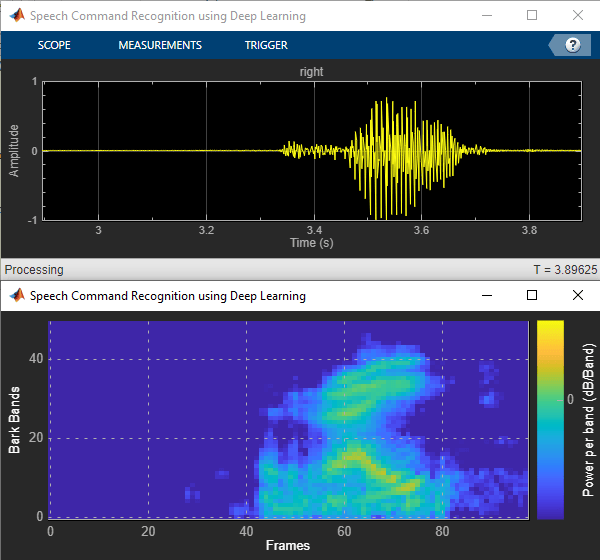
dsp.MatrixViewer (DSP System Toolbox)オブジェクトおよびtimescope (DSP System Toolbox)オブジェクトを作成し、結果を表示します。
matrixViewer = dsp.MatrixViewer( ...
    ColorBarLabel="Power per band (dB/Band)", ...
    XLabel="Frames", ...
    YLabel="Bark Bands", ...
    Position=[400 100 600 250], ...
    ColorLimits=[-4 2.6445], ...
    AxisOrigin="Lower left corner", ...
    Name="Speech Command Recognition Using Deep Learning");

timeScope = timescope( ...
    SampleRate=fs, ...
    YLimits=[-1 1], ...
    Position=[400 380 600 250], ...
    Name="Speech Command Recognition Using Deep Learning", ...
    TimeSpanSource="Property", ...
    TimeSpan=1, ...
    BufferLength=fs);

timeScope.YLabel = "Amplitude";
timeScope.ShowGrid = true;
時間スコープおよび行列ビューアーを表示します。時間スコープおよび行列ビューアーの両方が開いているか、制限時間に達するまで、コマンドを検出します。制限時間に達する前にライブ検出を停止するには、時間スコープ ウィンドウまたは行列ビューアー ウィンドウを閉じます。
show(timeScope)
show(matrixViewer)
timeLimit = 10;

tic
while isVisible(timeScope) && isVisible(matrixViewer) && toc < timeLimit
    % Capture Audio
    x = adr();
    write(audioBuffer,x);
    y = read(audioBuffer,fs,fs-samplesPerCapture);

    % Compute auditory features
    features = extract(afe,y);
    auditory_features = log10(features + 1e-6);

    % Transpose to get the auditory spectrum
    auditorySpectrum = auditory_features';

    % Perform prediction
    score = predict(net,auditory_features);
    [~,YPredicted] = max(score);

    % Perform statistical post processing
    YBuffer = [YBuffer(2:end),YPredicted];
    probBuffer = [probBuffer(:,2:end),score(:)];

    [YMode_idx, count] = mode(YBuffer);
    count = single(count);
    maxProb = max(probBuffer(YMode_idx,:));

    if (YMode_idx == single(backgroundIdx) || count < countThreshold || maxProb < probThreshold)
        speechCommandIdx = backgroundIdx;
    else
        speechCommandIdx = YMode_idx;
    end

    % Update plots
    matrixViewer(auditorySpectrum);
    timeScope(x);

    if (speechCommandIdx == backgroundIdx)
        timeScope.Title = ' ';
    else
        timeScope.Title = char(labels(speechCommandIdx));
    end
    drawnow
end
スコープを非表示にします。
hide(matrixViewer)
hide(timeScope)
MATLAB コードの展開準備
コード生成と互換性がある特徴抽出を実行する関数を作成するには、audioFeatureExtractor オブジェクトでgenerateMATLABFunction (Audio Toolbox)を呼び出します。オブジェクト関数 generateMATLABFunction は、コード生成と互換性があり、同等の特徴抽出を実行するスタンドアロン関数を作成します。
generateMATLABFunction(afe,"extractSpeechFeatures")HelperSpeechCommandRecognition サポート関数は、前述の特徴抽出およびネットワーク予測プロセスをカプセル化します。特徴抽出はコード生成と互換性があるため、特徴抽出は生成された関数 extractSpeechFeatures によって処理されます。ネットワークがコード生成と互換性をもつように、サポート関数は coder.loadDeepLearningNetwork 関数を使用してネットワークを読み込みます。
HelperSpeechCommandRecognition 関数を使用して、音声コマンドのライブ検出を実行します。
show(timeScope)
show(matrixViewer)
timeLimit = 10;

tic
while isVisible(timeScope) && isVisible(matrixViewer) && toc < timeLimit
    x = adr();

    [speechCommandIdx, auditorySpectrum] = HelperSpeechCommandRecognition(x);

    matrixViewer(auditorySpectrum);
    timeScope(x);

    if (speechCommandIdx == backgroundIdx)
        timeScope.Title = ' ';
    else
        timeScope.Title = char(labels(speechCommandIdx));
    end
    drawnow
end
スコープを非表示にします。
hide(timeScope)
hide(matrixViewer)
MATLAB 実行可能ファイルの生成
実行可能プログラムの生成用にコード生成構成オブジェクトを作成します。
cfg = coder.config('mex');
cfg.LargeConstantGeneration = 'WriteOnlyDNNConstantsToDataFiles';
cfg.LargeConstantThreshold = 2^12;
codegen (MATLAB Coder)を呼び出し、HelperSpeechCommandRecognition 関数用の C コードを生成します。構成オブジェクトとプロトタイプの引数を指定します。HelperSpeechCommandRecognition_mex という名前の MEX ファイルが現在のフォルダーに生成されます。
codegen HelperSpeechCommandRecognition -config cfg -args {rand(samplesPerCapture, 1, 'single')} -profile -report -v
展開されたコードを使用した音声コマンド認識の実行
時間スコープおよび行列ビューアーを表示します。時間スコープおよび行列ビューアーの両方が開かれている間、または制限時間に達するまで、生成された MEX を使用してコマンドを検出します。制限時間に達する前にライブ検出を停止するには、時間スコープ ウィンドウまたは行列ビューアー ウィンドウを閉じます。
show(timeScope)
show(matrixViewer)

timeLimit = 10;

tic
while isVisible(timeScope) && isVisible(matrixViewer) && toc < timeLimit
    x = adr();

    [speechCommandIdx, auditorySpectrum] = HelperSpeechCommandRecognition_mex(x);

    matrixViewer(auditorySpectrum);
    timeScope(x);

    if (speechCommandIdx == backgroundIdx)
        timeScope.Title = ' ';
    else
        timeScope.Title = char(labels(speechCommandIdx));
    end
    drawnow
end

hide(matrixViewer)
hide(timeScope)
MEX 実行時間の評価
tic および toc を使用し、MATLAB でシミュレーションを完全に実行するための実行時間と、MEX 関数の実行時間を比較します。
シミュレーション コードのパフォーマンスを測定します。
testDur = 50e-3;
x = pinknoise(fs*testDur,'single');
numLoops = 100;
tic
for k = 1:numLoops
    [speechCommandIdx, auditory_features] = HelperSpeechCommandRecognition(x);
end
exeTime = toc;
fprintf('SIM execution time per 50 ms of audio = %0.4f ms\n',(exeTime/numLoops)*1000);
SIM execution time per 50 ms of audio = 6.4912 ms
MEX コードのパフォーマンスを測定します。
tic
for k = 1:numLoops
    [speechCommandIdx, auditory_features] = HelperSpeechCommandRecognition_mex(x);
end
exeTimeMex = toc;
fprintf('MEX execution time per 50 ms of audio = %0.4f ms\n',(exeTimeMex/numLoops)*1000);
MEX execution time per 50 ms of audio = 2.1581 ms
MEX 関数を使用し、得られるパフォーマンスを評価します。このパフォーマンス テストは、3.60 GHz で動作する Intel(R) Xeon(R) W-2133 CPU を使用するマシン上で実行されています。
PerformanceGain = exeTime/exeTimeMex
PerformanceGain =
3.0079

