Polyspace Query Language: Create your own coding rules and coding standards
In R2026a, you can use Polyspace Query Language (PQL) to create your own defect checkers and coding standards. PQL is a declarative query language designed for analyzing C/C++ code. By using PQL, you can:
Create new user-defined defect checkers — Construct new user-defined defect checkers by using PQL classes and predicates. For examples of this workflow, see:
Create new user-defined coding standards — Curate a collection of supported Polyspace® Bug Finder™ checkers and user-defined defects in a user-defined coding standard to detect bugs and issues specific to your code base. For more details, see Create User-Defined Coding Standard by Using Polyspace Query Language.
Polyspace now supports the new command polyspace-query-language and the file format .pql for
these workflows.
For details about PQL syntax and workflows, see Create Your Own Coding Rules and Coding Standard.
Polyspace Platform: Default user interface for static analysis
Starting in R2026a, the Polyspace Platform user interface is the default user interface for static analysis. Polyspace Platform supports static analysis and dynamic testing of C/C++ code in one common interface. This means that:
You can perform a single one-time setup for static analysis and dynamic testing.
You can view results of static analysis and dynamic testing on a common dashboard.
Polyspace Bug Finder and Polyspace Code Prover™ provide information that makes the dynamic testing workflow easier.
You can migrate your current Polyspace project files (.psprj) to Polyspace Platform project files (.psprjx). For more information
on migration steps or reverting to the classic Polyspace user interface, see Using Polyspace Platform as Default User Interface for Static Analysis.
Polyspace Platform: Create modular projects and reuse shared configurations by referencing external configuration files
When you create a build, static analysis, or testing and profiling configuration in the
Polyspace Platform user interface, it is saved in the .psprjx project
file. Starting in R2026a, you can modularize your Polyspace Platform project to improve sharing and version control workflows by
converting build, static analysis, and testing and profiling configurations to external
configurations. An external configuration is a configuration that you save in a separate
.pscfg file that is linked to one or more projects by reference.
For more information, see Create Easily Shareable Projects for Version Control.
Polyspace Platform: Preferences renamed to Settings
Polyspace Platform Preferences has been renamed to Polyspace Platform Settings. For more information, see Polyspace Platform Settings.
Polyspace Platform: Keep results from only the latest run
Starting in R2026a, when you use the Polyspace Platform user interface, you can specify whether to keep results from all runs, or to keep results from only the latest run. By default, Polyspace keeps results from all runs. If you change this setting to keep results from only the latest run:
Polyspace stores results from static analysis and dynamic testing runs in
the same run subfolder, according to their result type
(Defects, RTE, or
Tests).
Polyspace overwrites previous results of the same type, preserving any justifications from earlier runs.
For more information, see Polyspace Platform Settings.
Polyspace Platform: Set documentation location to web or locally installed doc
Starting in R2026a, when you use the Polyspace Platform user interface, you can specify whether to open documentation on the
web, at www.mathworks.com (internet connection required), or to open
documentation that is installed locally.
For more information, see Polyspace Platform Settings.
Polyspace Platform: Change user interface colors by selecting dark or light theme
Starting in R2026a, you can specify a light or dark color scheme for the Polyspace Platform user interface. By default, the Polyspace Platform theme matches the current operating system color scheme.
For more information and current limitations, see Polyspace Platform Settings.
Polyspace Platform: Specify output folder when generating launching script for a project
Starting in R2026a, you can use the optional -output-dir argument to
specify an output folder when using the polyspace-project
-generate-launching-script-for
command. Use this command to generate the files needed to run static analysis on a
Polyspace Platform project from the command line.
Compiler Support: Analyze code written for Clang versions 17.x, 18.x, and 19.x
In R2026a, Polyspace supports analyzing C/C++ code written for Clang compiler versions 17.x, 18.x,
and 19.x. If you build your source code by using any of these Clang compiler versions, specify
the compiler name as clang17.x, clang18.x, or
clang19.x.
Previously, to analyze code written for these compilers, you had to manually define compiler-specific macros and language extensions. Now, you can specify these compilers during configuration and Polyspace defines the necessary macros and language extensions.
In the Polyspace Platform user interface, specify the Clang version using the option Compilation toolchain (Static
Analysis).
At the command line, specify a compiler by using the option -compiler. For instance:
polyspace-bug-finder-server -sources file.c -compiler clang17.x ...
Compilation toolchain (Static Analysis).Simulink Support: Project Settings now open in Polyspace Platform user interface
Starting in R2026a, configure the Polyspace analysis options for generated code in the Polyspace Platform user interface. In the Polyspace section of the Simulink® toolstrip, select Settings > Project Settings.
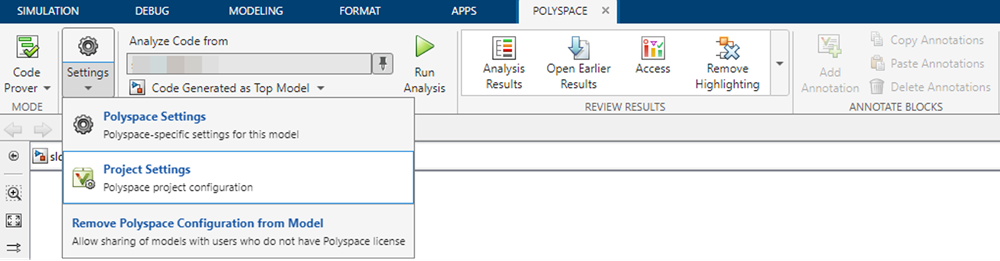
The Polyspace Platform user interface opens.
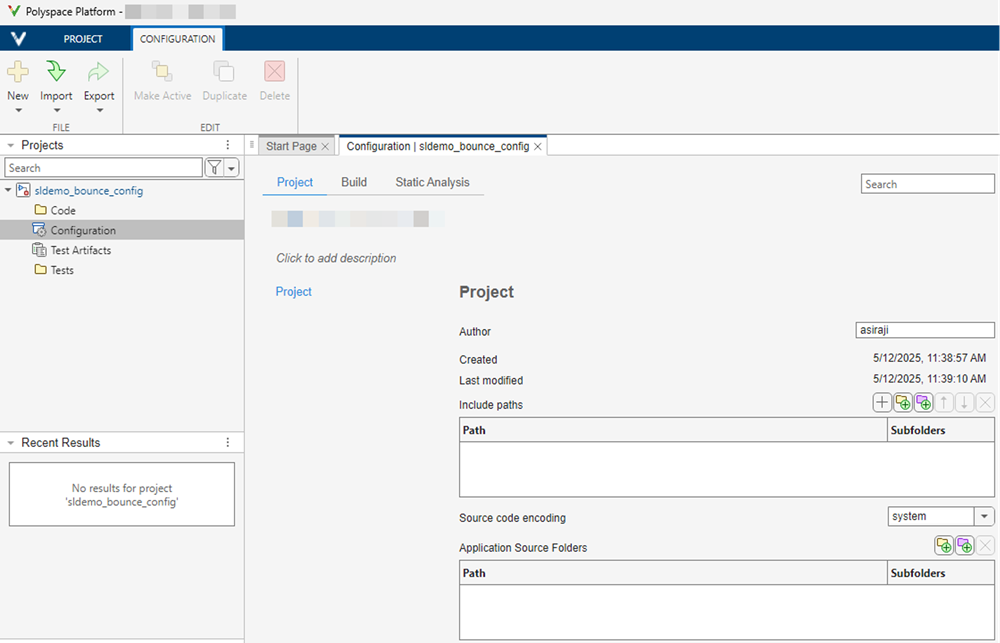
Polyspace prepopulates the options necessary to analyze generated code. Update the options in the Build and Static Analysis tabs of the Configuration pane to configure your analysis.
The configuration parameter Use custom project
file now supports .psprjx projects by default. The
.psprj project templates remain supported.
Simulink Support: New Simulink context menu design for Polyspace Code Verifier
The way in which you use the Simulink context menu for the Polyspace Code Verifier app has changed.
To view the Polyspace Code Verifier options in the context menu, right-click the canvas, hover over Select Apps, and select Polyspace Code Verifier. A Polyspace Code Verifier section appears in the context menu. Use the options in this section to run Polyspace analyses, access Polyspace configuration parameters, and open results.
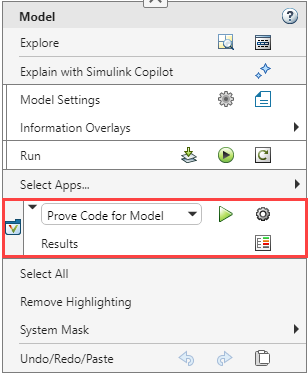
The context menu has a dropdown to choose between Polyspace Bug Finder and Polyspace Code Prover:
Prove Code for Model — Verifies absence of runtime errors by running a Code Prover verification on the code generated from the model.
Find Bugs in Model Code — Finds bugs by running a Bug Finder analysis on the code generated from the model.
The context menu contains these commonly used buttons:
| Context menu button | Action |
|---|---|
| Run default Polyspace analysis. | |
| Open the Polyspace pane in the Configuration Parameters dialog box. | |
| Open the analysis result. |
To view annotation options in the context menu, right-click a block. The annotation options appear in the Polyspace Code Verifier section.
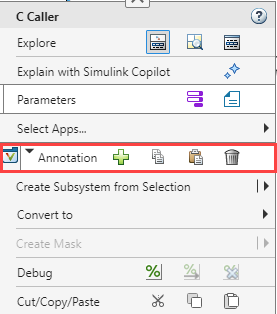
| Context menu button | Action |
|---|---|
| Add Polyspace annotations to the block. | |
| Copy the existing Polyspace annotations from the block. | |
| Paste Polyspace annotations to the block. | |
| Delete existing Polyspace annotations from the block. |
For more information about the changes to the Simulink context menu, see Find Simulink Context Menu Options (Simulink).
Concurrency: Autodetect thread creation and critical sections implemented using Zephyr thread APIs
Starting in R2026a, Polyspace supports the thread APIs from the Zephyr real-time operating system kernel. Polyspace recognizes these concurrency functions:
k_thread_create
k_sem_take
k_sem_give
If your code uses these functions for implementing multitasking, Polyspace autodetects thread creation and critical sections. For more details, see Auto-Detection of Thread Creation and Critical Section in Polyspace.
Because the analysis of code containing recursive mutexes is now more precise, the number of coding rule violations and defects reported on your code related to concurrency can change.
Concurrency: Detect concurrency issues in code containing POSIX recursive mutex
Starting in R2026a, Polyspace supports recursive mutexes from the POSIX library. Recursive mutexes allow multiple locking and the same number of unlocking by the same thread or task without causing a deadlock. Polyspace now no longer reports concurrency issues for such use of POSIX recursive mutexes. Consider this code:
#include <pthread.h>
pthread_mutex_t Rb;
void* t1(void *ignore) {
(void)ignore;
pthread_mutex_lock(&Rb);
pthread_mutex_lock(&Rb); // No DOUBLE_LOCK
pthread_mutex_unlock(&Rb);
return 0;
}
int main(void) {
pthread_t id1;
pthread_mutexattr_t Attr;
pthread_mutexattr_init(&Attr);
pthread_mutexattr_settype(&Attr, PTHREAD_MUTEX_RECURSIVE);
pthread_mutex_init(&Rb, &Attr);
pthread_create(&id1, 0, t1, 0);
pthread_join(id1, 0);
return 0;
}
t1 locks the recursive mutex
Rb twice and then unlocks it twice.Polyspace
Bug Finder recognizes the recursive nature of the mutex and does not report the defect
Double lock.
For more details, see Auto-Detection of Thread Creation and Critical Section in Polyspace.
Because the analysis of code containing recursive mutexes is now more precise, the number of coding rule violations and defects reported on your code related to concurrency can change.
Support for Mac computers with Apple silicon processors
Starting in R2026a, you can run Polyspace products on Mac computers that use Apple silicon processors with ARM® architecture. Polyspace products are no longer supported on Intel®-based Mac computers.
Migrate your projects to the Polyspace Platform user interface to continue using Polyspace on Mac. For more information, see Using Polyspace Platform as Default User Interface for Static Analysis.
The following features are not currently supported when using Apple silicon-based Macs:
Report generation. You can continue to perform report generation on
Windows® or Linux® machines. Alternatively, you can use the polyspace-results-export command
to export your results to a CSV or JSON file.
Editing data range specification (DRS) in the user interface. You can configure DRS on Apple silicon-based Macs by pasting the constraint XML file path into the Constraint setup text box. You can edit the constraint XML file in the Polyspace Platform user interface on Windows or Linux machines. Alternatively, manually edit this file outside of the user interface, see XML File Format for Polyspace Analysis Constraints.
Offloading analysis to another computer.
Creating a Polyspace Platform project by tracing a build command. Instead, you can
generate a JSON compilation database using your build system and create a
Polyspace project from this compilation database. For more information, see
polyspace-configure.
Changes in analysis options and binaries
Default output format of polyspace-configure command will change and option -output-project will be removed in a future release
Warns
The default output format of the polyspace-configure command will change in a future release. In addition, the option -output-project will also be removed.
Currently, the polyspace-configure command – by default or when used with the -output-project option – generates a project file in the .psprj format. This format is intended for the classic Polyspace user interface, which has been replaced with the Polyspace Platform user interface. For more information, see Using Polyspace Platform as Default User Interface for Static Analysis (Polyspace Code Prover).
To generate Polyspace Platform projects in the new .psprjx format using polyspace-configure, use the -output-platform-project option. This new format will become the default format in a future release.
Simulink Support: Targets modeled with greater precision
Starting in R2026a, the code generation targets you specify in Simulink are modeled by Polyspace with greater precision.
This change can result in a different number of results in your analysis.
CERT C Support: Check for violations of 28 additional recommendations
In R2026a, you can check for violations of 28 new CERT® C recommendations in addition to previously supported rules and recommendations.
| CERT C Recommendations | Description | Polyspace Checker |
|---|---|---|
| API01-C | Avoid laying out strings in memory directly before sensitive data | CERT C: Rec. API01-C |
| API02-C | Functions that read or write to or from an array should take an argument to specify the source or target size | CERT C: Rec. API02-C |
| API05-C | Unspecified Array Size in Function Signature | CERT C: Rec. API05-C |
| DCL03-C | Use a static assertion to test the value of a constant expression | CERT C: Rec. DCL03-C |
| DCL04-C | Do not declare more than one variable per declaration | CERT C: Rec. DCL04-C |
| DCL05-C | Use typedefs of non-pointer types only | CERT C: Rec. DCL05-C |
| DCL09-C | Declare functions that return errno with a return type of errno_t | CERT C: Rec. DCL09-C |
| DCL20-C | Explicitly specify void when a function accepts no arguments | CERT C: Rec. DCL20-C |
| ERR01-C | Use ferror() rather than errno to check for FILE stream errors | CERT C: Rec. ERR01-C |
| ERR06-C | Understand the termination behavior of assert() and abort() | CERT C: Rec. ERR06-C |
| ERR07-C | Prefer functions that support error checking over equivalent functions that don't | CERT C: Rec. ERR07-C |
| EXP02-C | Be aware of the short-circuit behavior of the logical AND and OR operators | CERT C: Rec. EXP02-C |
| EXP16-C | Do not compare function pointers to constant values | CERT C: Rec. EXP16-C |
| EXP20-C | Perform explicit tests to determine success, true and false, and equality | CERT C: Rec. EXP20-C |
| INT16-C | Do not make assumptions about representation of signed integers | CERT C: Rec. INT16-C |
| INT17-C | Define integer constants in an implementation-independent manner | CERT C: Rec. INT17-C |
| MSC00-C | Compile cleanly at high warning levels | CERT C: Rec. MSC00-C |
| MSC05-C | Do not manipulate time_t typed values directly | CERT C: Rec. MSC05-C |
| MSC06-C | Beware of compiler optimizations | CERT C: Rec. MSC06-C |
| POS04-C | Avoid using PTHREAD_MUTEX_NORMAL type mutex locks | CERT C: Rec. POS04-C |
| PRE02-C | Macro replacement lists should be parenthesized | CERT C: Rec. PRE02-C |
| SIG02-C | Avoid using signals to implement normal functionality | CERT C: Rec. SIG02-C |
| STR00-C | Represent characters using an appropriate type | CERT C: Rec. STR00-C |
| STR10-C | Do not concatenate different type of string literals | CERT C: Rec. STR10-C |
| WIN01-C | Do not forcibly terminate execution | CERT C: Rec. WIN01-C |
| WIN02-C | Restrict privileges when spawning child processes | CERT C: Rec. WIN02-C |
| WIN03-C | Understand HANDLE inheritance | CERT C: Rec. WIN03-C |
| WIN04-C | Consider encrypting function pointers | CERT C: Rec. WIN04-C |
For the complete list of supported CERT C rules and recommendations, see CERT C Rules and Recommendations.
CWE Support: Check for violations of 29 additional rules in CWE 4.17
In R2026a, Polyspace supports Common Weakness Enumeration (CWE™) version 4.17. In this release, you can check for violations of 29 new CWE rules in addition to previously supported rules.
| CWE Rule | Description | Polyspace Checkers |
|---|---|---|
| CWE 176 | Improper Handling of Unicode Encoding | CWE Rule 176 |
| CWE 187 | Partial String Comparison | CWE Rule 187 |
| CWE 193 | Off-by-one Error | CWE Rule 193 |
| CWE 233 | Improper Handling of Parameters | CWE Rule 233 |
| CWE 234 | Failure to Handle Missing Parameter | CWE Rule 234 |
| CWE 295 | Improper Certificate Validation | CWE Rule 295 |
| CWE 324 | Use of a Key Past its Expiration Date | CWE Rule 324 |
| CWE 363 | Race Condition Enabling Link Following | CWE Rule
363 |
| CWE 403 | Exposure of File Descriptor to Unintended Control Sphere ('File Descriptor Leak') | CWE Rule 403 |
| CWE 432 | Dangerous Signal Handler not Disabled During Sensitive Operations | CWE Rule 432 |
| CWE 459 | Incomplete Cleanup | CWE Rule 459 |
| CWE 462 | Duplicate Key in Associative List (Alist) | CWE Rule 462 |
| CWE 464 | Addition of Data Structure Sentinel | CWE Rule 464 |
| CWE 494 | Download of Code Without Integrity Check | CWE Rule 494 |
| CWE 521 | Weak Password Requirements | CWE Rule 521 |
| CWE 588 | Attempt to Access Child of a Non-structure Pointer | CWE Rule 588 |
| CWE 597 | Use of Wrong Operator in String Comparison | CWE Rule 597 |
| CWE 689 | Permission Race Condition During Resource Copy | CWE Rule 689 |
| CWE 768 | Incorrect Circuit Evaluation | CWE Rule 768 |
| CWE 771 | Missing Reference to Active Allocated Resource | CWE Rule 771 |
| CWE 773 | Missing Reference to Active File Descriptor or Handle | CWE Rule 773 |
| CWE 775 | Missing Release of File Descriptor or Handle after Effective Lifetime | CWE Rule 775 |
| CWE 781 | Improper Address Validation in IOCTL with METHOD_NEITHER I/O Control Code | CWE Rule 781 |
| CWE 782 | Exposed IOCTL with Insufficient Access Control | CWE Rule 782 |
| CWE 788 | Access of Memory Location After End of Buffer | CWE Rule 788 |
| CWE 835 | Loop with Unreachable Exit Condition | CWE Rule
835 |
| CWE 909 | Missing Initialization of Resource | CWE Rule
909 |
| CWE 911 | Improper Update of Reference Count | CWE Rule 911 |
| CWE-1325 | Improperly Controlled Sequential Memory Allocation | CWE Rule
1325 |
For all CWE rules supported with Polyspace Bug Finder, see Common Weakness Enumeration (CWE).
In accordance with CWE version 4.17, these CWE rules are recategorized:
| CWE Rule | Change in Categorization |
|---|---|
| These rules are now part of both CWE658 and CWE659 |
CWE Rule
190 | This rule is no longer part of CWE659 |
CWE Rule
88 | This rule is moved to the category Data Neutralization Issues. |
CWE Rule
1335 | This rule is moved to the category Numeric Issues. |
CWE Rule
1341 | This rule is moved to the category Resource Management Errors. |
| These rules are moved to the category Others. |
Bug Finder Defects: Check for inappropriate utility functions, misuse of
unique_ptr, and wasteful enumerations
In R2026a, you can use Bug Finder to check for these new defects:
Unnecessary
copy caused by type conversion — Mismatched type between a
const reference and its initializer results in unnecessary
copy.
Swap may
throw — The signature of a swap function permits raising
exceptions.
Destructor may
throw — The signature of a destructor permits raising
exceptions.
Use of new
instead of make_unique — Use of new operator to
initialize or reset a unique_ptr.
Unnecessary
large enum base type — The base type of an enumeration is larger
than necessary to hold the enumerators.
Out of bound
access of C++ standard library containers — Index of C++ container
out of bounds during container access using standard operators or methods.
For the full list of checkers, see Defects. For more information on defect groups, see Bug Finder Defect Groups.
Accuracy Improvement: Out of bounds array access reported on member function calls
Starting in R2026a, Polyspace reports defects and coding rule violations if a member function of an array element is invoked using an out of bounds element. For example, consider this code:
class Foo {
// ...
public:
int func();
int x;
};
int main() {
constexpr int N = 4;
Foo a[N];
volatile int rd;
int i = N;
if (rd) {
return a[i].func(); // Defect - Array access out of bounds
}
}func() is invoked using an
array element that is out of bound. Polyspace reports an Array access out of bounds defect.Simulink Support: Review results in Polyspace Platform user interface
Starting in R2026a, after you perform a Polyspace analysis using the Polyspace Code Verifier app, the Results Overview dashboard opens in the Polyspace Platform user interface.
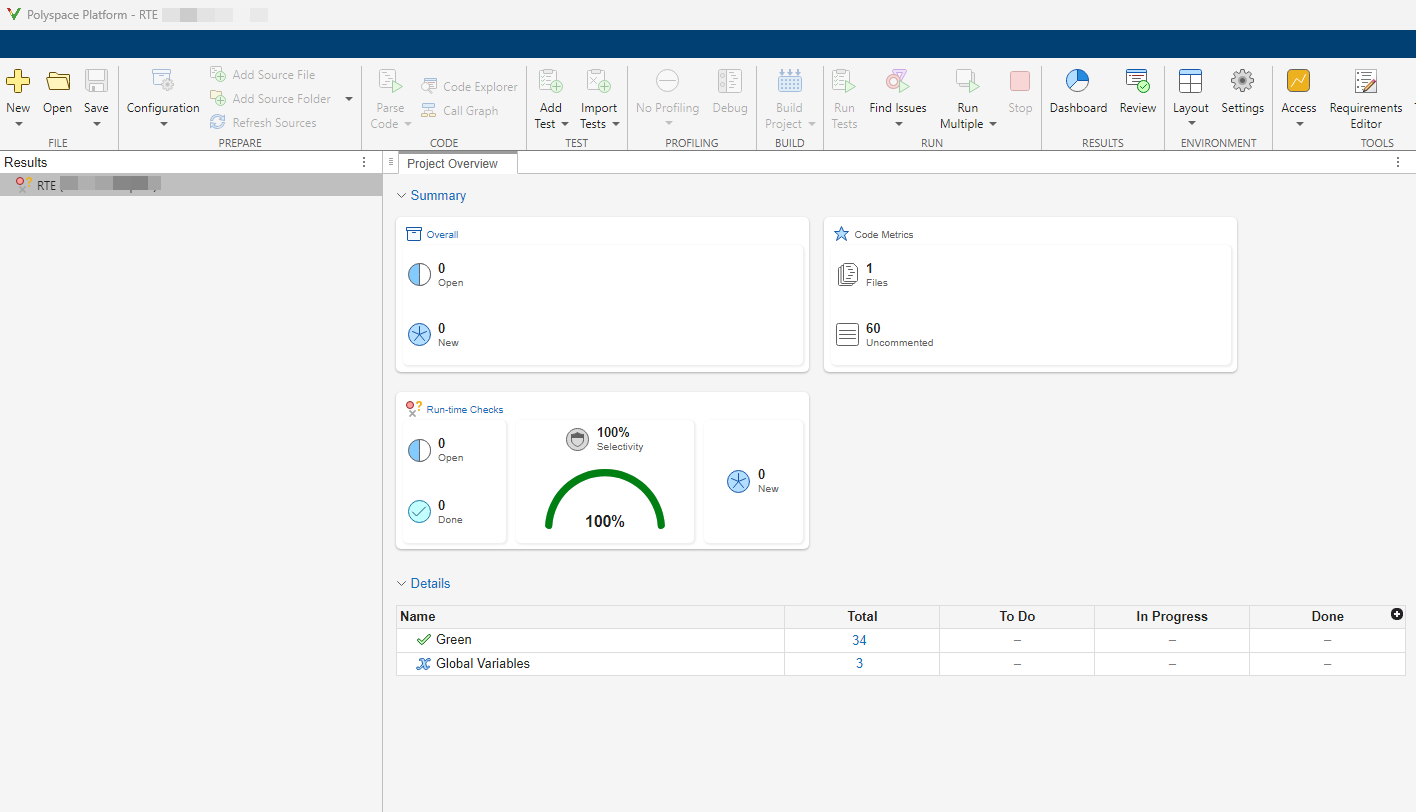
To review the results list, click Review.
In R2026a, you can:
Navigate to the model directly from the Result Details pane by clicking the Go To Model button (). The Simulink block that causes the Polyspace result is highlighted in the Simulink editor.
Copy annotations from individual results in the Results Details pane to corresponding Simulink blocks by using the Annotate Block button (). The annotations you entered are copied as Polyspace Annotation to the Simulink block. If multiple Polyspace results correspond to the same block, annotation for each result is copied to the block separately.
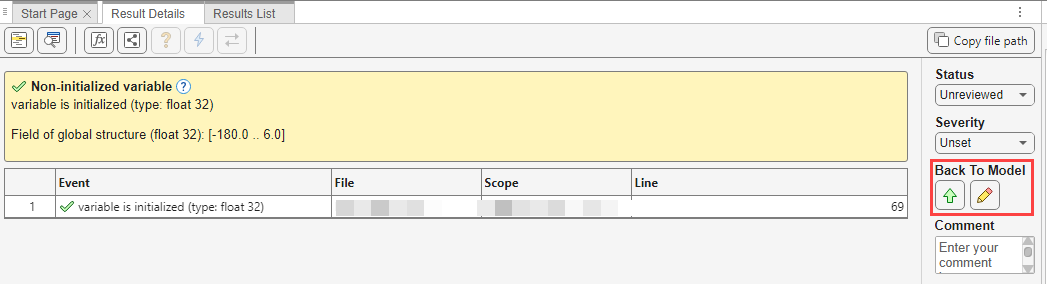
For more details, see Address Polyspace Results by Annotating Simulink Blocks.
Source Code: Result highlighting for multi-line violations
Starting in R2026a, when you select a Polyspace result from the Results List, Polyspace now highlights the entire relevant code range for the result rather than a single line. This can be useful when reviewing complex rules where multiple lines of code contribute to the issue.
Functionality being removed or changed
polyspace-report-generator options will be removed
Still runs
The following options for the command will be removed in a future release:polyspace-report-generator
-generate-results-list-file
-generate-variable-access-file
-key-mode
Use instead for exporting results to an external format such as CSV or JSON.polyspace-results-export
Use the VariableAccess report template for generating a global variables accesses report. See Bug Finder and Code Prover report (-report-template).