Preprocess Data for AI Eigenvector-Based CSI Feedback Compression
R2026bThis example shows how to preprocess channel estimates and prepare a data set for training an autoencoder for eigenvector-based channel state information (CSI) feedback compression. It focuses on the Prepare Data step in the workflow for AI-Based CSI Feedback. You can run each step independently or work through the steps in order.
In this example, you:
Preprocess the channel estimates from previously generated data by averaging the channel response over times slots and subbands, and then computing the corresponding eigenvectors..
Visualize the preprocessed channel estimate.
Preprocess a data set of channel estimates in bulk for training neural networks.
For an example of the previous step in the workflow, see Generate MIMO OFDM Channel Realizations for AI-Based Systems.
Type I and Type II codebooks specified in 3GPP Release 15 are based on implicit CSI feedback where the UE performs singular value decomposition (SVD) on downlink CSI matrix to extract the eigen vectors to form the precoding matrix. The precoding matrix is used to search predefined codebooks to select the precoding matrix indicator (PMI) which the UE transmits to the gNB. 3GPP Release 19 investigated the use case of DL-based CSI feedback based on the existing mechanism of using implicit feedback where neural networks replace the PMI modules at the UE and the gNB.
Channel Realization Data
If the required data is not present in the workspace, this example generates the channel realization data by using the prepareChannelRealizations helper function.
if ~exist("sdsChan","var") || ~exist("channel","var") || ~exist("carrier","var") ... || (exist("sdsChan","var") && ... exist("userParams","var") && ... ~strcmp(userParams.Preset,"EV-CSI Compression")) numSamples =1000; [sdsChan,systemParams,channel,carrier] = prepareChannelRealizations(numSamples); end
Starting channel realization generation
6 worker(s) running
00:00:26 - 100% Completed
After generating the data, you can view the system configuration by inspecting outputs (sdsChan, systemParams, channel, and carrier) of the prepareChannelRealizations helper function.
Preprocess Channel Estimate
The preprocessing steps to extract the channel response eigenvectors are:
Averaging over slots: If the channel does not change much during a slot, you can average over slots to reduce the noise in the channel estimates and reduce the data size.
Averaging over resource blocks: If the channel coherence bandwidth is much larger than that of each resource block, you can average over the subcarriers in each resource block to reduce the data size.
Power distribution across transmit antennas: Multiply the complex channel response matrix by its Hermitian (complex conjugate) matrix to get the power distribution of each transmit antenna for each resource block.
Averaging over subbands: If the contribution of each transmit antenna does not change much over multiple resource blocks, you can divide the total number of resource blocks into subbands and average over each subband.
Eigenvector of each subband: Calculate the eigen vector corresponding to each subband and concatenate them to create a complex matrix of dimensions
Ntx-by-Nsubbands.
Read one frame and average the channel estimate Hest over the symbols dimension and over each resource block.
Hest = read(sdsChan);
[Nsc,Nsymbol,Nrx,Ntx] = size(Hest);
Hrb = mean(reshape(Hest,12,[],Nsymbol,Nrx,Ntx),[1,3]);
HPermute = permute(squeeze(Hrb),[2,3,1]);
[Nrx,Ntx,Nrb] = size(HPermute)
Nrx =
4
Ntx =
32
Nrb =
48
Compute the power distribution of transmit antennas for each resource block.
HProd = pagemtimes(pagectranspose(HPermute),HPermute);
Select the number of resource blocks per subband such that the bandwidth of each subband is much less than the channel coherence bandwidth. Divide the resource blocks into subbands. Average the channel response over the resource blocks in each subband.
Nsb = 12;
HSubband = squeeze(mean(reshape(HProd,Ntx,Ntx,[],Nsb),3));
For each subband, compute the eigenvector corresponding to the highest eigenvalue. Concatenate the eigenvectors of each subband to create the eigenvector channel response matrix, Hev.
Hev = zeros(Ntx,Nsb,"single");
for i = 1 : Nsb
    [V,~] = eigs(HSubband(:,:,i),1);
    Hev(:,i) = V;
end
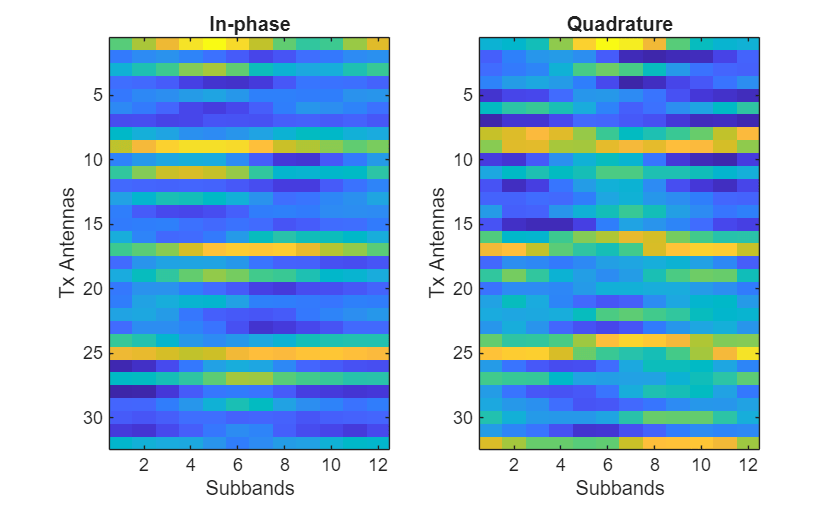
Split Hev into real and imaginary parts and concatenate them along the first dimension.
HevReal = [real(Hev);imag(Hev)];

[NtxIQ,Nsb] = size(HevReal)
NtxIQ =
64
Nsb =
12
Visualize Generated Data
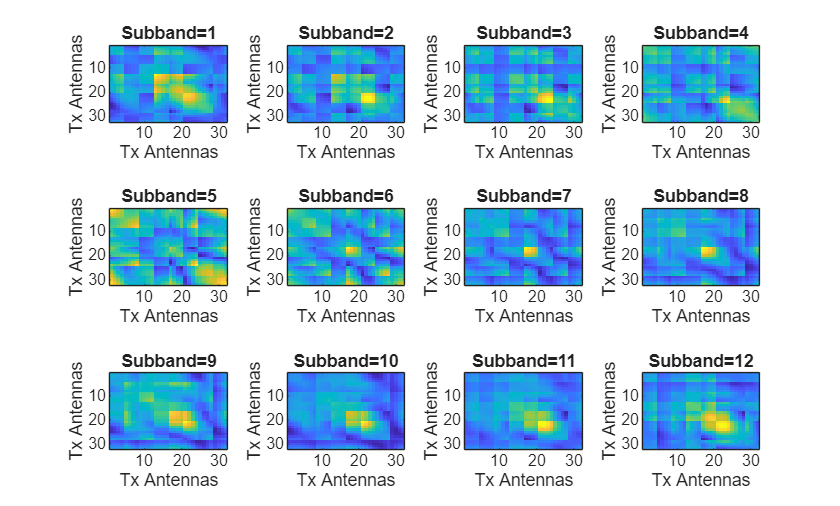
Inspect the power distribution of transmit antennas for each subband. The diagonal elements in each plot represent the distribution of the power received at all receive antennas from each transmit antennas. The off-diagonal elements represent the spatial domain correlation between the transmit antennas.
figure
tiledlayout
for i = 1:Nsb
nexttile
    imagesc(abs(HSubband(:,:,i)))
    xlabel("Tx Antennas");
    ylabel("Tx Antennas")
    title(sprintf("Subband=%d",i))
end
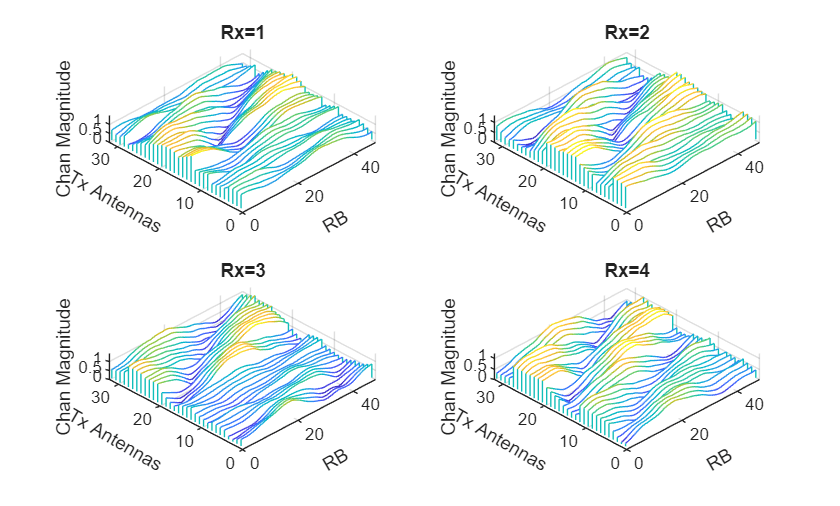
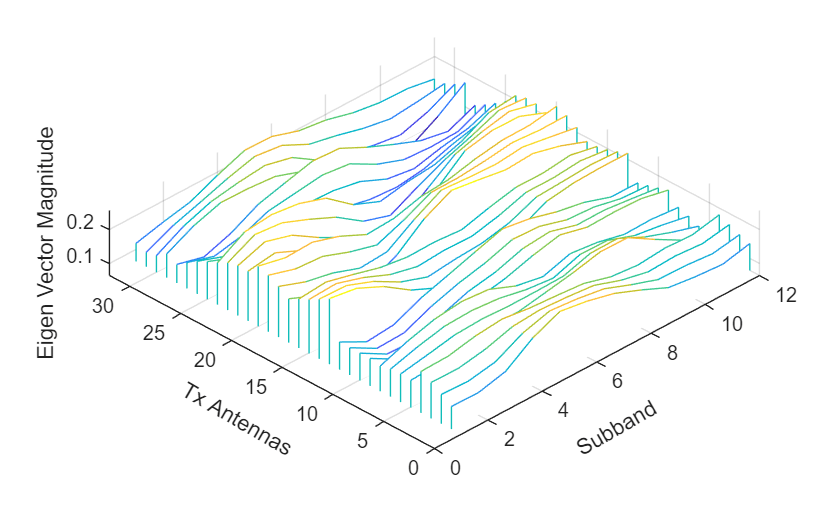
Compare the channel response magnitude at each receive antenna and the resulting eigenvector matrix (neural network input). The eigenvector matrix preserves the channel power response from all transmit antennas.
figure
tiledlayout
for i = 1:Nrx
nexttile
    waterfall(squeeze(abs(HPermute(i,:,:))))
    view(-45,75)
    grid on
    xlabel("RB",Rotation=30)
    ylabel("Tx Antennas",Rotation=-30)
    zlabel("Chan Magnitude")
    title(sprintf("Rx=%d",i))
end
figure
waterfall(squeeze(abs(Hev(:,:))))
view(-45,75)
grid on
xlabel("Subband",Rotation=30);
ylabel("Tx Antennas",Rotation=-30);
zlabel("Eigen Vector Magnitude")
title("")
Preprocess Data in Bulk
The helperPreprocess3GPPChannelData function preprocesses the channel realizations saved in files in the dataDir directory. The function takes the sdsChan signal datastore as the first input to load the channel realizations. To save the preprocessed data to a folder named processed, set SaveData to true.
To generate preprocessed channel realizations that the network can use as both the input signal and the target signal of an autoencoder, set TrainingObjective to "eigenvector autoencoding".
[sdsProcessed,dataOptions] = helperPreprocess3GPPChannelData( ...
sdsChan, ...
TrainingObjective="eigenvector autoencoding", ...
DataComplexity="complex", ...
Verbose=true, ...
SaveData=true, ...
UseParallel=true);
Starting CSI data preprocessing
6 worker(s) running
00:00:13 - 100% Completed
Access the data files using the returned signal datastore. Display a sample.
sdsProcessed.SignalVariableNames = "inputData";
inputDataCell = readall(sdsProcessed);
size(inputDataCell{1})
ans = 1×2
64 12
inputData = cat(3,inputDataCell{:});
[NtxIQ,Nsb,Nsamples] = size(inputData)
NtxIQ = 64
Nsb =
12
Nsamples =
1000
figure
subplot(1,2,1)
imagesc(inputData(1:Ntx,:,1))
xlabel("Subbands")
ylabel("Tx Antennas")
title("In-phase")
subplot(1,2,2)
imagesc(inputData(Ntx+1:end,:,1))
xlabel("Subbands")
ylabel("Tx Antennas")
title("Quadrature")
Preprocess Data Using Transform Datastore
Alternatively, you can preprocess the data using a transform datastore, where the transform function is the preconfigured helperPreprocess3GPPChannelData function. The transform function creates a new datastore, tdsChan, that applies preprocessing to the data read from the underlying datastore, sdsChan. This approach is particularly useful when dealing with large data sets that cannot fit entirely in memory. If you have Parallel Computing Toolbox™, you can apply the preprocessing in parallel.
tdsChan = transform(sdsChan, @(x){helperPreprocess3GPPChannelData( ...
    x, ...
    TrainingObjective="eigenvector autoencoding", ...
    DataComplexity="complex", ...
    Verbose=false, ...
    SaveData=false, ...
    UseParallel=false)});
Read all the data and apply preprocessing. Use parallel processing, if available.
inputDataCell = readall(tdsChan,UseParallel=true);
inputData2 = cat(3,inputDataCell{:});
[NtxIQ,Nsb,Nsamples] = size(inputData2)
NtxIQ = 2
Nsb =
1
Nsamples =
1000
Further Exploration
After preprocessing the CSI snapshots, explore the Train Transformer Autoencoder for Eigenvector-based CSI Feedback Compression example. In that example, you can learn how to design, train, and evaluate a transformer autoencoder for CSI eigenvector compression and reconstruction:
Local Functions
function [sdsChan,systemParams,channel,carrier] = prepareChannelRealizations(numSamples)
systemParams.TxAntennaSize = [4 4 2 1 1];   % rows, columns, polarization, panels
systemParams.RxAntennaSize = [2 2 1 1 1];   % rows, columns, polarization, panels
systemParams.MaxDoppler = 1;                % Hz
systemParams.RMSDelaySpread = 300e-9;       % s
systemParams.DelayProfile = "CDL-C"; % CDL-A, CDL-B, CDL-C, CDL-D, CDL-D, CDL-E

carrier = nrCarrierConfig;
nSizeGrid = 48;                                         % Number resource blocks (RB)
systemParams.SubcarrierSpacing = 15;  % 15, 30, 60, 120 kHz
carrier.NSizeGrid = nSizeGrid;
carrier.SubcarrierSpacing = systemParams.SubcarrierSpacing;
waveInfo = nrOFDMInfo(carrier);

channel = nrCDLChannel;
channel.DelayProfile = systemParams.DelayProfile;
channel.DelaySpread = systemParams.RMSDelaySpread;     % s
channel.MaximumDopplerShift = systemParams.MaxDoppler; % Hz
channel.RandomStream = "Global stream";
channel.TransmitAntennaArray.Size = systemParams.TxAntennaSize;
channel.ReceiveAntennaArray.Size = systemParams.RxAntennaSize;
channel.ChannelFiltering = false;
channel.SampleRate = waveInfo.SampleRate;
channel.CarrierFrequency = 3.5e9;

samplesPerSlot = ...
    sum(waveInfo.SymbolLengths(1:waveInfo.SymbolsPerSlot));
slotsPerFrame = 1;
channel.NumTimeSamples = samplesPerSlot*slotsPerFrame;
systemParams.NumSymbols = slotsPerFrame*14;
useParallel = true;
saveData =  true;
dataDir = fullfile(pwd,"Data");
dataFilePrefix = "nr_channel_est";
resetChanel = true;
sdsChan = helper3GPPChannelRealizations( ...
    numSamples, ...
    channel, ...
    carrier, ...
    UseParallel=useParallel, ...
    SaveData=saveData, ...
    DataDir=dataDir, ...
    dataFilePrefix=dataFilePrefix, ...
    NumSlotsPerFrame=slotsPerFrame, ...
    ResetChannelPerFrame=resetChanel);
end

