Create Event-Based Timing Patterns
R2026bUse event-based temporal logic to control chart execution based on recurring events. By using events with temporal logic operators, you can create timing patterns that respond to specific events rather than absolute time.
You can implement event-based timing patterns using these operators:
after(n,E): Returns true when event E has occurred at least n times since the associated state became active
at(n,E): Returns true when event E has occurred exactly n times since the associated state became active
before(n,E): Returns true when event E has occurred fewer than n times since the associated state became active
every(n,E): Returns true on every nth occurrence of event E since the associated state became active
temporalCount(E): Returns the number of occurrences of event E since the associated state became active
Implementation Guidelines
Identify or create the event that will serve as your timing mechanism. You can use
either explicit events from other parts of your model or implicit events like
change, enter, or exit.
Each temporal logic operator has an associated state, which is the state where the action appears or from which the transition path originates. The timing counter used by each operator resets whenever the associated state reactivates.
You can use two notations for event-based temporal logic in transitions:
Trigger notation
Conditional notation
Choose Appropriate Syntax
Trigger Notation:
temporalLogicOperator(n,E)[C]
With this notation, the transition occurs when the chart processes a broadcast of the
base event E.
Conditional Notation:
E1[temporalLogicOperator(n,E2) && C]
With this notation, the transition can occur when the chart processes a broadcast of
the nonbase event E1 or the event E2.
Periodic Actions
To execute tasks at regular intervals, use the temporal logic operator
every. Use every(n,E) to perform tasks on every nth
occurrence of event E. Self-loop transitions with the
every operator maintain the active state between executions. State
variables combined with event counting create nested periodic patterns. Multiple actions at
different frequencies can be coordinated using the same event base.
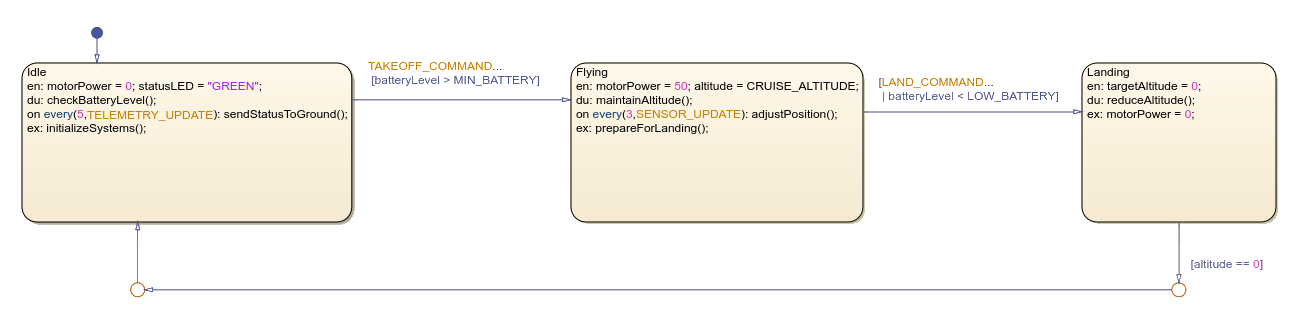
This example shows a simple drone flight controller with three states,
Idle, Flying, and Landing. The
model uses the every operator to execute periodic actions like position
adjustments during flight and status updates during idle state.
Sequential Timing
To trigger actions at specific event counts, use the at operator. You
can implement a sequence using on at(n,E) actions with increasing values
of n to perform tasks in order as events occur. Transitions with at(n,E)
conditions allow states to progress through a sequence based on event counts.
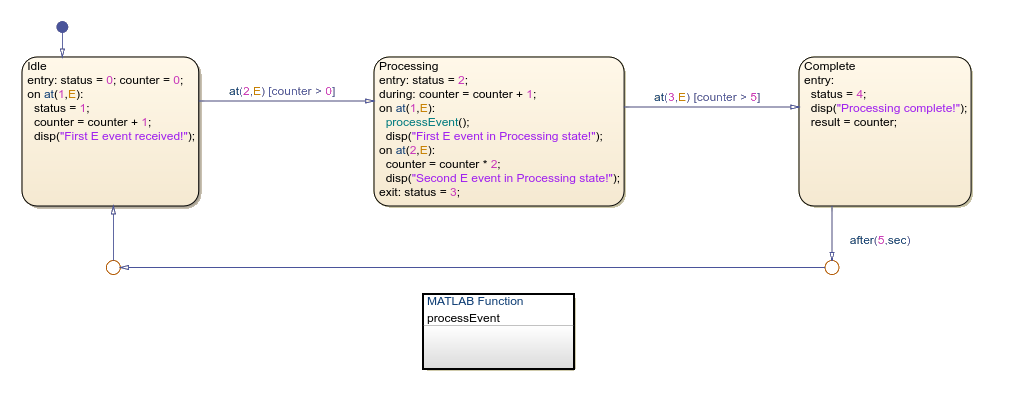
This example shows how a chart uses temporal logic to respond to event occurrences. The
chart transitions through three states, Idle,
Processing, and Complete, based on specific event
counts using the at operator. Each state performs distinct actions when
events occur an exact numbers of times.
Event Counting
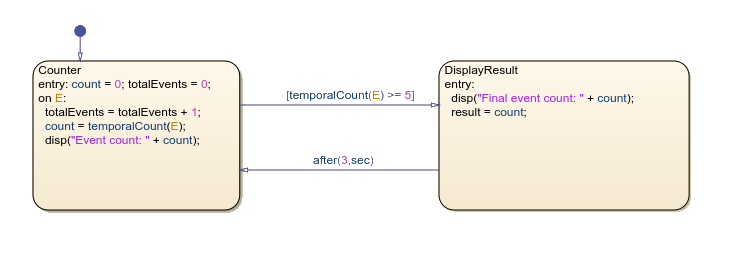
To track occurrences of events, use the temporalCount operator which
returns the number of times event E has occurred since the state became
active. You can store this count in variables to implement custom timing logic based on
event frequency. You can also use transition conditions to check these count values and
execute state changes. The count persists through the active lifecycle of the state until
the state becomes inactive or the chart resets.