Pattern Wizard
R2026bCreate decision, loop, and switch patterns in Stateflow
Description
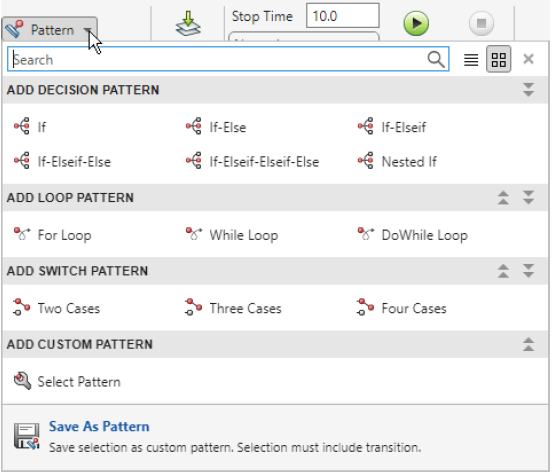
Use the Pattern Wizard to create and manage flow chart patterns in Stateflow® charts and graphical functions. You can use the built-in decision, loop, and switch patterns to create structures that comply with MAB guidelines. You can save custom patterns for reuse, extend existing flow charts with new logic patterns, and convert MATLAB® code into graphical representations. Pattern options include:
If,If-Else,If-Elseif, and other nested decision patternsFor-,While-, andDoWhile-loop patternsSwitch patterns with up to four cases
Custom patterns
Patterns that you define in a MATLAB program file
Open the Pattern Wizard
To open the Pattern Wizard, open a Stateflow chart. In the Modeling tab, select Pattern.
Examples
To create an If-Else flow chart:
On the Modeling tab, select Pattern > If-Else.
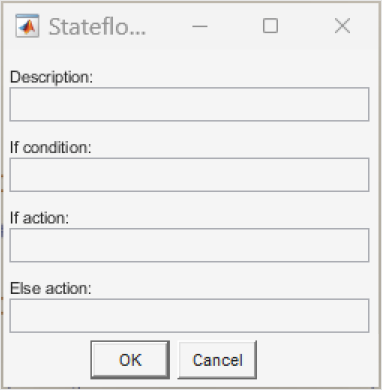
In the Stateflow Pattern dialog box, enter
x > 0in the If condition field.Enter
y = 1;in the If action field andy = 0;in the Else action field.Click OK. The Pattern Wizard generates an
If-Elseflow chart with the specified condition and actions.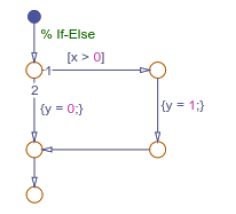
After you create a pattern, you can customize it by modifying the conditions and actions or by inserting additional logic patterns.
In the Stateflow Editor, select a transition in your chart where you want to insert the loop.
On the Modeling tab, select Pattern > For Loop.
In the Stateflow Pattern dialog box, set Initializer expression to
i = 1, Loop test expression toi <= 5, and Counting expression toi = i + 1.To execute the loop in each iteration, set Foor loop body to
sum = sum + i;Click OK. The Pattern Wizard inserts the
For-loop at the selected transition.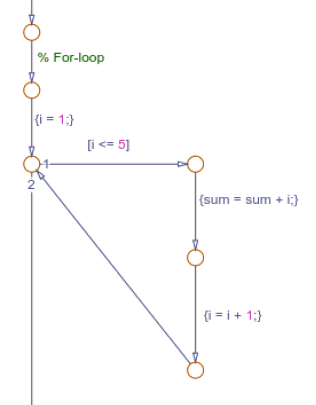
To save a custom pattern that iterates through the upper triangle of a matrix:
Create a flow chart with nested
For-loops where the inner loop starts at the value of the outer loop index.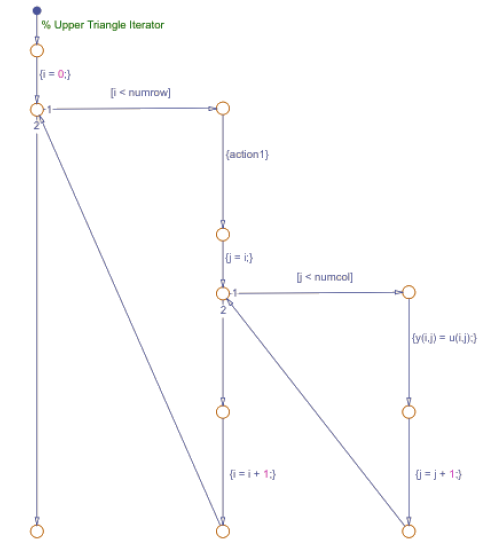
In the Stateflow Editor, select the entire flow chart pattern.
On the Modeling tab, select Pattern > Save As Pattern.
Name your pattern
UpperTriangleIteratorand click Save.
To use a custom pattern:
On the Modeling tab, select Pattern > Select pattern.
Select
UpperTriangleIteratorfrom the list and click OK.The Pattern Wizard adds the upper triangle iterator pattern to the chart.
In standalone Stateflow charts, you can convert:
If,If-Else, and other nested decision statementsFor-andWhile-loopsSwitchstatements
To convert MATLAB code into Stateflow flow charts:
First, create the Collatz conjuncture function from Convert MATLAB Code into Stateflow Flow Charts.
Save the function file collatz.m. The Collatz
conjecture function computes the collatz sequence for a given
number.
On the Modeling tab, select Pattern > Select File.
Choose a MATLAB file containing the Collatz conjecture function that computes the sequence for a given number. For more information about the Collatz conjecture, see Convert MATLAB Code into Stateflow Flow Charts.
Click Open. The Pattern Wizard creates a flow chart by using the
while-loop andIf-Elsestructure to implement the algorithm.
Limitations
You can only convert MATLAB code to flow charts in standalone Stateflow charts.
Version History
Introduced in R2008b

