MATLAB ヘルプ センター
Find Requirements Table blocks
Since R2022a
reqTables = slreq.modeling.find(model)
reqTables = slreq.modeling.find(model,table)
reqTables = slreq.modeling.find(model) returns all the Requirements Table blocks in the model or subsystem specified by model.
reqTables
model
example
reqTables = slreq.modeling.find(model,table) returns the Requirements Table block, table, in the model or subsystem specified by model. Use this syntax to return a Requirements Table block in a model. (since R2026a)
table
collapse all
Find the Requirements Table blocks in a model named myModel.
myModel
reqTables = slreq.modeling.find("myModel");
The function returns reqTables as an array of RequirementsTable objects.
RequirementsTable
Get the handle of the current model.
modelH = get_param(gcs,"Handle");
Find the Requirements Table blocks in the model named myModel.
reqTables = slreq.modeling.find(modelH);
Since R2026a
This example shows how to return a specific Requirements Table block in a model.
Load the model spec_model_final. The model has two Requirements Table blocks.
spec_model_final
model = "spec_model_final"; load_system(model);
The model has two Requirements Table blocks named AP_Mode_Determination and Cmd_Determination.
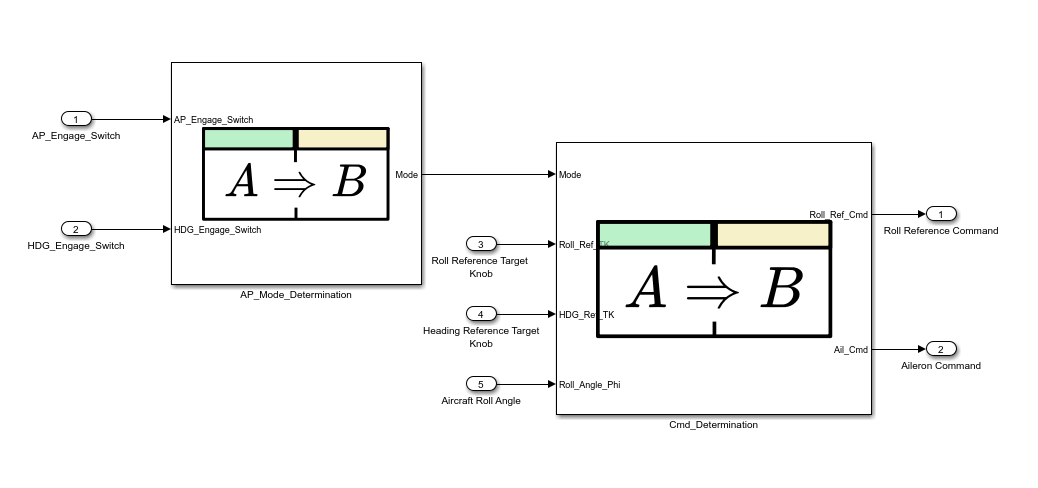
AP_Mode_Determination
Cmd_Determination
Get the AP_Mode_Determination Requirements Table block.
table = slreq.modeling.find(model,"AP_Mode_Determination")
table = RequirementsTable with properties: Name: 'AP_Mode_Determination' Path: 'spec_model_final/AP_Mode_Determination' RequirementHeaders: [1×1 struct] ChildEvaluation: 'independent'
Model or subsystem, specified as a string scalar or character vector that contains the name of the model, or a model handle.
Data Types: char | string | double
char
string
double
Requirements Table block, specified as a string scalar or character vector that contains the Requirements Table block name or path.
Data Types: char | string
Requirements Table blocks, returned as an array of RequirementsTable objects.
expand all
Use the new table argument to find specific Requirements Table blocks.
slreq.modeling.create
get_param
findRequirementRow
You clicked a link that corresponds to this MATLAB command:
Run the command by entering it in the MATLAB Command Window. Web browsers do not support MATLAB commands.
Web サイトの選択
Web サイトを選択すると、翻訳されたコンテンツにアクセスし、地域のイベントやサービスを確認できます。現在の位置情報に基づき、次のサイトの選択を推奨します:
また、以下のリストから Web サイトを選択することもできます。
最適なサイトパフォーマンスの取得方法
中国のサイト (中国語または英語) を選択することで、最適なサイトパフォーマンスが得られます。その他の国の MathWorks のサイトは、お客様の地域からのアクセスが最適化されていません。
南北アメリカ
ヨーロッパ
アジア太平洋地域
最寄りの営業オフィスへのお問い合わせ