MATLAB ヘルプ センター
Requirements Table ブロック内の位置の前の部分文字列を抽出する
R2022b 以降
newStr = extractBefore(str,subStr)
newStr = extractBefore(str,pos)
newStr = extractBefore(str,subStr) は、部分文字列 subStr の最初の出現箇所の前で終わる、str の部分文字列を返します。
newStr
str
subStr
例
newStr = extractBefore(str,pos) は、文字位置 pos の前で終わる、str の部分文字列を返します。
pos
すべて展開する
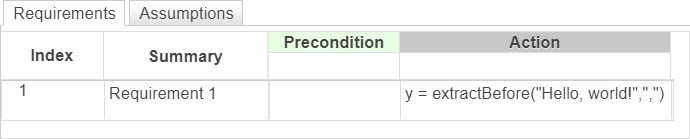
Requirements Table ブロックで、string "Hello, world!" 内の部分文字列 "," の前にある文字列を抽出する要件を作成します。出力は "Hello" です。
"Hello, world!"
","
"Hello"
y = extractBefore("Hello, world!",",")
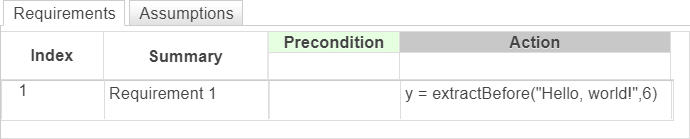
Requirements Table ブロックで、string "Hello, world!" 内の 6 番目の文字の前にある文字列を抽出する要件を作成します。出力は "Hello" です。
y = extractBefore("Hello, world!",6)
入力 string。string スカラーとして指定します。リテラル文字列は二重引用符で囲みます。
例: "Hello"
データ型: string
string
substr
部分文字列。string スカラーとして指定します。リテラル文字列は二重引用符で囲みます。
文字の位置。正の整数として指定します。
データ型: single | double | int8 | int16 | int32 | int64 | uint8 | uint16 | uint32 | uint64
single
double
int8
int16
int32
int64
uint8
uint16
uint32
uint64
出力 string。string スカラーとして返されます。
この演算子では Simulink.Bus オブジェクト フィールドの使用はサポートされません。
Simulink.Bus
R2022b で導入
extractAfter | insertBefore
extractAfter
insertBefore
You clicked a link that corresponds to this MATLAB command:
Run the command by entering it in the MATLAB Command Window. Web browsers do not support MATLAB commands.
Web サイトの選択
Web サイトを選択すると、翻訳されたコンテンツにアクセスし、地域のイベントやサービスを確認できます。現在の位置情報に基づき、次のサイトの選択を推奨します:
また、以下のリストから Web サイトを選択することもできます。
最適なサイトパフォーマンスの取得方法
中国のサイト (中国語または英語) を選択することで、最適なサイトパフォーマンスが得られます。その他の国の MathWorks のサイトは、お客様の地域からのアクセスが最適化されていません。
南北アメリカ
ヨーロッパ
アジア太平洋地域
最寄りの営業オフィスへのお問い合わせ