Automatically Generate Variant Configurations for Model
R2026bCreating variant configurations manually can be time-consuming, especially for models with many variant choices. To simplify this process, you can let Variant Manager scan your model, identify all valid combinations of control variable values, and generate configurations for you.
Generate configurations for the slexVariantManagerOverviewGS model, excluding
the smart controller.
Open Example Model
This tutorial uses the example model slexVariantManagerOverviewGS, which comes with a minimal set of variant configurations. You can use this model to follow along with the steps in the tutorial.
modelName = "slexVariantManagerOverviewGS";
open_system(modelName);
Generate Variant Configurations
Open Variant Manager.
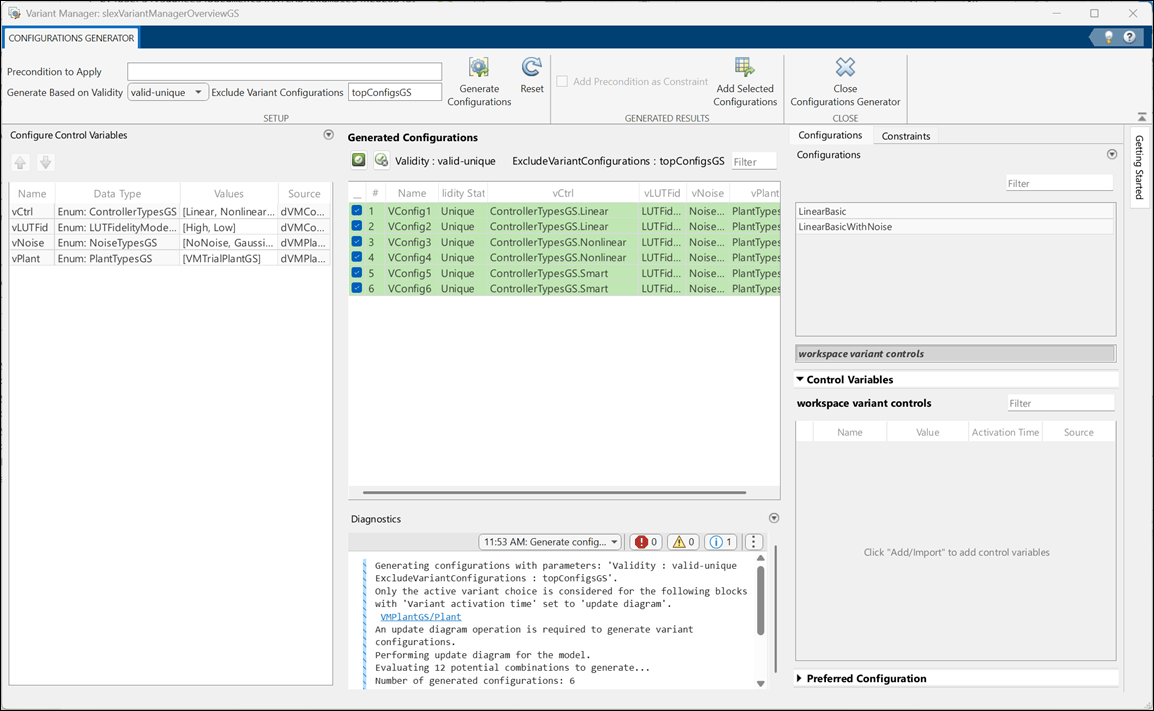
In the Setup section of the toolstrip, click Configurations Generator. This action opens the Configurations Generator tab.
In the Configure Control Variables table, find the row for the
vCtrlvariable. Remove theSmartoption from the list of values.Click Generate Configurations. Variant Manager creates valid combinations of the remaining control variable values. The generated configurations appear in a table. These configurations also satisfy any constraints you have defined.
If you want to add these configurations to the variant configurations object of the model, click Add Selected Configurations. This operation adds the selected configurations to the list of named configurations in the Configurations tab.
To return to the main Variant Manager view, click Close Configurations Generator.
To export the changes in the variant configuration data object to the data dictionary, click Apply Changes. Save the data dictionary.
Automatically generating configurations works well for large models that include many variant choices and you want to quickly explore all possible configurations, especially for tasks like parameter sweeping or broad simulation testing.
If your workflow is more structured and you prefer to use pretested referenced component configurations, or if you are following a bottom-up approach where components are defined and validated individually, then you might prefer to manually set up variant configurations using the referenced component configuration workflow.
You can also use these approaches together. Even if you have predefined variant configurations, you can still automatically generate any remaining configurations to get improved coverage. In the Exclude Variant Configurations box on the toolstrip, you can specify the variant configurations object associated with the model. When generating configurations, the software ignores any configurations present in this object.
See Also
Simulink.VariantManager.generateConfigurations | Simulink.VariantConfigurations

