Energy Accounting in Fluid Domains
R2026bEnergy accounting in fluid domains is different from other domains, such as electrical or mechanical. In electrical and mechanical systems, you can identify losses by comparing power into and out of a component, and power can be converted entirely into useful work. In isothermal liquid systems, where the fluid temperature is constant and assumed to be the same as the environment temperature, energy and power calculations are similar in this respect to the energy accounting in the electrical or mechanical domains. In thermal fluid systems, however, fluid energy is often transported through the system rather than simply dissipated. A fluid can carry a large amount of energy but the energy flow rate cannot be converted entirely into useful work, even if the process is ideal, because the second law of thermodynamics limits the energy conversion that can take place. For example, fluid with a high heat capacity may have a large amount of thermal energy, but if its temperature is close to environmental conditions, then only a small fraction of this thermal energy can be converted into useful work.
Therefore, energy accounting for thermal fluid systems distinguishes between energy rate, which tracks how much energy is flowing, and exergy rate, which tracks how much of that energy can still do useful work.
Energy rate helps you understand:
How much energy enters or leaves a block
Where energy is transferred between domains
How much energy is stored in the system
Exergy rate helps you understand:
How much useful work remains in a fluid stream
How much useful energy is lost in a block
Where irreversibility reduces system performance
Exergy represents the maximum useful work that can be extracted from a fluid stream as it comes into equilibrium with its environment. The environmental conditions used for analysis are the atmospheric conditions defined in the fluid properties block connected to the circuit. The thermal fluid energy rate is also measured with respect to the environmental conditions. Therefore, zero energy rate at a fluid port does not mean zero fluid flow if the flowing fluid is at the same pressure and temperature as the environment. A positive energy rate means fluid entering a block if the fluid has more energy than the environment, or fluid leaving the block if the fluid has less energy than the environment. Look at the sign of the mass flow rate to see whether fluid is entering or leaving the block.
Exergy analysis is available for these domains:
Thermal liquid
Gas
Depending on the type of block, you can use exergy results to evaluate:
How well a passive component, such as pipe, preserves useful energy
How effectively a turbine converts fluid exergy into mechanical work
How efficiently a compressor converts shaft work into useful fluid energy
To obtain both energy and exergy usage for a block, use this syntax for the getEnergyInfo
function:
[block_energyInfo,block_exergyInfo] = getEnergyInfo(simlog.block_node);
Because of the second output argument, the function additionally returns information about
the exergy and exergy rate usage for the block as an ExergyInfo
object. If the block does not calculate exergy, the ExergyInfo object is
empty.
Exergy Categories
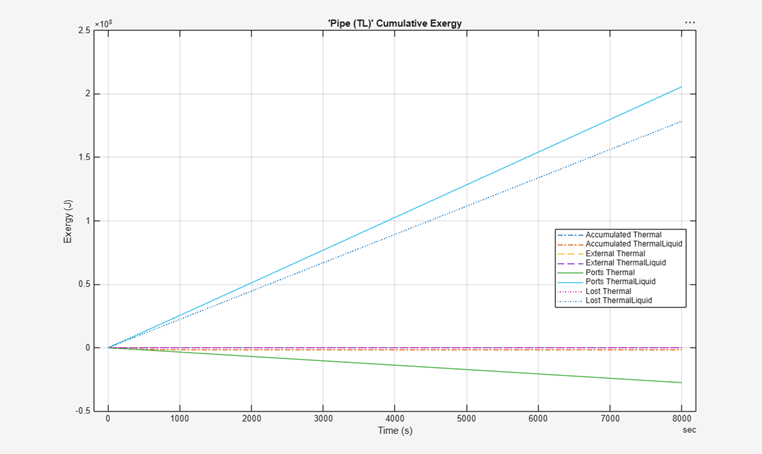
The exergy use categories for each type are the same as for the energy use: Ports, External, Converted, and Accumulated. However, exergy tables contain an additional category, Lost, which is especially important for thermal fluid blocks. Lost exergy represents useful work potential destroyed inside the component. It is not the same as heat transfer, and it is not treated as energy leaving the system. Instead, it reflects degradation in energy quality.
Visualizing the Block Energy and Exergy Usage
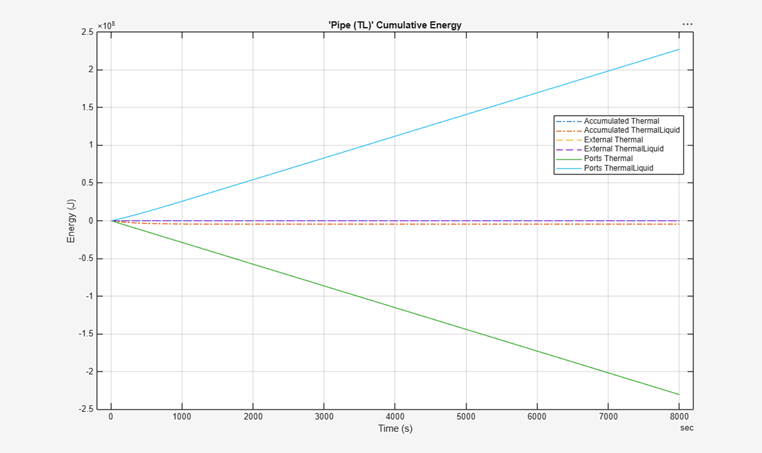
An easy way to visualize the difference between the energy and exergy usage for a
thermal fluid block is to plot its EnergyInfo and
ExergyInfo objects. The plot object
function assigns specific line styles and colors to each combination of energy or exergy
category and type used by the block.
[pipe_energyInfo,pipe_exergyInfo] = getEnergyInfo(simlog.Pipe_TL);
plot(pipe_energyInfo)
plot(pipe_exergyInfo)
See Also
getEnergyInfo | ExergyInfo | Enable energy
accounting

