Constant Power Load
R2026bConstant power load for DC or AC supply
Constant Power Load block
To add a block to a model, double-click the canvas and start typing the block name. Then, select the block from the list.
Libraries:
Simscape /
Electrical /
Passive
Description
The Constant Power Load block implements a constant power load for a DC or AC supply.
If you set the Load type parameter to
DC:
The block outputs a nominal rated power as long as the voltage from the DC supply is greater than or equal to the Minimum supply voltage parameter value.
When the voltage from the DC supply drops below the Minimum supply voltage parameter value, the load behavior changes and the block acts as a constant resistance. If the supply voltage becomes negative, the block acts as a constant reverse conductance.
To ensure smooth transitions between these behaviors, the block uses a third-order polynomial spline with continuous derivatives. You can specify the width of this transition using the Transition voltage width parameter.
If you set the Load type parameter to
AC:
The block outputs a nominal rated power at steady state as long as the voltage from the AC supply is greater than or equal to the Minimum supply voltage (RMS) parameter value. The block calculates the RMS power in harmonic approximation so that the block can calculate the power for AC voltage signals with time-dependent amplitudes. If the time scale of the amplitude change is comparable to the period of the alternating current, the instantaneous power briefly changes during the transition period.
When the voltage from the AC supply drops below the Minimum supply voltage (RMS) parameter value, the load behavior changes and the block models a load with constant impedance.
For more information about the equations for the
AC load type in a three-phase system, see the Equations
section of the Constant Power Load
(Three-Phase) block.
Faults
To model a fault in the Constant Power Load block, in the Faults section, click Add fault next to the fault that you want to model. For more information about fault modeling, see Fault Behavior Modeling and Fault Triggering.
The Constant Power Load block allows you to model an electrical fault as an open circuit. The block can trigger fault events at a specific time.
Load-Flow Analysis
If the block is in a network that is compatible with the frequency-time simulation mode, you can perform a load-flow analysis on the network. A load-flow analysis provides steady-state values that you can use to initialize a machine.
For more information, see Perform a Load-Flow Analysis Using Simscape Electrical and Frequency and Time Simulation Mode.
Examples
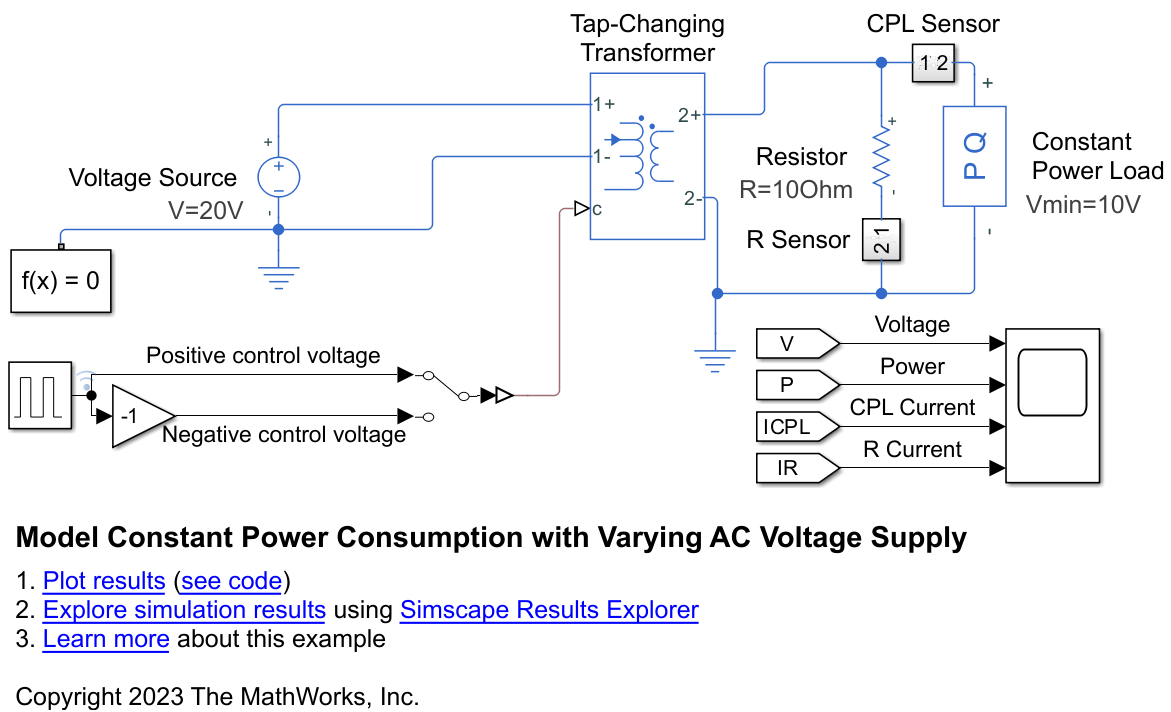
Model Constant Power Consumption with Varying AC Voltage Supply
Model constant power consumption using the Constant Power Load block in an AC circuit with varying voltage controlled by a Tap-Changing Transformer block.
Assumptions and Limitations
The Constant Power Load block reports thermal dissipation using DQ-averaged quantities but the
energy accounting framework computes port power instantaneously. The block uses a
harmonic estimator that integrates the supply voltage over one full cycle of the rated
frequency to extract the voltage amplitude. This integration window fills after
approximately the reciprocal of the rated frequency plus the voltage time constant. When
you set the Load type parameter to AC
and get energy information for this block using the getEnergyInfo function, the energy accounting results are inaccurate
during this initial transient period. Once the estimator converges, the ports and
external energy align on a cycle-averaged basis and the results are accurate at steady
state. To reduce the duration of the inaccuracy, set the Rated
frequency parameter to a larger value. When you set the Load
type parameter to DC, energy accounting is
accurate at all times.

