Reset Battery States for Multi-Scenario Real-Time Testing
R2026bThis example shows how to reinitialize battery states between test scenarios without stopping the simulation or building the real-time application again. To fully reinitialize a Simscape™ physical network each time the subsystem transitions from disabled to enabled, the model in this example uses the reset option of the enabled subsystems. At each re-initialization event, all system variables return to their initial targets. You can update these targets between resets to define different test scenarios, for example specifying a new state of charge (SOC) or cell temperature.
Set Up Re-initialization Using Enabled Subsystems
An enabled subsystem is a conditionally executed subsystem that runs once at each major time step while the control signal has a positive value. Simscape supports the reset option on the Enable Port block in Enabled Subsystems. When you set the States when enabling parameter of the Enable Port block to reset, the software fully re initializes the physical network each time the subsystem transitions from disabled to enabled state.
Open the BatteryReset model. A Scope block displays the SOC, voltage, and temperature signals during simulation. The model has simulation pacing enabled, so it runs at approximately real-time speed.
model = "BatteryReset";
open_system(model);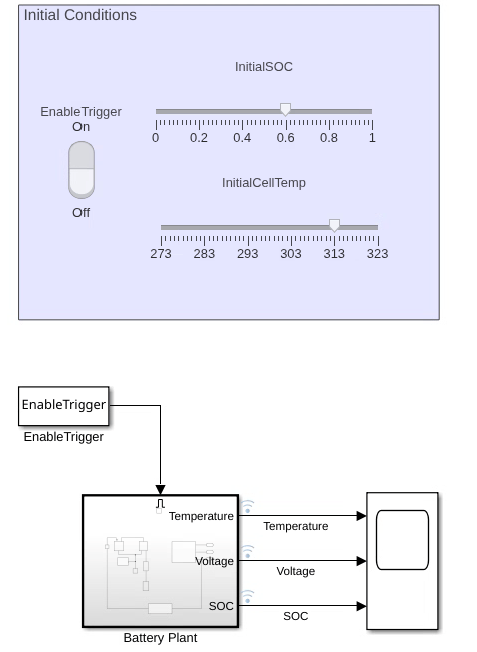
The BatteryReset model in this example places the entire battery network inside the Battery Plant enabled subsystem. The block initial targets, initial SOC and temperature, are the initial conditions used for re-initialization. This model defines these targets as tunable workspace variables that can be changed at runtime. Updated values take effect at the next re-initialization event, enabling different test scenarios without rebuilding or restarting the application.
The BatteryReset model includes these controls in the Initial Conditions dashboard:
Sliders for the
InitialSOCandInitialCellTempinitial targets. Use these sliders to tune the initial conditions at runtime.A Rocker Switch controls the
EnableTriggerworkspace variable, which drives the enable port of theBattery Plantsubsystem. Toggling the switch off disables theBattery Plantsubsystem. Toggling it back on re-enables the subsystem and triggers re-initialization with the current slider values.
Run and Reset Interactively
To reinitialize battery states between test scenarios without stopping the simulation, follow these steps:
Start the simulation.
Adjust the InitialSOC and InitialCellTemp sliders to specify new initial conditions.
Toggle the Rocker Switch off and on to disable and enable again the
Battery Plantsubsystem.
When the subsystem transitions from the disabled to the enabled state, all battery states reinitialize to the slider values you specified. The Scope block shows the state discontinuity at each reset event.
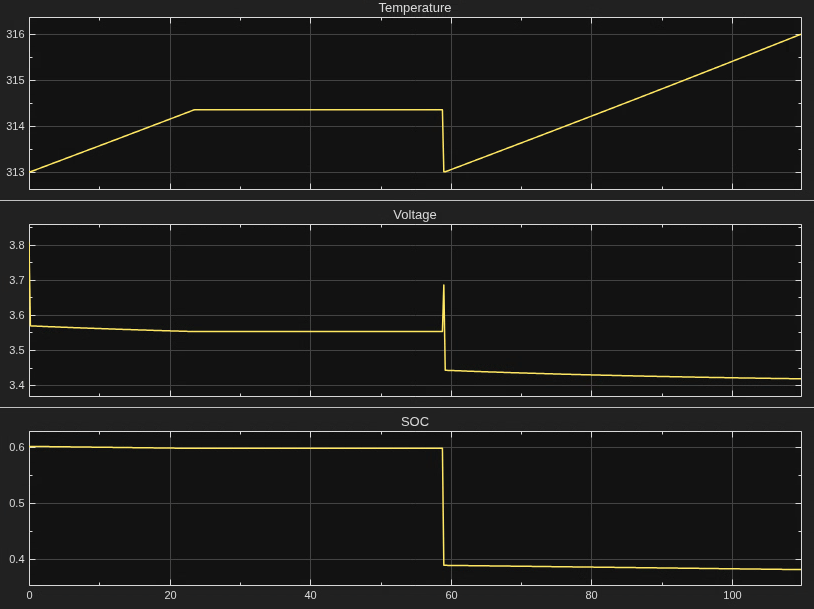
In this example, the battery resets at approximately 48 seconds with a different initial SOC target. The discontinuity in the SOC and voltage signals confirms that the system variables reinitialized to the new target values.
Deploy to Real-Time Target
This workflow is identical on a Simulink® Real-Time™ target. The model is configured with a fixed-step solver and tunable parameters, so you can build and deploy it to a Speedgoat machine without modification. On the target, use the Simulink Real-Time instrument panel or setparam to adjust the initial conditions and trigger resets between test scenarios.
For target setup details, see Real-Time Signal Logging and Parameter Tuning (Simulink Real-Time).
See Also
Topics
- Real-Time Signal Logging and Parameter Tuning (Simulink Real-Time)

