mlreportgen.chart.Border Class
Namespace: mlreportgen.chart
Description
Use an object of the mlreportgen.chart.Border class to define a border for a shape.
The mlreportgen.chart.Border class is a handle class.
Class Attributes
HandleCompatible | true |
ConstructOnLoad | true |
For information on class attributes, see Class Attributes.
Creation
Description
creates a borderObj = mlreportgen.chart.BorderBorder object that is black.
creates a borderObj = mlreportgen.chart.Border(color)Border object of the color specified by the
color argument.
Input Arguments
Properties
Fill applied to the chart element object, specified as an object of these fill classes:
mlreportgen.chart.SolidFillmlreportgen.chart.GradientFill
Attributes:
GetAccess | public |
SetAccess | public |
NonCopyable | true |
Width of the chart element object, specified as a character vector or string scalar that contains a number followed by an abbreviation for a unit of measurement. Valid abbreviations are:
"px"— Pixels"cm"— Centimeters"in"— Inches"mm"— Millimeters"pc"— Picas"pt"— Points
You can also specify pixels by omitting the unit. For example, "5"
specifies 5 pixels.
Example: "5in" specifies five inches
Attributes:
GetAccess | public |
SetAccess | public |
NonCopyable | true |
Data Types: char | string
Line dash type, specified as an mlreportgen.chart.LineDashType
object of one of these enumerations:
| Line Dash | Description |
|---|---|
mlreportgen.chart.LineDashType.Solid | Solid line |
mlreportgen.chart.LineDashType.RoundDot | Dotted line with round dots |
mlreportgen.chart.LineDashType.SquareDot | Dotted line with square dots |
mlreportgen.chart.LineDashType.DashDot | Line with alternating dots and dashes |
mlreportgen.chart.LineDashType.LongDash | Dashed line |
mlreportgen.chart.LineDashType.LongDashDot | Line with alternating dots and dashes |
mlreportgen.chart.LineDashType.LongDashDotDot | Line with alternating double dots and a dash |
Attributes:
GetAccess | public |
SetAccess | public |
NonCopyable | true |
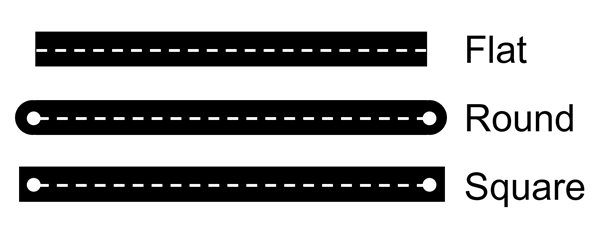
Line cap type, specified as an mlreportgen.chart.LineCapType
object of one of these enumerations:
| Line Cap | Description |
|---|---|
mlreportgen.chart.LineCapType.Flat | Line ends exactly at the endpoint with a flat edge |
mlreportgen.chart.LineCapType.Round | Line midpoint ends exactly at the endpoint with a half round end that extends past the endpoint |
mlreportgen.chart.LineCapType.Square | Line midpoint ends exactly at the endpoint with a square end that extends past the endpoint |
Attributes:
GetAccess | public |
SetAccess | public |
NonCopyable | true |
Line join type, specified as an mlreportgen.chart.LineJoinType
object of one of these enumerations:
| Line Cap | Description |
|---|---|
mlreportgen.chart.LineJoinType.Bevel | Cuts off the corner of the line join with a straight line to form a flat edge |
mlreportgen.chart.LineJoinType.Rounded | Adds a circular arc between the lines to form a rounded corner |
mlreportgen.chart.LineJoinType.Miter | Extends the outer edge of the lines to connect at a single point to form a sharp corner |
Attributes:
GetAccess | public |
SetAccess | public |
NonCopyable | true |
Line compound type, specified as an
mlreportgen.chart.LineCompoundType object of one of these
enumerations:
| Line Compound | Description |
|---|---|
mlreportgen.chart.LineCompoundType.Simple | Single line |
mlreportgen.chart.LineCompoundType.Double | Double line |
mlreportgen.chart.LineCompoundType.ThinThick | Thin line, then thick line |
mlreportgen.chart.LineCompoundType.ThickThin | Thick line, then thin line |
mlreportgen.chart.LineCompoundType.Triple | Triple line |
Attributes:
GetAccess | public |
SetAccess | public |
NonCopyable | true |
Version History
Introduced in R2026b

