ROS カスタム メッセージの MATLAB への登録
R2026bこの例では、MATLAB® で ROS カスタム メッセージを作成して、別のマシン上で共有します。この別のマシンは、同じプラットフォーム上で実行されており、同じバージョンの MATLAB を使用している必要があります。次の図に示すように、必要な msg ファイルが含まれる ROS パッケージがなければなりません。
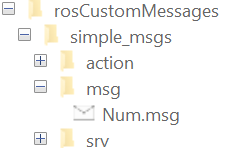
新しい MATLAB セッションを開き、カスタム メッセージ パッケージ フォルダーをローカル フォルダーに作成します。Windows® マシン上でカスタム メッセージを生成する場合は、フォルダー パスの文字数の制限を回避するために、短いフォルダー パスを指定します。以下に例を示します。
genDir = fullfile('C:/Work/rosCustomMessages')
genDir = fullfile(pwd,'rosCustomMessages');
packagePath = fullfile(genDir,'simple_msgs');
mkdir(packagePath)
カスタム メッセージ パッケージ フォルダー内に msg という名前のフォルダーを作成します。
mkdir(packagePath,'msg')msg フォルダー内に .msg という名前のファイルを作成します。
messageDefinition = {'int64 num'};

fileID = fopen(fullfile(packagePath,'msg', ...
               'Num.msg'),'w');
fprintf(fileID,'%s\n',messageDefinition{:});
fclose(fileID);
カスタム メッセージ パッケージ フォルダー内に srv という名前のフォルダーを作成します。
mkdir(packagePath,'srv')srv フォルダー内に .srv という名前のファイルを作成します。
serviceDefinition = {'int64 a'
                     'int64 b'
                     '---'
                     'int64 sum'};

fileID = fopen(fullfile(packagePath,'srv', ...
               'AddTwoInts.srv'),'w');
fprintf(fileID,'%s\n',serviceDefinition{:});
fclose(fileID);
カスタム メッセージ パッケージ フォルダー内に action という名前のフォルダーを作成します。
mkdir(packagePath,'action')action フォルダー内に .action という名前のファイルを作成します。
actionDefinition = {'int64 goal'
                    '---'
                    'int64 result'
                    '---'
                    'int64 feedback'};

fileID = fopen(fullfile(packagePath,'action', ...
               'Test.action'),'w');
fprintf(fileID,'%s\n',actionDefinition{:});
fclose(fileID);.msg、.srv、および .action ファイル内の ROS 定義からカスタム メッセージを共有可能な ZIP アーカイブとして生成します。
rosgenmsg(genDir,CreateShareableFile=true)
Identifying message files in folder 'C:/Work/rosCustomMessages'.Done.
Validating message files in folder 'C:/Work/rosCustomMessages'.Done.
[1/1] Generating MATLAB interfaces for custom message packages... Done.
Running catkin build in folder 'C:/Work/rosCustomMessages/matlab_msg_gen_ros1/win64'.
Build in progress. This may take several minutes...
Build succeeded.build log
Generating zip file in the folder 'C:/Work/rosCustomMessages'.Done.

To use the custom messages, follow these steps:

1. Add the custom message folder to the MATLAB path by executing:

addpath('C:\Work\rosCustomMessages\matlab_msg_gen_ros1\win64\install\m')
savepath

2. Refresh all message class definitions, which requires clearing the workspace, by executing:

clear classes
rehash toolboxcache

3. Verify that you can use the custom messages.
   Enter "rosmsg list" and ensure that the output contains the generated
   custom message types.
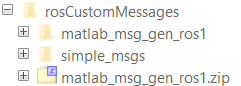
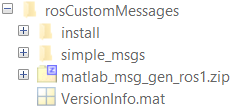
ZIP アーカイブ内に生成したカスタム メッセージをターゲット コンピューターにコピーし、rosRegisterMessages 関数を使用して登録します。
rosRegisterMessages(genDir)
To use the custom messages, follow these steps:

1. Add the custom message folder to the MATLAB path by executing:

addpath('C:\Work\rosCustomMessages\install\m')
savepath

2. Refresh all message class definitions, which requires clearing the workspace, by executing:

clear classes
rehash toolboxcache

3. Verify that you can use the custom messages.
   Enter "rosmsg list" and ensure that the output contains the generated
   custom message types.
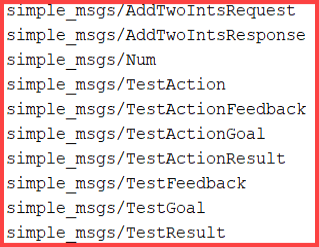
ターゲット コンピューターで rosmsg list を実行して、ワークフローで使用するカスタム メッセージを表示します。