Convert for-Loops into parfor-Loops
R2026bIn some cases, you must modify the code to convert for-loops to
parfor-loops. This example shows how to diagnose and fix
parfor-loop problems using a simple nested
for-loop. Run this code in MATLAB® and examine the results.
for x = 0:0.1:1
    for y = 2:10
        A(y) = A(y-1) + y;
    end
end
To speed up the code, try to convert the for-loops to
parfor-loops. This code produces errors.
parfor x = 0:0.1:1
    parfor y = 2:10
        A(y) = A(y-1) + y;
    end
end
In this case you cannot simply convert the for-loops to
parfor-loops without modification. To make this work, you must
change the code in several places. To diagnose the problems, copy this code into the
MATLAB editor and look for Code Analyzer messages. Use the following steps to
diagnose and resolve them.
Tip
If you encounter warnings or errors related to parfor-loop
requirements, guidelines, or limitations in MATLAB Code Analyzer, you can use a MATLAB Copilot action to help diagnose the issue. In the Code Analyzer message, click the  button to ask Copilot to explain the specific requirement or
limitation that the code violates and suggest code changes that can make the loop valid for
parallel execution. For an example workflow, see Resolve Issues in parfor-loops Using MATLAB Copilot.
button to ask Copilot to explain the specific requirement or
limitation that the code violates and suggest code changes that can make the loop valid for
parallel execution. For an example workflow, see Resolve Issues in parfor-loops Using MATLAB Copilot.
Identify structural errors reported by Code Analyzer.
When MATLAB analyzes the nested
parfor-loops, Code Analyzer reports errors related to loop structure and loop variables:The outer loop uses a noninteger step size, which is not supported by
parfor.A
parfor-loop is nested inside anotherparfor-loop, which is not allowed.
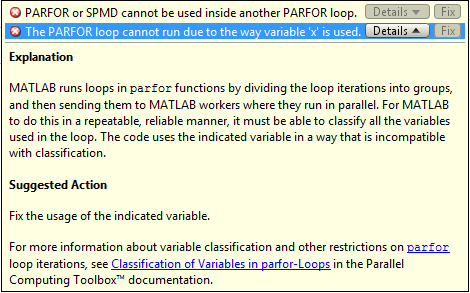
At this stage, Code Analyzer does not report any variable classification or data dependency error for
A. MATLAB reports only structural issues that prevent further analysis.Resolve nested parfor-loop errors.
You cannot nest a
parfor-loop inside anotherparfor-loop. Choose one loop to run in parallel and rewrite the other loop as a for loop. Because parallel overhead occurs only once, run the outer loop in parallel.parfor x = 0:0.1:1 for y = 2:10 A(y) = A(y-1) + y; end endAlternatively, you can call a function that uses a
parfor-loop inside the body of the otherparfor-loop. However, such nestedparfor-loops give you no computational benefit, because all workers are used to parallelize the outermost loop. For help dealing with nested loops, see Nested parfor and for-Loops and Other parfor Requirements.Fix invalid parfor-loop variables.
In the original example, the loop variable
xdoes not use consecutive integers, whichparforrequires. Replace the loop variable with a valid integer index and map it to the required values. For next steps in troubleshootingparfor-loop variables, see Ensure That parfor-Loop Variables Are Consecutive Integers.xValues = 0:0.1:1; parfor idx = 1:numel(xValues) x = xValues(idx); for y = 2:10 A(y) = A(y-1) + y; end end
Diagnose loop independence and variable dependencies.
After you fix the structural issues, MATLAB analyzes the loop body. Code Analyzer now reports that variable
Acannot be classified.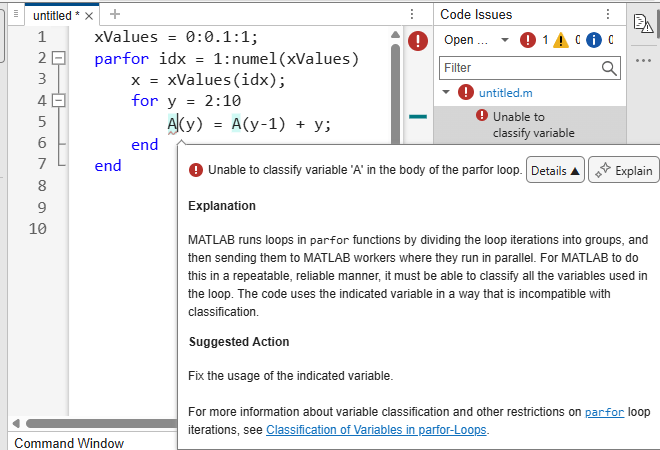
The body of the
parfor-loop must be independent. One loop iteration cannot depend on a previous iteration, because the iterations are executed in parallel in a nondeterministic order. In the example,is not independent, and therefore you cannot useA(y) = A(y-1) + y;
parfor. To proceed, restructure the computation to remove the dependency or keep the loop as afor-loop. For next steps in dealing with independence issues, see Ensure That parfor-Loop Iterations Are Independent.

