メインコンテンツ

Quantizer

Multi-bit or multi-level based unified mid-tread quantization

Since R2026a

  • Quantizer

Libraries:
Mixed-Signal Blockset / ADC / Building Blocks

Description

Use the Quantizer block for mid-tread quantizations in delta-sigma modulators with multi-bit and multi-level support and realistic non-ideal modeling. You can model the input/output characteristics as a function of number of bits or number of levels. You can also model various impairments such as offset error, gain error, and INL (integral nonlinearity). The block uses a mid-tread quantization characteristics.

Examples

expand all

Open the model quantizer_impairments attached with this example.

model = 'quantizer_impairments';
open_system(model)
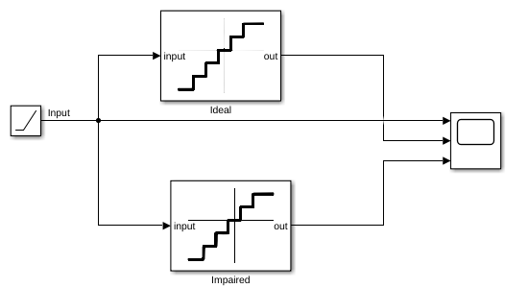
The model has two 4-bit Quantizer blocks connected to the same input signal. The quantizer blocks are identical in every way, but one is label Ideal and the other is labeled Impaired. Initially, none of them have any impairments.

Effect of offset error

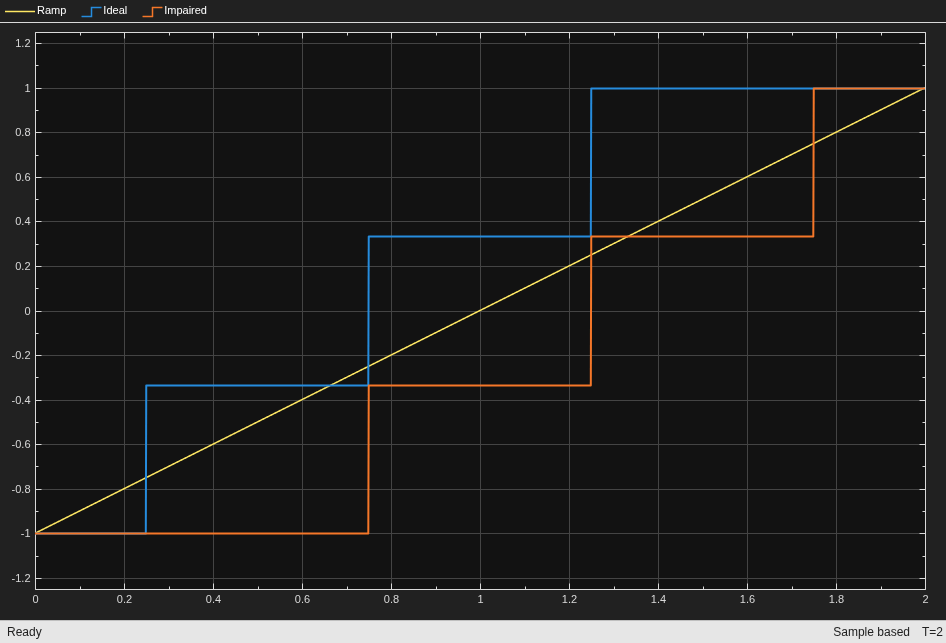
To observe the effect of offset error only, select Enable offset error option in the quantizer block labeled Impaired and set offset error value to 1 LSB.

set_param([model '/Impaired'],'EnableOffsetError','on', ...
    'OffsetError','1')

Run the simulation. Observe how the output shifts because of the offset error.

sim(model);
Effect of Gain Error

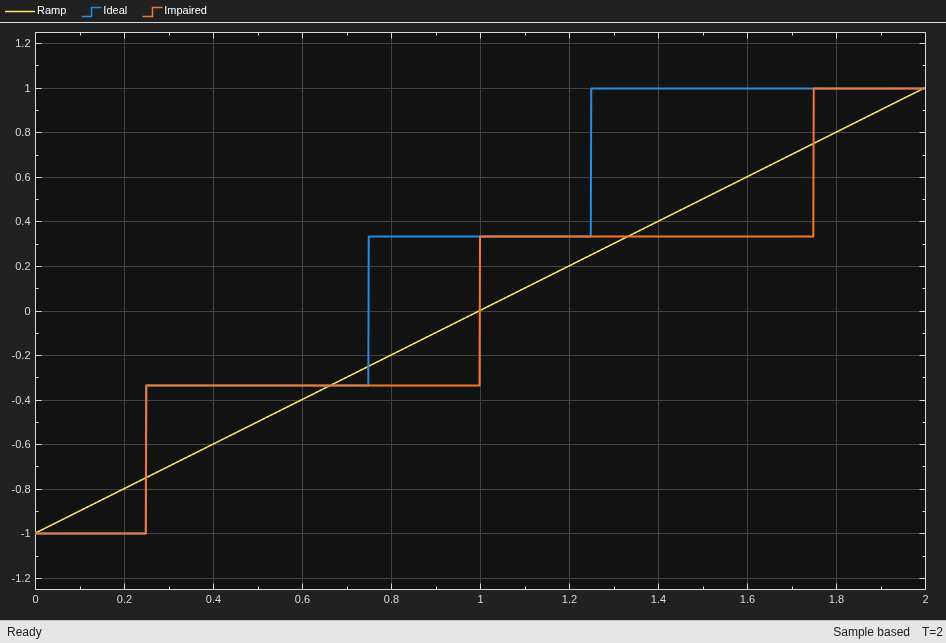
To observe the effect of gain error only, deselect the Enable Offset Error option in the impaired model. Select Enable gain error option and set gain error value to 1 LSB.

set_param([model '/Impaired'],'EnableOffsetError','off', ...
    'EnableGainError','on','GainError','1');

Rerun the model. Observe how the output shifts due to gain error.

sim(model);
Ports

Input

expand all

Analog input signal, specified as a scalar.

Data Types: double

Output

expand all

Digital output signal, returned as a scalar.

Data Types: double

Parameters

expand all

To edit block parameters interactively, use the Property Inspector. From the Simulink® Toolstrip, on the Simulation tab, in the Prepare gallery, select Property Inspector.

Determine how to define the input/output characteristics:

  • Multibit — Define the input/output characteristics as a function of the number of bits.

  • Level-Based — Define the input/output characteristics as a function of the number of levels.

Programmatic Use

Block parameter: TypeOfQuantizer
Type: character vector
Values: Multibit | Level-Based
Default: Multibit

Number of bits, specified as a positive integer scalar.

Dependencies

To enable this parameter, set Type of quantizer to Multibit.

Programmatic Use

Block parameter: Nbits
Type: character vector
Values: positive integer scalar
Default: 2

Number of levels, specified as a positive even integer scalar.

Dependencies

To enable this parameter, set Type of quantizer to Level-Based.

Programmatic Use

Block parameter: Nlevels
Type: character vector
Values: positive integer scalar
Default: 4

Period of the clock signal which is used to sample the input signal, specified as a positive real scalar.

Programmatic Use

Block parameter: ts
Type: character vector
Values: positive real scalar
Default: 1e-3

Configuration

Largest possible value that the quantizer can produce given its full-scale range, specified as a real scalar.

Programmatic Use

Block parameter: Vhigh
Type: character vector
Values: real scalar
Default: 2

Smallest possible value that the quantizer can produce given its full-scale range, specified as a real scalar.

Programmatic Use

Block parameter: Vlow
Type: character vector
Values: real scalar
Default: -2

Range of input signal values that quantizer can process, specified as a real scalar.

Programmatic Use

Block parameter: Xfs
Type: character vector
Values: real scalar
Default: 2

Impairments

Select this parameter to enable gain error calculations while modeling the quantizer.

Programmatic Use

Block parameter: EnableGainError
Type: character vector
Values: off | on
Default: off

Error in the slope of the quantizer transfer curve, specified as a real scalar in LSB (least significant bit), FS (full-scale), or %FS (percentage full scale).

Dependencies

To enable this parameter, select the Enable gain error parameter.

Programmatic Use

Block parameter: GainError
Type: character vector
Values: real scalar
Default: 0

Select this parameter to enable offset error calculations while modeling the quantizer.

Programmatic Use

Block parameter: EnableOffsetError
Type: character vector
Values: off | on
Default: off

Amount by which to shift quantization steps, specified as a real scalar in LSB (least significant bit), FS (full-scale), or %FS (percentage full scale).

Dependencies

To enable this parameter, select the Enable offset error parameter.

Programmatic Use

Block parameter: OffsetError
Type: character vector
Values: real scalar
Default: 0

Select this parameter to enable INL calculations while modeling the quantizer.

Programmatic Use

Block parameter: EnableINL
Type: character vector
Values: off | on
Default: off

Maximum deviation of the measured transfer function from a straight line, specified as a real scalar in LSB (least significant bit), FS (full-scale), or %FS (percentage full scale).

Dependencies

To enable this parameter, select the Enable INL parameter.

Programmatic Use

Block parameter: INL
Type: character vector
Values: real scalar
Default: 0

Version History

Introduced in R2026a