Radial Basis Functions for Model Building
R2026bModel-Based Calibration Toolbox™ provides a variety of radial basis functions (RBFs). Before using the RBFs to fit your model, try to fit your model with the default Gaussian Process model.
If you decide to use RBFs, the Model Browser has a quick option for comparing all the different RBF kernels and trying a variety of numbers of centers.
After fitting the default RBF, select the RBF global model in the model tree.
Click the Build Models icon
 .
.In the Build Models dialog box, select the RBF icon. Click OK.
The Model Building Options dialog box appears. You can specify a range of values for the maximum number of centers. Click Model settings to change any other model settings. The defaults used are the same as the parent RBF model type.
You can select Build all kernels to create models with the specified range of centers for each kernel type as a selection of child nodes of the current RBF model.
Note that this process can take a long time for local models because it creates alternative models with a range of centers for each kernel type for each response feature. Once model building begins, you can click Stop to end the process.
Click Build to create the specified models.
Advanced Users: Working with Radial Basis Functions
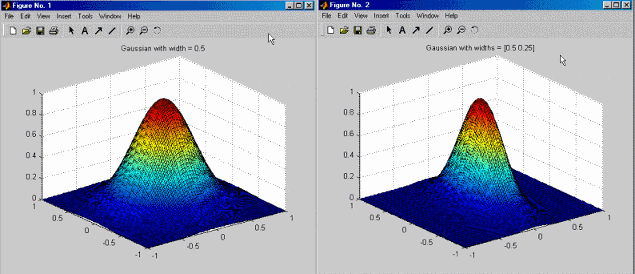
The RBFs are characterized by the form of  and have an associated width parameter
 . This parameter is related to the spread of the
function around its center. The default width is the average over the
centers of the distance of each center to its nearest neighbor. This
heuristic is given in Hassoun[2] for Gaussians, but it is only a rough guide that
provides a starting point for the width selection algorithm.
. This parameter is related to the spread of the
function around its center. The default width is the average over the
centers of the distance of each center to its nearest neighbor. This
heuristic is given in Hassoun[2] for Gaussians, but it is only a rough guide that
provides a starting point for the width selection algorithm.
Radial basis functions have the form
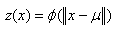
where x is a n-dimensional vector,
 is an n-dimensional vector called
the center of the radial basis function, and ||.||
denotes Euclidean distance and is a univariate function defined for positive
input values. Within this example, this is called the profile
function.
is an n-dimensional vector called
the center of the radial basis function, and ||.||
denotes Euclidean distance and is a univariate function defined for positive
input values. Within this example, this is called the profile
function.
The model is built up as a linear combination of N radial
basis functions with N distinct centers. Given an input
vector x, the output of the RBF network is the activity
vector  , given by
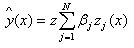
where  is the weight associated with the
jth radial basis function, centered at
is the weight associated with the
jth radial basis function, centered at  , and
, and  . The output
  approximates a target set of values denoted by
y.
approximates a target set of values denoted by
y.
Another parameter associated with the radial basis functions is the regularization parameter λ. This positive parameter is used in most of the fitting algorithms. The parameter λ penalizes large weights, which tends to produce smoother approximations of y and to reduce the tendency of the network to overfit.
Plan of Attack
Before using the RBFs to fit your model, check that you cannot fit your model with the default Gaussian Process model. If you need to use RBFs, follow these steps to determine which parameters have the greatest impact on fit.
Fit the default RBF. Remove any obvious outliers.
Estimate how many RBFs are required. If a center coincides with a data point, the center is marked with a magenta asterisk on the Predicted/Observed plot. You can view the location of the centers in graphical and table format by using the View Centers button
 . If you remove an
outlier that coincides with a center, refit by
clicking Update Fit.
. If you remove an
outlier that coincides with a center, refit by
clicking Update Fit.Complete these with more than one kernel. You can alter the parameters in the fit by clicking Set Up in the Model Selection dialog box.
Choose the main width selection algorithm. Try with both
TrialWidthsandWidPerDimalgorithms.Determine which types of kernel look you want to use.
Narrow the corresponding width range to search again.
Choose the center selection algorithm.
Choose the lambda-selection algorithm.
Try changing the parameters in the algorithms.
If any points appear to be possible outliers, try fitting the model both with and without those points.
Radial Basis Function Modeling Considerations
This table provides considerations for modeling with RBFs.
| Consideration | |
|---|---|
| How many RBFs to use |
|
| Width selection algorithms |
|
| Which RBF to use |
|
| Lambda selection algorithms | Lambda is the regularization parameter.
Fitting too many non-RBF terms is results in a large value of lambda, indicating that the underlying trends are being addressed by the linear part. In this case, you should reset the starting value of lambda before the next fit. |
| Center selection algorithms |
|
| General parameter fine-tuning |
|
| Hybrid RBFs | Go to the linear part pane and specify the polynomial or spline terms that you expect to see in the model. |
| How to find RBF model formula | With any model, you can use the View Model button or View > Model Definition to see the details of the current model. On the Model Viewer dialog box, you can see the kernel type, number of centers, and the width and regularization parameters for any RBF model. However, to completely specify the formula of an RBF model, you also need to provide the locations of the centers and the height of each basis function. The center location information is available in the View Centers dialog box. View the coefficients in the Stepwise window. Note that these values are all in coded units. |
Types of Radial Basis Functions
Within the Model Setup dialog box, you can choose which RBF kernel to use. Kernels are the types of RBF. This table describes the types.
| RBF Kernel | Description | ||||||||||||||||||||||||
|---|---|---|---|---|---|---|---|---|---|---|---|---|---|---|---|---|---|---|---|---|---|---|---|---|---|
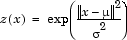
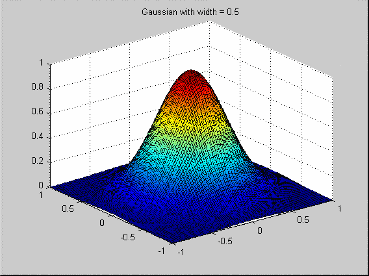
| Gaussian | Gaussian functions are the radial basis functions most commonly used in the neural network community. The profile function is
This profile function leads to the radial basis function
In this case, the width parameter is the same as the standard deviation of the Gaussian function.
| ||||||||||||||||||||||||
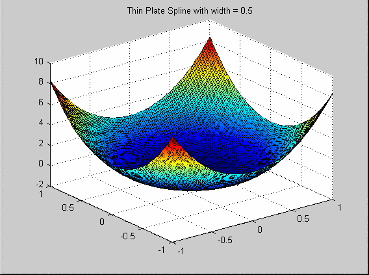
| Thin-plate spline | A thin-plate spline radial basis
function is an example of a smoothing spline, as
popularized by Grace Wahba
(
| ||||||||||||||||||||||||
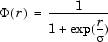
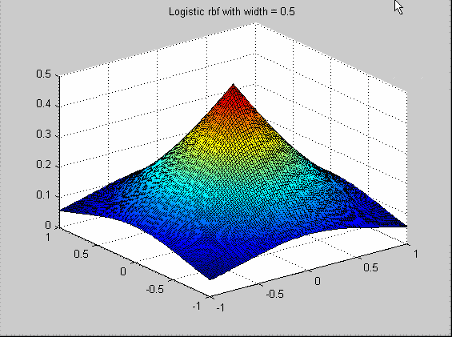
| Logistic basis function | Logistic radial basis functions are mentioned in Hassoun[2]. The profile function is
| ||||||||||||||||||||||||
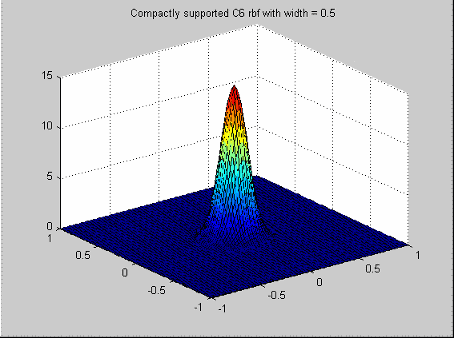
Wendland's compactly supported function | Wendland's compactly supported functions form a family of radial basis functions that have a piecewise polynomial profile function and compact support[7]. Which function you choose depends on the dimension of the space (n) from which the data is drawn and the desired amount of continuity of the polynomials.
We have used the
notation When n is even, the radial basis function corresponding to dimension n+1 is used. Note that each radial basis
function is nonzero when r is
in [0,1]. You can change the support to be Similar formulas for the profile functions exist for n>5, and for even continuity > 4. Wendland's functions are available up to an even continuity of 6, and in any space dimension n. Note
| ||||||||||||||||||||||||
| Multiquadrics | Multiquadrics kernels are a popular
tool for scattered data fitting. They have the
profile function | ||||||||||||||||||||||||
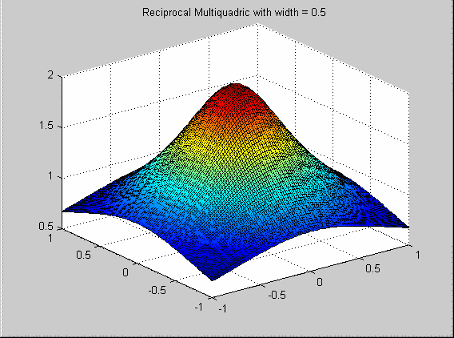
| Reciprocal multiquadrics | Reciprocal multiquadrics have the profile function
Note that a width
| ||||||||||||||||||||||||
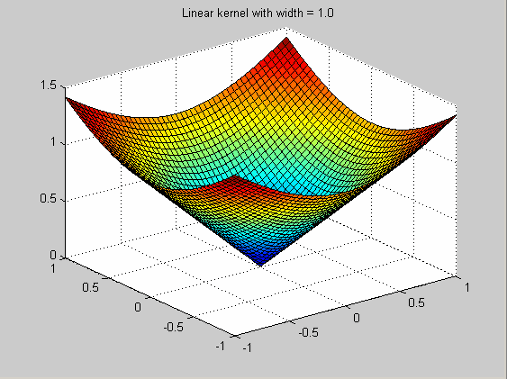
| Linear | Linear kernels have the profile
function
| ||||||||||||||||||||||||
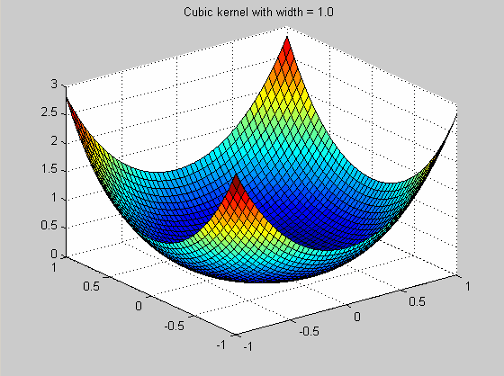
| Cubic | Cubic kernels have the profile function
|
















Fitting Routines
RBFs have four characteristics to consider: weights, centers, width, and λ. Each of these can have significant impact on the quality of the resulting fit. You must determine good values for each characteristic. The weights are always determined by specifying the centers, width, and λ, then solving an appropriate linear system of equations. However, the initial problem of determining good centers, width, and λ is complex due the strong dependencies among the parameters. For example, the optimal λ varies considerably as the width parameter changes. A global search over all possible center locations, width, and λ is computationally prohibitive in all but the simplest of situations.
To combat this problem, the fitting routines come in three different levels.
At the lowest level are the algorithms that choose appropriate centers for given values of width and λ. The centers are chosen one at a time from a candidate set. The resulting centers are therefore ranked in rough order of importance.
At the middle level are the algorithms that choose appropriate values for λ and the centers, given a specified width.
At the top level are the algorithms that find good values for each of the centers, width, and λ. These top-level algorithms test different width values. For each value of width, one of the middle-level algorithms is called that determines good centers and values for λ.
Center Selection Algorithms
Rols. Rols (regularized orthogonal least squares)
is the basic algorithm as described in Chen, Chng, and
Alkadhimi[1]. In Rols, the centers
are chosen one at a time from a candidate set consisting of all
the data points or a subset thereof. The algorithm picks new
centers in a forward selection procedure. Starting from zero
centers, at each step, the center that most greatly reduces the
regularized error is selected. At each step, the regression
matrix X is decomposed using the Gram-Schmidt
algorithm into a product X = WB where W has orthogonal
columns and B is upper triangular with ones
on the diagonal. This calculation is similar in nature to a QR
decomposition. Regularized error is given by  , where g = Bw and e is the residual,
given by
, where g = Bw and e is the residual,
given by  . Minimizing regularized error makes the sum
square error
. Minimizing regularized error makes the sum
square error  small and also does not let
 get too large. As g is
related to the weights by g = Bw, this calculation keeps the weights under
control and reduces overfit. The term
get too large. As g is
related to the weights by g = Bw, this calculation keeps the weights under
control and reduces overfit. The term  rather than the sum of the squares of the
weights
rather than the sum of the squares of the
weights  is used to improve efficiency.
The algorithm terminates either when the maximum number of centers is reached or when adding new centers does not significantly decrease the regularized error ratio.
| Fit Parameter | Description |
|---|---|
| Maximum number of centers | The maximum number of centers that the
algorithm can select. The default is the smaller
of 25 centers or π of the number of data points.
The format is min(nObs/4,25).
You can enter a value or edit the existing
formula. |
| Percentage of data to be candidate centers | The percentage of the data points that should be used as candidate centers. This parameter determines the subset of the data points that form the pool to select the centers from. The default is 100%, that is, to consider all the data points as possible new centers. Reduce this parameter value to speed up the execution time. |
| Regularized error tolerance | The number of centers that are selected before the algorithm stops. See Chen, Chng, and Alkadhimi[1]for details. This parameter should be a positive number between 0 and 1. Larger tolerances mean that fewer centers are selected. The default is 0.0001. If fewer than the maximum number of centers is chosen and you want to force the selection of the maximum number, reduce the tolerance to epsilon (eps). |
RedErr. RedErr stands for reduced error. This
algorithm starts from zero centers, and selects centers in a
forward selection procedure. The algorithm finds the data point
with the largest residual, and chooses that data point as the
next center. This process is repeated until the maximum number
of centers is reached.
This algorithm has only the Number of centers fit parameter.
WiggleCenters. This algorithm is based on a heuristic that puts more centers in
a region where there is more variation in the residual. For each
data point, a set of neighbors is identified as the data points
within a distance of sqrt(nf) divided by the maximum number of
centers, where nf is the number of factors.
The average residuals within the set of neighbors is computed.
Then, the amount of wiggle of the residual in the region of that
data point is defined to be the sum of the squares of the
differences between the residual at each neighbor and the
average residuals of the neighbors. The data point with the most
wiggle is selected as the next center.
For fit parameters, this algorithm has the
Rols algorithm, except it has no
Regularized error tolerance.
CenterExchange. This algorithm takes a concept from optimal design of
experiments and applies it to the center selection problem in
radial basis functions. A candidate set of centers is generated
by a Latin hypercube, a method that provides a quasi-uniform
distribution of points. From this candidate set, n centers are
chosen at random. This set is augmented by p
new centers, then this set of n+p centers is reduced to n by
iteratively removing the center that yields the best PRESS
statistic. This process is repeated the number of times
specified in Number of augment/reduce
cycles.
CenterExchange and Tree
Regression are the only algorithms that permit
centers that are not located at the data points. Thus, you do
not see centers on model plots. The
CenterExchange algorithm has the
potential to be more flexible than the other center selection
algorithms that choose the centers to be a subset of the data
points. However, CenterExchange is
significantly more time consuming than other center selection
algorithms and not recommended on larger problems.
| Fit Parameter | Description |
|---|---|
| Number of centers | Number of chosen centers |
| Number of augment/reduce cycles | Number of times the software augments, then reduces the center set |
| Number of centers to augment by | Number of center sets software will use to augment |
Lambda Selection Algorithms
IterateRidge. For a specified width, this algorithm optimizes the
regularization parameter with respect to the GCV criterion.
The initial centers are selected by one of the low-level center
selection algorithms. Otherwise, the previous choice of centers
is used. You can select an initial start value for
λ by testing an initial number of
values for lambda that are equally spaced on a logarithmic scale
between 10-10 and 10 and choosing the
one with the best GCV score. This process helps avoid falling
into local minima on the GCV - λ curve. The
parameter λ is then iterated to try to
minimize GCV. The iteration stops when either the maximum number
of updates is reached or the log10(GCV) value
changes by less than the tolerance.
| Fit Parameter | Description |
|---|---|
| Center selection algorithm | Maximum number of times that the update of λ is made. The default is 10. |
| Maximum number of updates | Maximum number of times that the update of λ is made. The default is 10. |
| Minimum change in log10(GCV) | Tolerance. This parameter defines the
stopping criterion for iterating
λ. The update stops when the
difference in the log10(GCV)
value is less than the tolerance. The default is
0.005. |
| Number of initial test values for lambda | Number of test values of λ to determine a starting value for λ. Setting this parameter to 0 means that the best λ so far is used. |
| Do not reselect centers for new width | This check box determines whether the centers are reselected for the new width value, and after each lambda update, or if the best centers to date are to be used. Keeping the best centers found so far is not computationally expensive and is often sufficient, but this option can cause premature convergence to a particular set of centers. |
| Display | When you select this check box, this algorithm plots the results of the algorithm. The starting point for λ is marked with a black circle. As λ is updated, the new values are plotted as red crosses connected with red lines. The best λ found is marked with a green asterisk. |
IterateRols. For a specified width, this algorithm optimizes the
regularization parameter in the Rols
algorithm with respect to the GCV criterion.
Rols selects an initial fit and the
centers using the user-supplied λ. Specify an
initial start value for λ by testing an
initial number of start values for lambda that are equally
spaced on a logarithmic scale between
10-10 and 10, then select the
one with the best GCV score.
λ is then iterated to improve GCV. Each time
that λ is updated, the center selection
process is repeated. Thus, IterateRols is
much more computationally expensive than
IterateRidge.
A lower bound of 10-12 is placed on λ, and an upper bound of 10.
| Fit Parameter | Description |
|---|---|
| Center selection algorithm | Maximum number of times that the update of λ is made. The default is 10. |
| Maximum number of updates | Maximum number of times that the update of λ is made. The default is 10. |
| Minimum change in log10(GCV) | Tolerance. This defines the stopping
criterion for iterating λ; the update stops when
the difference in the
log10(GCV) value is less than the
tolerance. The default is 0.005. |
| Number of initial test values for lambda | Number of test values of λ to determine a starting value for λ. Setting this parameter to 0 means that the best λ so far is used. |
| Do not reselect centers for new width | This check box determines whether the centers are reselected for the new width value, and after each lambda update, or if the best centers to date are to be used. |
| Display | When you select this check box, this algorithm plots the results of the algorithm. The starting point for λ is marked with a black circle. As λ is updated, the new values are plotted as red crosses connected with red lines. The best λ found is marked with a green asterisk. |
StepItRols. This algorithm combines the center-selection and
lambda-selection processes. Rather than waiting until all
centers are selected before is updated, this algorithm
allows you to update λ after each center is
selected. StepItRols is a forward selection
algorithm that, like Rols, selects centers on
the basis of regularized error reduction. The stopping criterion
for StepItRols is
log10(GCV) changing by less than the
tolerance more than a specified number of times in a row. Once
the addition of centers has stopped, the intermediate fit with
the smallest log10(GCV) is selected. This
process can involve removing some of the centers that entered
late in the algorithm.
| Fit Parameter | Description |
|---|---|
| Maximum number of centers | Maximum number of centers that the
algorithm can select. The default is the smaller
of 25 centers or π of the number of data points.
The format is min(nObs/4, 25).
You can enter a value. |
| Percentage of data to be candidate centers | Percentage of the data points that should be used as candidate centers. This determines the subset of the data points that form the pool to select the centers from. The default is 100%, that is, to consider all the data points as possible new centers. This can be reduced to speed up the execution time. |
| Number of centers to add before updating | How many centers are selected before iterating λ begins. |
| Minimum change in log10(GCV) | Tolerance. It should be a positive number between 0 and 1. The default is 0.005. |
| Maximum number of times log10(GCV) change is minimal | Controls how many centers are selected
before the algorithm stops. The default is 5. Left
at the default, the center selection stops when
the log10(GCV) values change by
less than the tolerance five times in a
row. |
Width Selection Algorithms
TrialWidths. This routine tests several width values by trying different
widths. A set of trial widths equally spaced between specified
initial upper and lower bounds is selected. The width with the
lowest value of log10(GCV) is selected. The
area around the best width is then tested in more detail and
referred to as a zoom. Specifically, the new range of trial
widths is centered on the best width found at the previous
range, and the length of the interval from which the widths are
selected is reduced to 2/5 of the length of the interval at the
previous zoom. Before the new set of trial widths is tested, the
center selection is updated to reflect the best width and
λ found so far. This can mean that the
location of the optimum width changes between zooms because of
the new center locations.
| Fit Parameter | Description |
|---|---|
| Lambda selection algorithm | Midlevel fit algorithm that you test with
the various trial values of λ.
The default is
IterateRidge. |
| Number of trial widths in each zoom | Number of trials made at each zoom. The widths tested are equally spaced between the initial upper and lower bounds. Default is 10. |
| Number of zooms | Number of times you zoom in. Default is 5. |
| Initial lower bound on width | Lower bound on the width for the first zoom. Default is 0.01. |
| Initial upper bound on width | Upper bound on the width for the first zoom. Default is 20. |
| Display | If you select this check box, a stem
plot of |
WidPerDim. In WidPerDim (width per dimension),
the radial basis functions are generalized. Rather than having a
single width parameter, a different width in each input factor
can be used, that is, the level curves are elliptical rather
than circular. The basis functions are not radially
symmetric.
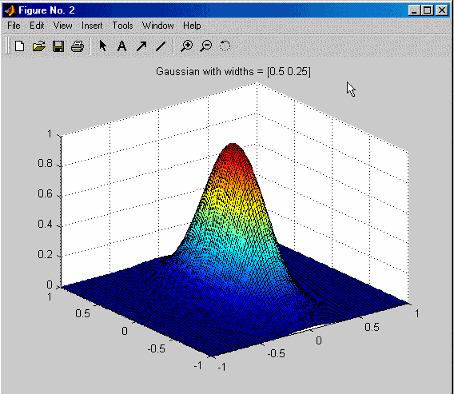
This characteristic can be helpful when the amount of
variability varies considerably in each input direction. This
algorithm offers more flexibility than
TrialWidths but is more computationally
expensive.
You can set Initial width in the RBF
controls on the Global Model Setup dialog box. For most
algorithms the Initial width is a single
value. However, for WidPerDim, you
can specify a vector of widths to use as starting widths.
A vector of widths should be the same number as the number of global variables, and the widths must be in the same order as specified in the test plan. If you provide a single width, all dimensions start off from the same initial width but are likely to move to a vector of widths during model fitting.
An estimation of the time for the width per dimension algorithm is computed. This calculation is given as a number of time units. A time estimate of over 10 but less than 100 generates a warning. A time estimate of over 100 might take a prohibitively long amount of time. You can stop execution and change some of the parameters to reduce the run time.
| Fit Parameter | Description |
|---|---|
| Lambda selection algorithm | Midlevel fit algorithm that you test with
the various trial values of λ.
The default is
IterateRidge. |
| Number of trial widths in each zoom | Number of trials made at each zoom. The widths tested are equally spaced between the initial upper and lower bounds. Default is 10. |
| Number of zooms | Number of times you zoom in. Default is 5. |
| Initial lower bound on width | Lower bound on the width for the first zoom. Default is 0.01. |
| Initial upper bound on width | Upper bound on the width for the first zoom. Default is 20. |
| Display | If you select this check box, a stem plot of log10(GCV) against width is plotted. The best width is marked by a green asterisk. |
Tree Regression. There are three parts to the tree regression algorithm for
RBFs.
| Regression Algorithm Part | Description |
|---|---|
Tree building | The tree regression algorithm builds a regression tree from the data and uses the nodes of this tree to infer candidate centers and widths for the RBF. The root panel of the tree corresponds to a hypercube that contains all of the data points. This panel is divided into two child panels such that each child contains the same amount of variation, as much as is possible. The child panel with the most variation is then split similarly. This process continues until there are no panels left to split, that is, until no childless panel has more than the minimum number of data points, or until the maximum number of panels is reached. Each panel in the tree corresponds to a candidate center, and the size of the panel determines the width that goes with that vector. The size of the child panels can be based solely on the size of the parent panel or can be determined by shrinking the child panel onto the data that it contains. Once you have selected
Click Advanced to open the Radial Basis Functions Options dialog box to change settings such as maximum number of panels and minimum number of data points per panel. To shrink child panels to fit the data, select Shrink panels to data. |
Alpha selection | The size for the candidate widths are not taken directly from the panel sizes. You must scale the panel sizes to get the corresponding widths. This scaling factor is called alpha. The same scaling factor must be applied to every panel in the tree. An alpha selection algorithm determines the optimal value of alpha. You can choose
the parameter Click Advanced to open the Radial Basis Functions Options dialog box to change settings such as bounds on alpha, number of zooms, and number of trial alphas. You can select the Display check box to see the progress of the algorithm and the values of alpha trailed. |
Center selection | Tree building generates candidate centers, and alpha selection generates candidate widths for these centers. The center selection chooses which of those centers to use.
Click
Advanced to open the Radial
Basis Functions Options dialog box to reach the
Model selection criteria
setting. Model selection
criteria determines what function
should be used as a measure of how good a model
is:
If you
leave Alpha selection
algorithm as the default
|
Prune Functionality
You can use the Prune function to reduce the number of centers in a radial basis function network. This process helps you decide how many centers are needed.
To use the Prune functionality:
Select an RBF global model in the model tree.
Either click the
 button or select Model > Utilities > Prune.
The graphs show how the fit quality of the network builds as more RBFs are added. This functionality makes use of the fact that most of the center selection algorithms are greedy in nature, so the order in which centers are selected roughly reflects the order of importance of the basis functions.
The default fit criteria are the logarithms of PRESS, GCV, RMSE, and weighted PRESS. Additional options are determined by your selections in Summary Statistics. Weighted PRESS penalizes having more centers, so you may want to select a number of centers to minimize weighted PRESS.
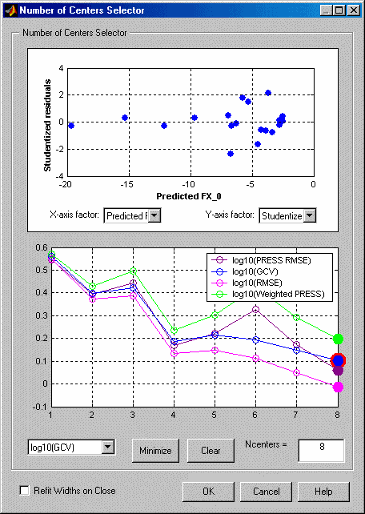
All four criteria in this example indicate the same minimum at eight centers.
If the graphs all decrease, as in the preceding example, then the maximum number of centers is likely too small, and the number of centers should be increased.
Clicking Minimize button selects the number of centers that minimizes the criterion selected in the list. Ideally, this value also minimizes all the other criteria. Click Clear to return to the previous selection.
Note that reducing the number of centers using Prune only refits the linear parameters. The nonlinear parameters are not adjusted. To perform an inexpensive width refit, select Refit widths on close. If a network has been pruned significantly, click Update Model Fit to perform a full refit of all the parameters.
Statistics
Let A be the matrix such that the weights are given
by  where X is the regression
matrix. The form of
where X is the regression
matrix. The form of A varies depending on the basic
fit algorithm employed.
In the case of ordinary least squares, we have A = X'X.
For ridge regression (with regularization parameter λ), A is given by A = X'X + λ.
Next is the Rols algorithm. During the
Rols algorithm X is
decomposed using the Gram-Schmidt algorithm to give X = WB, where W has orthogonal columns
and B is upper triangular. The corresponding matrix
A for Rols is then  .
.
The matrix  is called the hat matrix, and the leverage of the
ith data point
hi is given by
the ith diagonal element of H.
All the statistics derived from the hat matrix, for example, PRESS,
studentized residuals, confidence intervals, and Cook's distance, are
computed using the hat matrix appropriate to the particular fit
algorithm.
is called the hat matrix, and the leverage of the
ith data point
hi is given by
the ith diagonal element of H.
All the statistics derived from the hat matrix, for example, PRESS,
studentized residuals, confidence intervals, and Cook's distance, are
computed using the hat matrix appropriate to the particular fit
algorithm.

becomes

PEV is computed using the form of A appropriate to the particular fit algorithm.
| Regression Algorithm Part | Description |
|---|---|
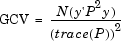
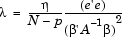
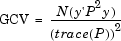
GCV criterion | Generalized cross-validation (GCV) is a measure of the goodness of fit of a model to the data that is minimized when the residuals are small, but not so small that the network overfits the data. GVC is easy to compute, and networks with small GCV values should have good predictive capability. GCV is related to the PRESS statistic. The definition of GCV is given by Orr[4].
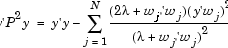
where y is the target vector, N is the number of observations, and P is the projection matrix, given by I - XA-1XT. An important feature of using GCV as a criterion for determining the optimal network in our fit algorithms is the existence of update formulas for the regularization parameter λ. These update formulas are obtained by differentiating GCV with respect to λ and setting the result to zero. That is, they are based on gradient-descent. This gives the general equation[5]
We now specialize these
formulas to the case of ridge regression and to
the |
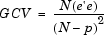
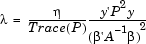
GCV for ridge regression | As shown in Orr[4] and stated in Orr[5], for the case of ridge regression, GCV can be written as
where
where NumTerms is the number of terms included in the model. For RBFs, p is the effective number of parameters, that is, the number of terms minus an adjustment to take into account the smoothing effect of lambda in the fitting algorithm. When lambda = 0, the effective number of parameters is the same as the number of terms. The
formula for updating λ is given
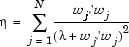
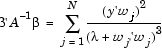
by In practice, the preceding formulas are not used explicitly in Orr[5]. Instead, a singular value decomposition of X is made, and the formulas are rewritten in terms of the eigenvalues and eigenvectors of the matrix XX'. This avoids taking the inverse of the matrix A, and it can be used to cheaply compute GCV for many values of λ. |
GCV for
| In the case of
are computed using the
formulas given in Orr[5]. Recall that the regression
matrix is factored during the
and the effective number of parameters is given by
The re-estimation formula
for λ is given by Note that these
formulas for |





Hybrid Radial Basis Functions
Hybrid RBFs combine a radial basis function model with more standard linear models such as polynomials or hybrid splines. This approach allows you to combine a priori knowledge, such as the expectation of quadratic behavior in one of the variables, with the nonparametric nature of RBFs.
The model setup user interface for hybrid RBFs has a top Set Up button, which you can use to set the fitting algorithm and options. The interface also has two tabs: one to specify the radial basis function part, and one for the linear model part.
Width selection algorithm:
TrialWidths. This algorithm is the same one used in ordinary RBFs, that is, a
guided search for the best width parameter.
Lambda and term selection algorithms:
Interlace. This algorithm is a generalization of
StepItRols for RBFs. The algorithm
chooses radial basis functions and linear model terms in an
interlaced way, rather than in two steps. At each step, a
forward search is performed to select the radial basis function
or the linear model term that most greatly decreases the
regularized error. This process continues until the maximum
number of terms is chosen. Terms are added using the stored
value of lambda until the Number of terms to add
before updating has been reached. Subsequently,
lambda is iterated after each center is added to improve
GCV.
| Fit Parameter | Description |
|---|---|
| Maximum number of terms | Maximum number of terms that will be chosen. The default is the number of data points. |
| Maximum number of centers | Maximum number of terms that can be radial basis functions. The default is a quarter of the data points, or 25, whichever is smaller. Note The maximum number of terms used is a combination of the maximum number of centers and the number of linear model terms. It is limited as follows: Maximum number of terms used = Minimum(Maximum number of terms, Maximum number of centers + number of linear model terms) As a result, the model may have more centers than specified in Maximum number of centers, but there will always be fewer terms than (Maximum number of centers + number of linear model terms). You can view the number of possible linear model terms on the Linear Part tab of the Global Model Setup dialog box (Total number of terms).
|
| Percentage of data to be candidate centers | Percentage of the data points that are available to be chosen as centers. The default is 100% when the number of data points is 200. |
| Number of terms to add before updating | How many terms to add before updating lambda begins. |
| Minimum change in log10(GCV) | Tolerance. |
| Maximum no. times log10(GCV) change is minimal | Number of steps in a row that the
change in |
Lambda and term selection algorithms:
Two-Step. This algorithm fits the linear model specified in the linear
model pane, then fits a radial basis function network to the
residual. You can specify the linear model terms to include in
the usual way using the term selector. If desired, you can
activate the stepwise options. In this case, after the linear
model part is fitted, some of the terms are automatically added
or removed before the RBF part is fitted. To select the
algorithm and options to fit the nonlinear parameters of the
RBF, clicking Set Up in the RBF training
options.
References
[1] Chen, S., E. S. Chng, and K. Alkadhimi. "Regularized Orthogonal Least Squares Algorithm for Constructing Radial Basis Function Networks." International Journal of Control 64, no. 5 (1996): 829–37. https://doi.org/10.1080/00207179608921659.
[2] Hassoun, Mohamad H. Fundamentals of Artificial Neural Networks. Cambridge: MIT Press, 1995.
[3] Orr, Mark J. L. "Introduction to Radial Basis Function Networks." Edinburgh: Center for Cognitive Science, 1996.
[4] Orr, Mark. "Optimizing the Widths of Radial Basis Functions." In Proceedings 5th Brazilian Symposium on Neural Networks, Belo Horizonte, Brazil, December 8–11, 1998. IEEE, 2002. https://doi.org/10.1109/SBRN.1998.730989.
[5] Orr, Mark J. L. "Regularization in the Selection of Radial Basis Function Centers." Neural Computation 7, no. 3 (May 1995): 606–23. https://doi.org/10.1162/neco.1995.7.3.606.
[6] Orr, Mark, et al. "Combining Regression Trees and Radial Basis Function Networks." International Journal of Neural Systems 10, no. 6 (2001): 453–65. https://doi.org/10.1142/S0129065700000363.
[7] Wendland, Holder. "Piecewise Polynomial, Positive Definite and Compactly Supported Radial Basis Functions of Minimal Degree." Advances in Computational Mathematics 4 (1995): 389–96. https://doi.org/10.1007/BF02123482.

