Get Started with Model-Based Calibration Toolbox
R2026bModel-Based Calibration Toolbox™ provides apps and design tools for modeling and calibrating complex nonlinear systems. It can be used in a wide range of applications, including powertrain systems such as engines, electric machines, pumps, and fans, as well as nonautomotive systems such as jet engines, marine hydrofoils, and drilling equipment. You can define optimal test plans, automatically fit statistical models, and generate calibrations and lookup tables for high-degree-of-freedom systems that would require exhaustive testing using traditional methods. Using the toolbox apps or MATLAB® functions, you can automate the model fitting and calibration process.
Models created with Model-Based Calibration Toolbox can be exported to Simulink® to support control design, sensitivity analysis, hardware-in-the-loop testing, and other simulation activities. Calibration tables can be exported to ETAS INCA and ATI Vision.
Tutorials
- Getting Started with Model-Based Calibration Optimization Workflow
Use the optimization workflow in the Model-Based Calibration apps to find optimal control and design parameters.
- Generate Current Controller Calibration Tables for Torque and Speed-Based Motor Controllers
Generate optimized calibration tables for torque-speed-based motor controllers.
- Predict Engine Torque Using Two-Stage Modeling
Create a statistical engine model that predicts engine brake torque as a function of spark angle.
- Manipulate Data for Modeling
Use the Data Editor to load, process, and select data for modeling.
About Model-Based Calibration
- What Is Model-Based Calibration?
To save development time, use models to optimally calibrate complex systems, engines, and powertrains.
- What Is the Model Browser?
Use the Model Browser to build and evaluate experimental designs and statistical models.
- Set Up Designs and Models, Resume Work, or Find Engine Modeling Examples
Use the MBC Model Fitting app.
- Set Up Calibrations, Resume Work, or Find Calibration Examples
Use the MBC Optimization app.
- Automate Design and Modeling with Scripts
Use scripts to automate design and modeling.
Videos
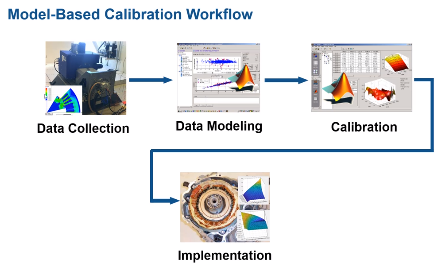
Virtual Design of Electrified Powertrain Systems
Follow the Model-Based Calibration Toolbox workflow to design a robust electrified powertrain
system.

