Read Waveform Data from Keysight DSO-X 1204A Oscilloscope Using IVI-C Driver
R2026bThis example shows how to initialize the AgInfiniiVision IVI-C driver, read a few properties from the driver, acquire waveform data using Keysight® Technologies DSO-X 1204A oscilloscope, and output the result in MATLAB®.
Requirements
To run this example, you must have the following installed on your computer:
Keysight IO libraries version 2021 or newer
Keysight InfiniiVision 1000, 1200, 2000, 3000, 4000, 6000, C7300, M924x and P924x X-Series Oscilloscope IVI driver version 2.8.2.0
For a walkthrough of this example, play the following video.
View Installed IVI-C Drivers and Connected Instruments
View a list of the IVI-C drivers and associated MATLAB drivers that are installed on your computer using ividriverlist.
list = ividriverlist
list = 17×4 table
             "Ag3352x"             "Ag3352x"             "IVIFgen"     1×20 string
     "AgInfiniiVision"     "AgInfiniiVision"            "IVIScope"    1×10⁶ string
          "AgRfSigGen"          "AgRfSigGen"         "IVIRfSigGen"     1×26 string
            "IviACPwr"            "IviACPwr"            "IVIACPwr"              ""
          "IviCounter"          "IviCounter"          "IVICounter"              ""
            "IviDCPwr"            "IviDCPwr"            "IVIDCPwr"              ""
        "IviDigitizer"        "IviDigitizer"        "IVIDigitizer"              ""
              "IviDmm"              "IviDmm"              "IVIDmm"              ""
    "IviDownconverter"    "IviDownconverter"    "IVIDownconverter"              ""
             "IviFgen"             "IviFgen"             "IVIFgen"              ""
         "IviPwrMeter"         "IviPwrMeter"         "IVIPwrMeter"              ""
         "IviRfSigGen"         "IviRfSigGen"         "IVIRfSigGen"              ""
            "IviScope"            "IviScope"            "IVIScope"              ""
           "IviSpecAn"           "IviSpecAn"           "IVISpecAn"              ""
      ⋮
List the IVI-C instruments that are connected to your computer using ividevlist with a timeout value of 40 seconds. Specifying a value for the timeout is optional. You can try a larger timeout value if your instrument does not appear within the default timeout period of 30 seconds.
devlist = ividevlist("Timeout",40)devlist = 1×5 table
"AgInfiniiVision" "USB0::0x2A8D::0x0386::CN59216227::0::INSTR" "AgInfiniiVision" "DSOX1204A" "CN59216227"
In this example, you use the AgInfiniiVision MATLAB driver.
Connect to Instrument
Connect to the DSO-X 1204A oscilloscope using ividev with the instrument's MATLAB driver name and resource name.
dev = ividev("AgInfiniiVision","USB0::0x2A8D::0x0386::CN59216227::0::INSTR")
dev =
  AgInfiniiVision with properties:

                    Model: "DSOX1204A"
             Manufacturer: "KEYSIGHT TECHNOLOGIES"
             SerialNumber: "CN59216227"
             ResourceName: "USB0::0x2A8D::0x0386::CN59216227::0::INSTR"
             VendorDriver: "AgInfiniiVision"
                 Simulate: 0

               ChannelIDs: ["Channel1", "Channel2", "Channel3", "Channel4"]
        DigitalChannelIDs: []
          MathFunctionIDs: ["Math1", "Math2"]
           MeasurementIDs: ["Channel1", "Channel2", "Channel3", "Channel4", "FUNC", ... ]
             SerialBusIDs: []
               WaveGenIDs: "WaveGen1"

    InherentIVIAttributes: [1x1 InherentIVIAttributes]
              Acquisition: [1x1 Acquisition]
                  Channel: [1x4 Channel]
       InstrumentSpecific: [1x1 InstrumentSpecific]
                  Trigger: [1x1 Trigger]
      WaveformMeasurement: [1x1 WaveformMeasurement]

Show all functions
Get General Instrument Properties
Query information about the driver and its attributes. You can explore properties and sub-properties of the object by clicking on the property links from the object display output.
dev.InherentIVIAttributes
ans =
  InherentIVIAttributes with properties:

    AdvancedSessionInformation: [1x1 AdvancedSessionInformation]
            DriverCapabilities: [1x1 DriverCapabilities]
          DriverIdentification: [1x1 DriverIdentification]
      InstrumentIdentification: [1x1 InstrumentIdentification]
                   UserOptions: [1x1 UserOptions]
dev.InherentIVIAttributes.DriverIdentification
ans =
  DriverIdentification with properties:

    SpecificDriverClassSpecMajorVersion: 4
    SpecificDriverClassSpecMinorVersion: 1
              SpecificDriverDescription: "IVI driver for the Keysight 1000X, 1200X, 2000X, 3000X, 4000X, 6000X, C7300, M924x and P924x Oscilloscope families. [Compiled for 64-bit.]"
                   SpecificDriverPrefix: "AgInfiniiVision"
                 SpecificDriverRevision: "2.8.2.0"
                   SpecificDriverVendor: "Keysight Technologies"
Read Waveform from Oscilloscope
Reset the instrument to a known state and automatically configure the measurement parameters.
reset(dev)
autoSetup(dev)
Get the actual record length, which is the number of points that the oscilloscope acquires.
recordLength = actualRecordLength(dev)
recordLength =
62500
Enable channel 1 on the oscilloscope.
dev.Channel("Channel1").ChannelEnabled = true;Explore the properties of channel 1.
dev.Channel("Channel1")ans =
Channel with properties:
RepCapID: "Channel1"
ChannelEnabled: 1
InputImpedance: 1e+06 (Ohms)
MaximumInputFrequency: 7e+07 (Hz)
ProbeAttenuation: 10
ProbeSenseValue: 10
VerticalCoupling: 1
VerticalOffset: 12.6 (Volts)
VerticalRange: 40 (Volts)
Set the channel probe attenuation to 1.
dev.Channel("Channel1").ProbeAttenuation = 1;Specify the sweep time duration in milliseconds.
maxTimeMilliseconds = 1e3;
Read a waveform from the oscilloscope.
[waveformArray,actualPoints] = readWaveform(dev,"Channel1",recordLength,maxTimeMilliseconds);Visualize Data and Display Any Errors
Get the number elements in the waveform array and verify that they match the actual number of points returned by the readWaveform function.
n = numel(waveformArray);
Calculate the time in between samples and create a time vector.
dt = dev.Acquisition.HorizontalTimePerRecord/dev.Acquisition.HorizontalRecordLength;
t = (0:n-1) * dt;
Display the waveform.
plot(t,waveformArray);
grid on;
xlabel('Time (s)');
ylabel('Volts (V)');
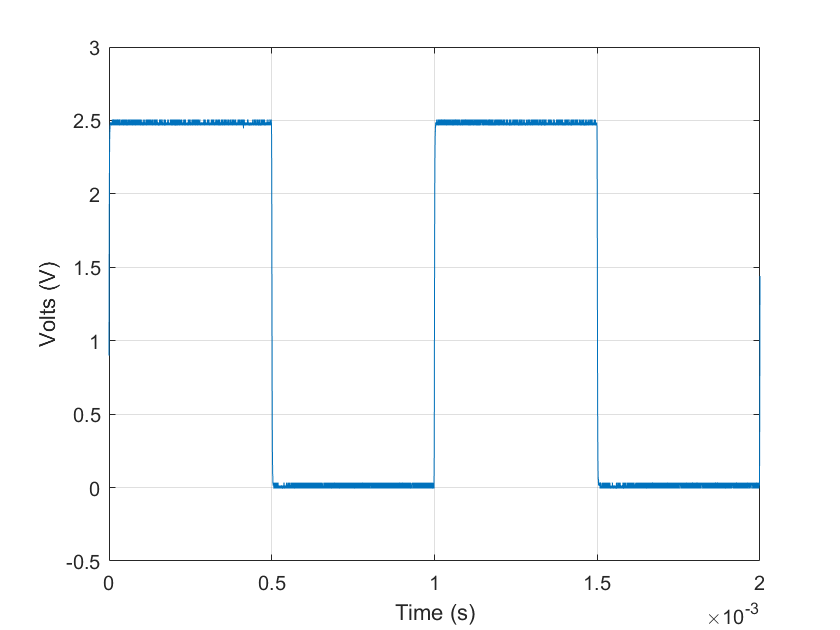
If there are any errors, query the driver to retrieve and display them.
errorNum = 1;
while (errorNum ~= 0)
    [errorNum,errorMsg] = error_query(dev);
    fprintf('ErrorQuery: %d, %s\n',errorNum,errorMsg);
end
ErrorQuery: 0, No error
Clean Up
Disconnect and clear the ividev object from the workspace.
clear devSee Also
ividriverlist | ividevlist | ividev

