OPC UA Certificate Management
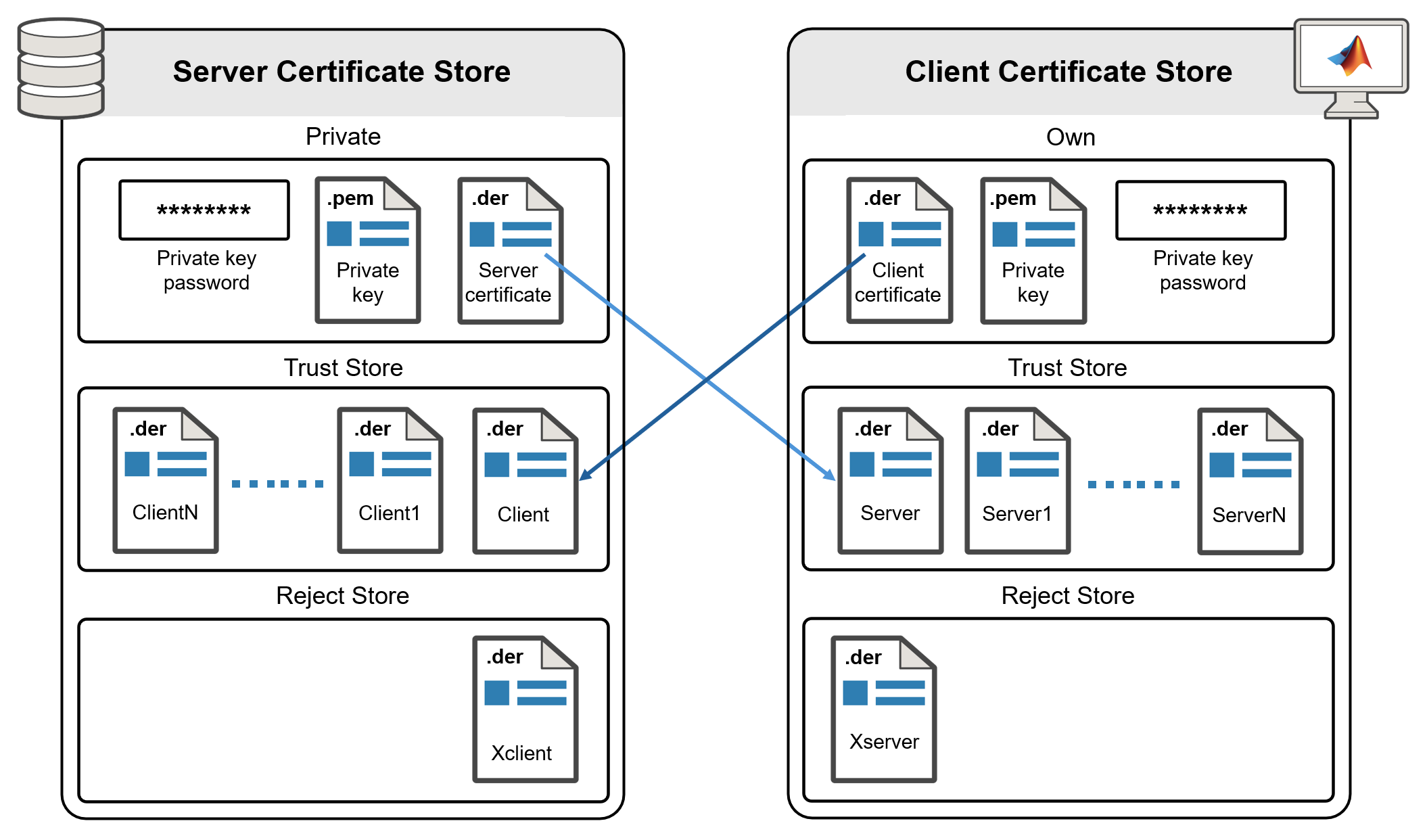
R2026bThe OPC UA standard supports communication between the client and the server by verifying certificates exchanged during the connection process. The client and server certificate trust stores include:
Application instance certificate — Contains the public key that encrypts and signs messages. You can share this certificate with communication partners.
Private key — Decrypts messages and validates the signature. The client and server hold their respective private keys.
Private key password — Unlocks the respective private key.
When you connect your OPC UA client to a server using the connect function, the server's trust store must include your MATLAB® OPC UA client's application instance certificate, and the MATLAB OPC UA client's trusted certificate store must include the server
certificate.
Authorize Clients and Manage Server Trust Store
To allow only authorized clients to connect to an OPC UA server, the server
administrator might require clients to share their Client Application Instance
Certificate before establishing a connection. In this case, you must export the
MATLAB client certificate, containing the public key, and the administrator can
store that public key in the server's trust store. The first time you query a host
using the opcuaserverinfo function or create an
OPC UA client object using the opcua function, Industrial Communication Toolbox™ automatically generates a user-specific self-signed application
instance client certificate. To share this client certificate with server
administrators, copy it using the opc.ua.exportClientCertificate function.
Authorize Servers and Manage Client Trust Store
To allow only authorized servers to connect to an OPC UA client, add the server
certificate to the MATLAB client's trusted certificate store. You can add the server
certificate to the trusted certificate store of the MATLAB OPC UA client using the opc.ua.trustServerCertificate function. To prevent a server from
connecting with your client, add its server certificate to the rejected certificate
store of the MATLAB OPC UA client using the opc.ua.rejectServerCertificate function.
Note for Administrators
At present, you cannot replace the Client Application Instance Certificate for Industrial Communication Toolbox.

