navigate
R2026bNavigate to elements in Safety Analysis Manager documents and changed artifacts
Since R2024b
Description
navigate( navigates to the specified
Safety Analysis Manager element. If the Safety Analysis Manager is
closed, this function opens it. You can navigate to elements in Safety Analysis
Manager spreadsheets and fault tree documents. (since R2026b)element)
navigate( navigates to the
changed artifact associated with the specified detected change.detectedChange)
To use this input argument, you must have Requirements Toolbox™.
Examples
Create a spreadsheet with four columns and four rows.
mySpreadsheet = safetyAnalysisMgr.newDocument("spreadsheet");
addRow(mySpreadsheet,Count=3)
addColumn(mySpreadsheet,Count=3)
View the cell in the last row and column by getting the SpreadsheetCell
object and using the navigate function.
myCell = getCell(mySpreadsheet,4,4);
navigate(myCell)
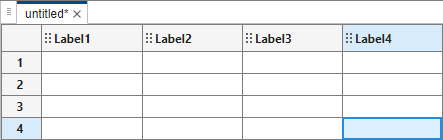
The Safety Analysis Manager highlights the spreadsheet cell.
Create a fault tree document and a fault tree.
myTreeDoc = safetyAnalysisMgr.newDocument("fault-tree");
myFaultTree = myTreeDoc.FaultTrees(1);

myTopGate = myFaultTree.Gates(1);
event1 = createEvent(myTopGate);
event1.FailureModel.Parameters.Q.Value = 0.05;
event1.FailureModel.Parameters.W.Value = 0.05;
event2 = createEvent(myTopGate);
event2.FailureModel.Parameters.Q.Value = 0.1;
event2.FailureModel.Parameters.W.Value = 0.05;
gate1 = createGate(myTopGate);
gate2 = createGate(myTopGate,Type="and");
gate22 = createGate(gate2);

event3 = createEvent(gate1);
event3.FailureModel.Parameters.Q.Value = 0.1;
event3.FailureModel.Parameters.W.Value = 0.1;
event4 = createEvent(gate1);
event4.FailureModel.Parameters.Q.Value = 0.02;
event4.FailureModel.Parameters.W.Value = 0.01;
event5 = createEvent(gate2);
event5.FailureModel.Parameters.Q.Value = 0.2;
event5.FailureModel.Parameters.W.Value = 0.01;
event6 = createEvent(gate22);
event6.FailureModel.Parameters.Q.Value = 0.2;
event6.FailureModel.Parameters.W.Value = 0.2;
event7 = createEvent(gate22);
event7.FailureModel.Parameters.Q.Value = 0.15;
event7.FailureModel.Parameters.W.Value = 0.15;
View the intermediate gate gate22 by using the
navigate function.
navigate(gate22)
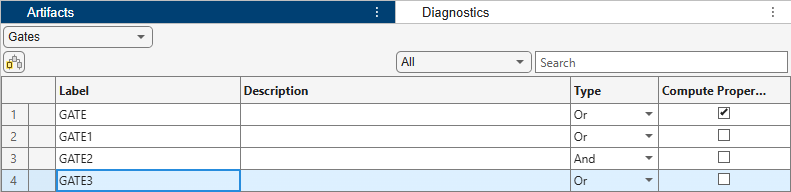
The Safety Analysis Manager highlights the gate in the Artifacts pane.
Open the example and the project.
openExample("faultanalyzer/ChangeTrackingSpreadsheetExample")
openProject("EvaluateFaultsFuelSystemProject");
The example contains a model and a Safety Analysis Manager spreadsheet
that does not have links or faults. Open the
sldemo_fuelsys_fault_analyzer model and the
FuelSysFMEA.mldatx spreadsheet. Create the faults and the links
between the faults and the spreadsheet by using the
fuelSysFaultSetupProject helper function.
mdl = "sldemo_fuelsys_fault_analyzer";
open_system(mdl);
FMEAName = safetyAnalysisMgr.openDocument("FuelSysFMEA.mldatx");
fuelSysFaultSetupProject
Get the fault from the model on the third input port of the To
Controller subsystem by using the Simulink.fault.findFaults function.
myFault = Simulink.fault.findFaults(...
mdl,ModelElement=mdl + "/To Controller/Inport/3");
Set the trigger time of the fault to 10 by changing the
Fault object property values and save the fault information by using
the Simulink.fault.save function.
myFault.StartTime = 10;
Simulink.fault.save(mdl)
Detect the changes to the linked artifact in the
FuelSysFMEA.mldatx spreadsheet by using the detectChanges function on the spreadsheet, and retrieve the
ChangeInformation objects of the changes.
detectChanges(FMEAName)
myChanges = getChanges(FMEAName);
View the fault in the model associated with the first change.
navigate(myChanges(1))

