Simple Engine
R2026bSimplified engine model using lookup tables
Simple Engine block

To add a block to a model, double-click the canvas and start typing the block name. Then, select the block from the list.
Libraries:
Powertrain Blockset /
Propulsion /
Combustion Engines
Vehicle Dynamics Blockset /
Powertrain /
Propulsion
Description
The Simple Engine block implements a simplified engine model that uses a table representing maximum engine torque as a function of engine speed to estimate engine torque for vehicle performance simulations. Fuel consumption is approximated using two scalar fuel property parameters and one scalar engine efficiency parameter. You can use the block for:
Hardware-in-the-loop (HIL) engine control design
Vehicle-level performance simulations
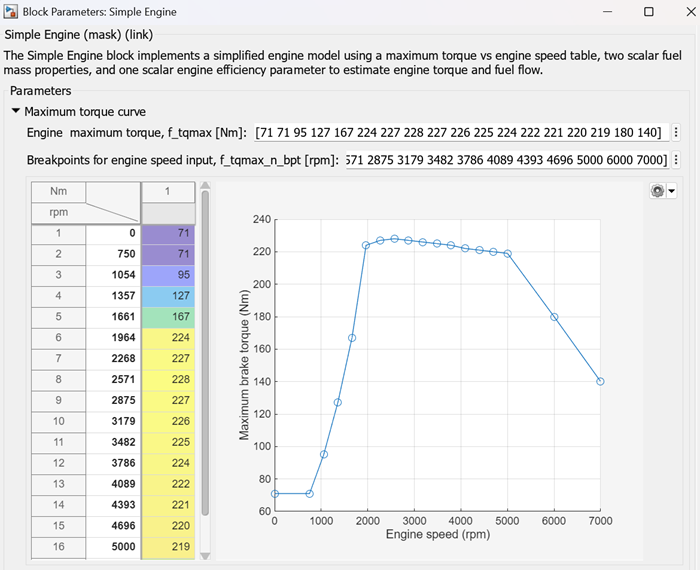
You can change the default maximum torque and engine speed breakpoints in the table to customize the model for a specific engine application. Double-click the block and, in the Block Parameters dialog box, expand the Maximum torque curve section. Enter values for the Engine maximum torque, f_tqmax and Breakpoints for engine speed input, f_tqmax_n_bpt parameters, and then click Apply or OK.
Ports
Input
Output
Parameters
Programmatic Use: Add Block
To add the block programmatically, use the add_block function with one of these library block paths as the source.
"autolibenginesystems/Simple Engine"
"vdynlib/Powertrain/Propulsion/Simple Engine"
Example: add_block("autolibenginesystems/Simple Engine","myModel/myBlock",MakeNameUnique="on")
For information about programmatic access to individual block parameters, see the Programmatic Use section of parameter descriptions on this page.
Extended Capabilities
Version History
Introduced in R2021b

