Temperature Salinity
R2026bTemperature Salinity block
To add a block to a model, double-click the canvas and start typing the block name. Then, select the block from the list.
Libraries:
Aerospace Blockset Maritime Applications Library /
Environment
Description
Add-On Required: This feature requires the Aerospace Blockset Maritime Applications Library add-on.
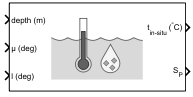
The Temperature Salinity block provides in-situ temperature and practical salinity of seawater by interpolating the World Ocean Atlas 2023 (WOA23) climatology decade long data set across depth, latitude, and longitude.
Ports
Input
Ocean depth below surface in the ocean, specified as a scalar value between 0 and 5500 m, inclusive, in the units specified in Units.
Data Types: double
Latitude for temperature and salinity lookup, specified as a scalar value between -90 and 90 deg, inclusive. The block wraps out-of-range values from -90 to 90, inclusive, before evaluation. μ specifies the latitude when retrieving gridded ocean temperature and salinity data from the World Ocean Atlas 2023 climatology data set. μ and l identify the ocean location at which temperature and salinity are evaluated.
Data Types: double
Longitude for temperature and salinity lookup, specified as a scalar in degrees between [-180, 180] deg, inclusive. μ and l identify the ocean location at which temperature and salinity are evaluated.
l specifies the longitude when retrieving gridded ocean temperature and salinity data from the World Ocean Atlas 2023 climatology data set. The block wraps out-of-range values from -180 to 180, inclusive, before evaluation.
Data Types: double
Output
In-situ temperature, returned as a scalar value in the units specified in Units. When the query location has no valid ocean data,
such as land cells, the block returns NaN or the
specified fill value, depending on the block parameter settings.
Data Types: double
Practical salinity (PSS-78), returned as a scalar value. When the query location has no
valid ocean data, such as land cells, the block returns
NaN or the specified fill value, depending on the
block parameter settings. This value is unitless.
Data Types: double
Parameters
To edit block parameters interactively, use the Property Inspector. From the Simulink® Toolstrip, on the Simulation tab, in the Prepare gallery, select Property Inspector.
Parameter and port units, specified as one of these values:
| Units | Depth | Temperature |
|---|---|---|
| meters | degrees Celsius (°C) |
| feet | degrees Fahrenheit (°F) |
Programmatic Use
To set the block parameter value
programmatically, use the set_param function.
To get the block parameter value
programmatically, use the get_param function.
| Parameter: | units |
| Values: | Metric (MKS) (default) | English |
Example: set_param(gcb,"units","Metric (MKS)")
Out-of-range block behavior, specified as one of these values:
| Action | Description |
|---|---|
|
|
| Warning in the Diagnostic Viewer. Model simulation continues. |
| Error in the Diagnostic Viewer. Model simulation stops. |
Programmatic Use
To set the block parameter value programmatically, use
the set_param function.
To get the block parameter value
programmatically, use the get_param function.
| Parameter: | action |
| Values: |
Error
(default) |
Warning
|
None
|
Example:
set_param(gcb,"action","Warning")
To enable the use of constant fill values for out-of-range results, select this parameter. Otherwise, clear this parameter.
Dependencies
To enable this parameter, set the Action for out-of-range
input parameter to Warning or
None.
Programmatic Use
To set the block parameter value programmatically, use
the set_param function.
To get the block parameter value
programmatically, use the get_param function.
| Parameter: | fillConst |
| Values: | off (default) | on |
Example: set_param(gcb,"fillConst","off")
Fill with constant value for temperature, specified as a real finite scalar in the units specified in Units.
Dependencies
To enable this parameter:
Select the Use constant fill values for out-of-range results parameter.
To enable this parameter, set the Action for out-of-range input parameter to
WarningorNone.
Programmatic Use
To set the block parameter value programmatically, use
the set_param function.
To get the block parameter value
programmatically, use the get_param function.
| Parameter: | fillValueT |
| Values: | 10 (default) | real finite scalar |
| Data Types: | double |
Example: set_param(gcb,"fillValueT","10")
Fill with constant value for practical salinity (PSS-78), specified as a real finite scalar. This value is unitless.
Dependencies
To enable this parameter:
Select the Use constant fill values for out-of-range results parameter.
To enable this parameter, set the Action for out-of-range input parameter to
WarningorNone.
Programmatic Use
To set the block parameter value programmatically, use
the set_param function.
To get the block parameter value
programmatically, use the get_param function.
| Parameter: | fillValueSP |
| Values: | 35 (default) | real finite scalar |
| Data Types: | double |
Example: set_param(gcb,"fillValueSP","35")
Version History
Introduced in R2026b
See Also
External Websites
MATLAB Command
You clicked a link that corresponds to this MATLAB command:
Run the command by entering it in the MATLAB Command Window. Web browsers do not support MATLAB commands.


Web サイトの選択
Web サイトを選択すると、翻訳されたコンテンツにアクセスし、地域のイベントやサービスを確認できます。現在の位置情報に基づき、次のサイトの選択を推奨します:
また、以下のリストから Web サイトを選択することもできます。
最適なサイトパフォーマンスの取得方法
中国のサイト (中国語または英語) を選択することで、最適なサイトパフォーマンスが得られます。その他の国の MathWorks のサイトは、お客様の地域からのアクセスが最適化されていません。
南北アメリカ
- América Latina (Español)
- Canada (English)
- United States (English)
ヨーロッパ
- Belgium (English)
- Denmark (English)
- Deutschland (Deutsch)
- España (Español)
- Finland (English)
- France (Français)
- Ireland (English)
- Italia (Italiano)
- Luxembourg (English)
- Netherlands (English)
- Norway (English)
- Österreich (Deutsch)
- Portugal (English)
- Sweden (English)
- Switzerland
- United Kingdom (English)