How to get rid of angles in MATLAB world map?

3 ビュー (過去 30 日間)
Muhammad Anas Imtiaz
Muhammad Anas Imtiaz 2018 年 11 月 19 日
コメント済み: Mark Sherstan 2018 年 11 月 19 日
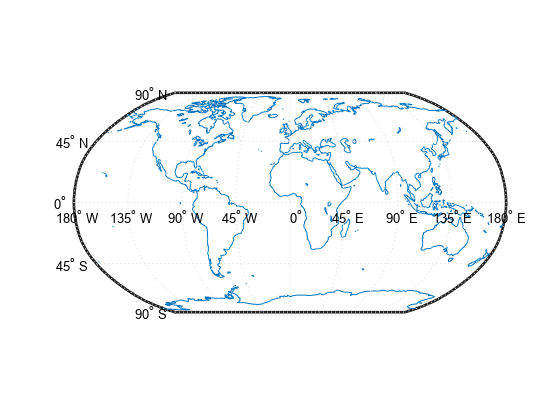
Suppose I have the map below (taken from here). Is there a way to get rid of the all the text (i.e 90N, 45N, ..., 180W, 135W, ...) from the map? I have tried going through the documentation on the webpage but couldn't find any useful information.
SetUpWorldMapAndDrawCoastlinesExample_01.png

採用された回答

Mark Sherstan
Mark Sherstan 2018 年 11 月 19 日
Access the figure handle and set the angle labels to be a blank string. This code will do it for you:
close all
h = worldmap('world');
load coastlines
plotm(coastlat,coastlon)
for ii = 1:14
h.Children(ii).String = '';
end
There may be other more effcient methods but this is a quick fix for now.

  2 件のコメント
Muhammad Anas Imtiaz
Muhammad Anas Imtiaz 2018 年 11 月 19 日
This is exactly what I was looking for. Just a small change was needed since I was using scatterm instead of plotm:
ii = 2:15
Mark Sherstan
Mark Sherstan 2018 年 11 月 19 日
Perfect! Glad to here it worked.

サインインしてコメントする。

その他の回答 (0 件)

製品


リリース

R2018b

Community Treasure Hunt

Find the treasures in MATLAB Central and discover how the community can help you!

Start Hunting!

Translated by