メインコンテンツ

分割ソルバーを使用するシミュレーションのブロック設定の最適化

R2026b

分割ソルバーは、特定のモデルのパフォーマンスを改善する、Simscape™ の固定ステップ ローカル ソルバーです。ただし、すべての回路網が分割ソルバーでシミュレーションを実行できるわけではありません。分割ソルバーを使用する一部のモデルは、数値的な問題により、エラーを発して初期化に失敗する可能性があります。非同期、同期、および永久磁石回転子のマシン ブロックでの初期化を妨げている数値的な問題を解決するために、零相項を除外することができます。寄生コンダクタンスを除外すると、寄生コンダクタンスを既定で含む Floating Neutral (Three-Phase) ブロックと Neutral Connection ブロックの数値的問題が解決されます。

モデルに最適なソルバーを選定するには、補助関数 ee_updateSolver を使用します。これは、さまざまなソルバーで処理を繰り返す場合に便利です。この関数は、モデル内の以下のブロックのインスタンスごとに特定のパラメーター値を更新します。

  • Solver Configuration ブロック

  • [零相] パラメーターをもつマシン ブロック

  • [Parasitic conductance to ground] パラメーターをもつ接続ブロック

関数の構文は ee_updateSolver(solver,system) です。文字ベクトルを使用して両方の入力引数を指定します。次の表に、指定するソルバーによって関数がどのように値を更新するかを示します。

入力引数Solver Configuration ブロック ([ソルバー タイプ])Solver Configuration ブロック [ローカル ソルバーを使用] および [固定コストでの実行時整合性の反復を使用])非同期、同期、永久磁石回転子のマシン ブロック ([零相])Floating Neutral (Three-Phase) ブロックおよび Neutral Connection ブロック ([Parasitic conductance to ground])
'Partitioning'分割選択Exclude0
'Backward Euler' または 'BackwardEuler'後退オイラー法選択Include1e-12
'Trapezoidal'台形則選択Include1e-12
'Global' または 'Nonlocal'変更なしクリアInclude1e-12

関数 ee_solverUpdate を使用したソルバーおよび零相設定の更新

この例では、関数 ee_solverUpdate を使用して、分割ソルバーおよび後退オイラー法ソルバーを使うシミュレーション用にモデルの Solver Configuration ブロックおよび PMSM ブロックを構成する方法を説明します。また、シミュレーションの持続時間と結果を比較する方法も説明します。

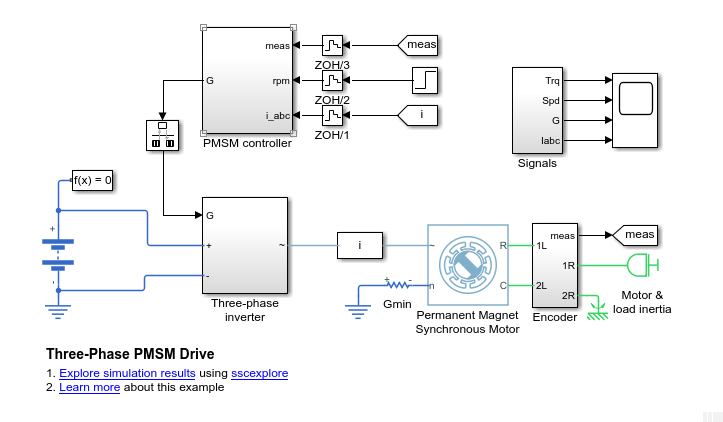
  1. モデルを開きます。MATLAB® コマンド プロンプトで、次のコードを入力します。
    openExample("simscapeelectrical/PMSMDriveExample")
    model = "PMSMDrive"
    open_system(model)

    関数 ee_solverUpdate で更新可能な 2 つのブロックは、Solver Configuration ブロックと PMSM ブロックです。

  2. 2 つのブロックのパラメーター設定を保存します。

    % Define the Solver Configuration block and the path
    %    to it as variables
    solvConfig = 'Solver Configuration';
    solvConfigPath = [model,'/',solvConfig];
    
    % Define the machine block and the path
    %    to it as variables
    machine = 'Permanent Magnet Synchronous Motor';
    machinePath = [model,'/',machine];
    
    % Create a cell array that contains configuration data
    configBaseline = {'Block','Parameter','Value';
            'Solver Configuration','Use local solver',...
            get_param(solvConfigPath,'UseLocalSolver');    
            'Solver Configuration','Solver type',...
            get_param(solvConfigPath,'LocalSolverChoice');
            'Solver Configuration','Sample time',...
            get_param(solvConfigPath,'LocalSolverSampleTime');
            'Solver Configuration',...
            'Use fixed-cost runtime consistency iterations',...
            get_param(solvConfigPath,'DoFixedCost');
            'Machine','Zero sequence',...
            get_param(machinePath,'zero_sequence')};

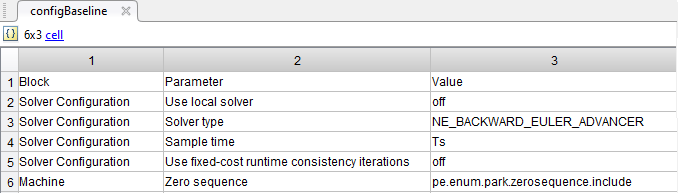
    設定は、MATLAB ワークスペースの配列 configBaseline に保存されます。

    Solver Configuration ブロックで対象となる設定は次のとおりです。

    • ローカル ソルバーを使用 — ローカルの Simscape ソルバーを使用するオプションがオフになっています。

    • ソルバー タイプ — 後退オイラー法 (Simscape のローカルの固定コスト ソルバー) が指定されています。ただし、ブロックのダイアログ ボックスを開くと、これが有効になっていないことを確認できます。これは、ローカル ソルバーを使用するオプションがオフになっているからです。

    • 固定コストでの実行時整合性の反復を使用 — 固定コストを使用するオプションがオフになっています。このオプションも、ローカル ソルバーがオフの場合は無効になります。

    マシンでは、[零相] パラメーターが [インクルード] に設定されています。零相方程式は、分割ソルバーでシミュレーションを実行するときに数値的な問題の原因となる可能性があります。

  3. 後でシミュレーション時間を比較できるようにすべてのシミュレーション出力を単一の Simulink.SimulationOutput オブジェクト内に返すために、sim コマンドの単出力形式を有効にします。

    % Enable single-output format 
    set_param(model,'ReturnWorkspaceOutputs', 'on')
  4. 回転子トルク信号 ([trqMotor] の From ブロックを Mux ブロックに接続) を、シミュレーション データのログ記録用とシミュレーション データ インスペクターでの表示用にマークします。

    % Define the trqMotor From block and the path
    %    to it as variables
    torqueSensor = 'From6';
    signalSubsystem = 'Signals';
    torqueSensorPath = [model,'/',signalSubsystem,'/',torqueSensor];
    
    % Mark the output signal from the trqMotor From block 
    %   for Simulink(R) data logging
    phTorqueSensor = get_param(torqueSensorPath,'PortHandles');
    set_param(phTorqueSensor.Outport(1),'DataLogging','on')

    ログ バッジ によって、モデル内の信号がマークされます。

  5. 結果と、ベースライン設定でのシミュレーションの所要時間を判定します。

    % Run a timed simulation using the Baseline solver configuration
    out = sim(model);
    tBaseline  = out.SimulationMetadata.TimingInfo.ExecutionElapsedWallTime; 

  6. 関数 ee_updateSolver を使用して、後退オイラー法のソルバー コンフィギュレーションに変更します。コンフィギュレーション設定を保存して、設定をベースライン設定と比較します。

    % Configure for Backward Euler solver simulation
    ee_updateSolver('Backward Euler',model)
    
    % Save the new parameter settings and compare them to the baseline 
    %   configuration.
    
    % Create a cell array that contains configuration data 
    configBackEuler = {'Block','Parameter','Value';
            'Solver Configuration','Use local solver',...
            get_param(solvConfigPath,'UseLocalSolver');    
            'Solver Configuration','Solver type',...
            get_param(solvConfigPath,'LocalSolverChoice');
            'Solver Configuration','Sample time',...
            get_param(solvConfigPath,'LocalSolverSampleTime');
            'Solver Configuration',...
            'Use fixed-cost runtime consistency iterations',...
            get_param(solvConfigPath,'DoFixedCost');
            'Machine','Zero sequence',...
            get_param(machinePath,'zero_sequence')};
    
    % Compare the Partitioning solver block settings to the Baseline settings
    configDiff = setdiff(configBackEuler,configBaseline)

    configDiff =
    
      1×1 cell array
    
        {'on'}
    

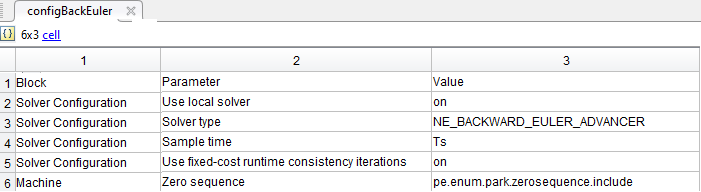
    ローカル ソルバーを使用するオプション (既定では後退オイラー法に設定) と、固定コストでの実行時整合性の反復を使用するオプションが、ここでは両方とも選択されています。

  7. 後退オイラー法ソルバーを使用して、時間測定付きシミュレーションを実行します。

    out = sim(model);
    tBackEuler = out.SimulationMetadata.TimingInfo.ExecutionElapsedWallTime;

  8. ここでローカル ソルバーを分割ソルバーに変更してモデルのシミュレーションを行うと、零相項があるため、エラーが発生します。関数 ee_updateSolver を使用して、エラーを出さずに分割ソルバーでシミュレーションを実行するためのモデルを構成します。コンフィギュレーション設定を保存し、設定をベースライン設定と比較して、時間測定付きシミュレーションを実行します。

    % Configure for Partioning solver simulation
    ee_updateSolver('Partitioning', model)
    
    % Create a cell array that contains configuration data 
    configPartitioning = {'Block','Parameter','Value';
            'Solver Configuration','Use local solver',...
            get_param(solvConfigPath,'UseLocalSolver');    
            'Solver Configuration','Solver type',...
            get_param(solvConfigPath,'LocalSolverChoice');
            'Solver Configuration','Sample time',...
            get_param(solvConfigPath,'LocalSolverSampleTime');
            'Solver Configuration',...
            'Use fixed-cost runtime consistency iterations',...
            get_param(solvConfigPath,'DoFixedCost');
            'Machine','Zero sequence',...
            get_param(machinePath,'zero_sequence')};
    
    % Compare the Partitioning solver block settings to the Baseline settings
    configDiff = setdiff(configPartitioning,configBaseline)
    
    %  Run a timed simulation using the Partitioning solver
    out = sim(model);
    tPartitioning = out.SimulationMetadata.TimingInfo.ExecutionElapsedWallTime;

    configDiff =
    
      3×1 cell array
    
        {'NE_PARTITIONING_ADVANCER'         }
        {'ee.enum.park.zerosequence.exclude'}
        {'on'                               }
    
    Warning: Initial conditions for nondifferential variables
    not supported. The following states may deviate from
    requested initial conditions:
       ['<a
       href="matlab:open_and_hilite_system('ee_pmsm_drive/Battery')"...
            >ee_pmsm_drive/Battery</a>']
       Battery.num_cycles
          o In ee.sources.battery_base
       ['<a
       href="matlab:open_and_hilite_system('ee_pmsm_drive/Permanent
       Magnet Synchronous Motor')">ee_pmsm_drive/Permanent
       Magnet Synchronous Motor</a>']
       Permanent_Magnet_Synchronous_Motor.angular_position 
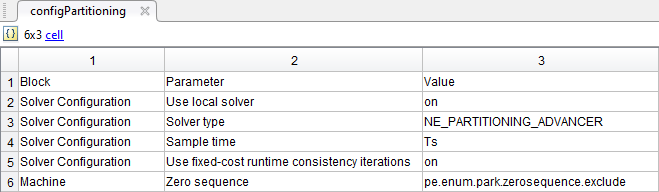
    これで、ソルバー タイプは分割ソルバーに設定され、マシンは零相項を除外するように構成されました。

    シミュレーションはエラーを出さずに実行されます。警告は表示されますが、これは、非微分変数の初期条件が分割ソルバーでサポートされていないためです。

  9. 以下を示す表を出力します。

    • ソルバーごとのシミュレーション時間

    • ローカル ソルバーとベースライン グローバル ソルバーの速度の差 (パーセント単位)

    % Display the simulation times
    compTimeDiffTable = table({'Baseline';...
        'Backward Euler';...
        'Partitioning'},...
        {tBaseline;tBackEuler;tPartitioning},...
    'VariableNames', {'Solver','Sim_Duration'});
    
    display(compTimeDiffTable);
    
    % Compute and display the percent difference for the simulation times
    spdBackEulerVsBaseline = 100*(tBaseline - tBackEuler)/tBaseline;
    spdPartitionVsBaseline = 100*(tBaseline - tPartitioning)/tBaseline;
    
    compPctDiffTable = table({'Backward Euler versus Baseline';...
        'Partitioning versus Baseline'},...
        {spdBackEulerVsBaseline;...
        spdPartitionVsBaseline},...
    'VariableNames', {'Comparison','Percent_Difference'});
    
    display(compPctDiffTable);
      3×2 table
    
             Solver         Sim_Duration
        ________________    ____________
    
        'Baseline'           [38.0255]  
        'Backward Euler'     [23.4011]  
        'Partitioning'       [ 9.2042]  
    
    compPctDiffTable =
    
      2×2 table
    
                   Comparison               Percent_Difference
        ________________________________    __________________
    
        'Backward Euler versus Baseline'        [38.4594]     
        'Partitioning versus Baseline'          [75.7946]    

    シミュレーション速度はマシンの処理能力と同時実行プロセスの計算コストに応じて異なるため、使用マシンでのシミュレーション時間は違ったものとなる場合があります。ローカルの固定ステップの分割ソルバーと後退オイラー法ソルバーは、グローバルの可変ステップ ソルバーであるベースライン ソルバーより高速です。分割ソルバーは後退オイラー法ソルバーより高速です。

  10. 結果を比較するために、シミュレーション データ インスペクターを開きます。

    % Get Simulation Data Inspector run IDs for 
    %    the last three runs
    runIDs = Simulink.sdi.getAllRunIDs;
    runBackEuler = runIDs(end - 1);
    runPartition = runIDs(end);
    
    % Open the Simulation Data Inspector
    Simulink.sdi.view
    
    compBaselinePartition = Simulink.sdi.compareRuns(runBackEuler,...
        runPartition);

    比較を確認するには、[比較] をクリックしてから、[From6] をクリックします。
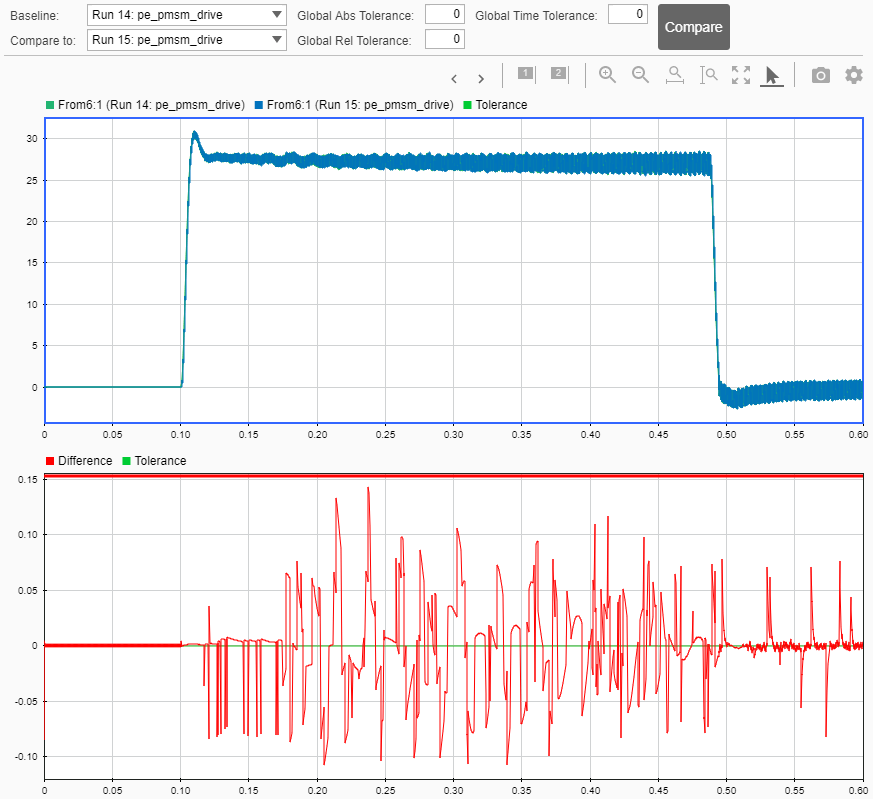
    最初のプロットは、後退オイラー法ソルバーと分割ソルバーのシミュレーション結果を重ねて示しています。2 番目のプロットは、それらの違いを示しています。既定の許容誤差は 0 です。結果の精度が要件を満たすかどうかを判定するために、相対許容誤差、絶対許容誤差、および時間の許容誤差を調整できます。詳細については、シミュレーション データの比較を参照してください。

また、関数 ee_updateSolver を使用して、グローバル ソルバーを使ったシミュレーション用にモデルをリセットすることもできます。

% Configure for Global/Nonlocal solver simulation
ee_updateSolver('Global',model)

関数 ee_updateSolver の制限

関数 ee_updateSolver を使用しても、シミュレーションの実行でエラーが出ないことや、シミュレーションで正確な結果が得られることが保証されるわけではありません。シミュレーションの精度が要件を確実に満たすようにするには、モデルまたはブロックの設定を変更するたびに、シミュレーション結果をベースライン結果と比較することをお勧めします。

参考

|

トピック