addconfigset
R2026bCreate configuration set object and add to model object
Syntax
configsetObj =
addconfigset(modelObj, 'NameValue')


configsetObj =
addconfigset(..., 'PropertyName', PropertyValue,
...)
Arguments
| Model object. Enter
a variable name. |
| Descriptive name for a configuration set object. Reserved words
'active' and 'default' are
not allowed. |
| Configset
object. |
Description
configsetObj =
addconfigset(modelObj, 'NameValue')configsetObj.
In the configuration set object, this method assigns a value
(NameValueName.
constructs a configuration set object,
configsetObj =
addconfigset(..., 'PropertyName', PropertyValue,
...)configsetObjconfigsetObjconfigsetObj properties are listed in Properties.
A configuration set stores simulation specific information. A model object can
contain multiple configuration sets, with one being active at any given time. The active
configuration set contains the settings that are used during a simulation.
configsetObjsetactiveconfigset to define the
active configset for modelObj.
Use the method copyobj to copy a configset
object and add it to the modelObj.
Examples
This example shows how to add a configset object to a SimBiology model and set it up for simulation.
Load the sample radiodecay model m1, and add a Configset object to the model.
sbioloadproject radiodecay;
configsetObj = addconfigset(m1, 'myset');
Configure the simulation stop criteria by setting the StopTime property.
configsetObj.StopTime = 15;
Set the configset object to be active so that its settings are used during simulation.
setactiveconfigset(m1,configsetObj);
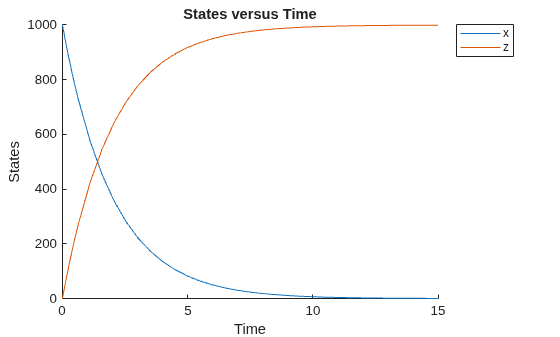
Simulate the model and plot results.
simdata = sbiosimulate(m1);
sbioplot(simdata);
Version History
Introduced in R2006a

