Report Only Failing Assessments in C/C++ Test Reports
R2026bYou can export C/C++ test results to HTML reports for archiving and certification. By default, a test report shows all assessments, irrespective of whether they failed, passed, or went unchecked. If most of your assessments are passing, reporting all assessments can clutter your report. This topic shows how to omit passing assessments from reports.
Omit Passing Assessments When Reporting
To omit test specifications when reporting test results:
When generating reports in the Polyspace® Platform user interface:
With the test results open, on the Polyspace Platform toolstrip, select Report. In the Generate HTML Report dialog box, clear Show passed assessments. For more details on the other options in the dialog box, see Generate Reports from C/C++ Test Results.
Select OK.
When generating reports at the command line, use the option
-omit-passed-assessmentswith the commandpolyspace-test -report.
You can also specify omitting of passed assessments in a report options file. For more information, see Customize Content and Style of Polyspace Test Reports.
Reports with Failing Assessments Only
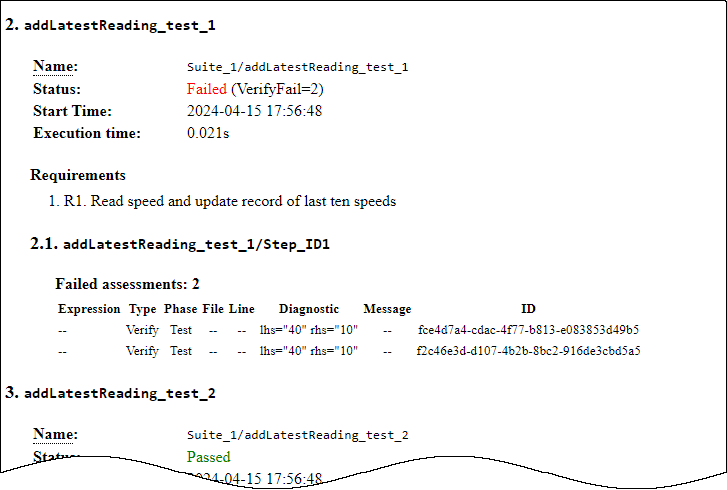
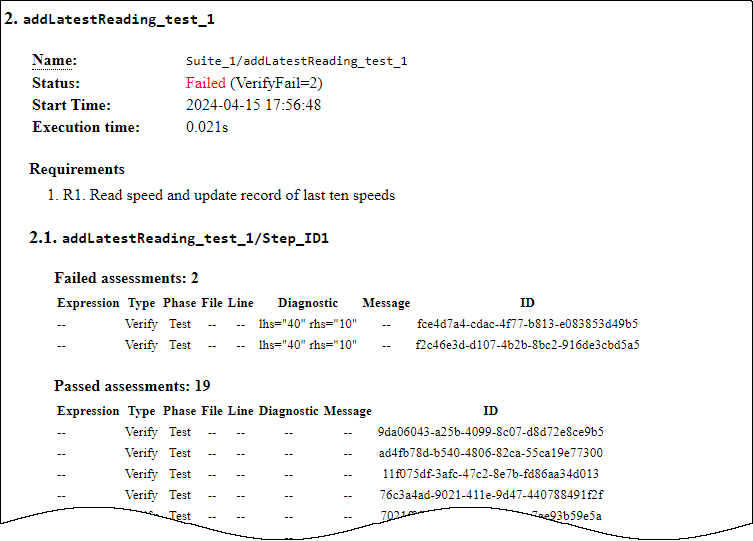
The following report excerpts show results of the same test addLatestReading_test_1 with and without passing assessments:
If you report all assessments, the test results show both failed and passed assessments.
If you omit passed assessments from the report, the test results show the remaining failed assessments only.