Data
R2026bCreate OPC UA Data object
Description
An opc.ua.Data object represents historical data retrieved from
OPC UA nodes. When you retrieve historical values, OPC UA servers might return a different
number of Value, Quality, and
Timestamp arrays for each node. This data is packaged into an OPC UA
data object, which allows you to process this data for common analysis tasks.
Creation
You can construct OPC UA data objects using the readHistory, readAtTime, or readProcessed functions of an OPC UA client.
Properties
Object Functions
summary | Display summary of OPC UA data object |
stairs | Plot OPC UA data in stairstep graph |
plot | Plot OPC UA data in line graph |
table | Convert OPC data object to a table |
tsintersect | Intersection of timestamps in OPC UA data object |
tsunion | Union of timestamps in OPC UA data object |
arrayHasSameTimeStamp | Verify if all elements in OPC UA data object have same timestamp |
append | Combine OPC data objects |
resample | Resample OPC UA data object to have defined timestamps |
single | Convert OPC UA data object array to single matrix |
double | Convert OPC UA data object array to double matrix |
int8 | Convert OPC UA data object array to int8 matrix |
int16 | Convert OPC UA data object array to int16 matrix |
int32 | Convert OPC UA data object array to int32 matrix |
int64 | Convert OPC UA data object array to int64 matrix |
uint8 | Convert OPC UA data object array to uint8 matrix |
uint16 | Convert OPC UA data object array to uint16 matrix |
uint32 | Convert OPC UA data object array to uint32 matrix |
uint64 | Convert OPC UA data object array to uint64 matrix |
logical | Convert OPC UA data object array to logical matrix |
filterByQuality | Filter OPC UA data by quality characteristics |
getIndexFromName | Return OPC data with matching names |
Examples
Create an OPC UA client and connect it to the server.
uaClnt = opcua("localhost",62550);
connect(uaClnt);
Construct a node object using index and identifier values.
uaNode =opcuanode(3,1005,c);
Retrieve data for the current day.
dataObj = readHistory(uaClnt,uaNode,datetime('today'),datetime('now'));
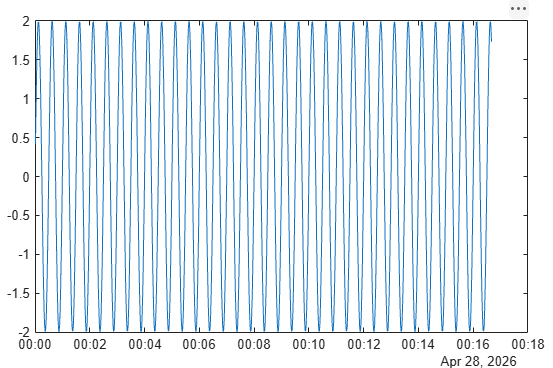
Summarize and plot retrieved data.
summary(dataObj);
1-by-1 OPC UA Data object:

      Name          Value           Start Timestamp       End Timestamp                Quality
    --------  ------------------  -------------------  -------------------  -----------------------------
    Sinusoid  1000 double values  2026-03-27 00:00:01  2026-03-27 00:16:40  1 unique quality [Good (Raw)]
plot(dataObj);
Version History
Introduced in R2015b

