Check Code Generation Compatibility in Deep Network Designer
R2026bUse the Deep Network Designer app to check if your network is ready for deployment workflows. The code generation analysis checks if your network supports generic C/C++ or CUDA code generation through MATLAB® Coder™ or a Simulink® Predict block.
Note
Use this analysis when you plan to export your network as a network block, such as a Predict block.
The app highlights any unsupported layers or configurations, and provides guidance to help you prepare your network for deployment.
To analyze your network for code generation, you need:
Deep Learning Toolbox™.
MATLAB Coder Interface for Deep Learning support package. If this support package is not installed, then the app provides a download link when you run the analysis.
Analyze Your Network for Code Generation Compatibility
To check your network for code generation compatibility:
Open or build your network in Deep Network Designer.
On the toolstrip, click the Code Generation Analysis button. The app runs the analysis and opens a report with the results.
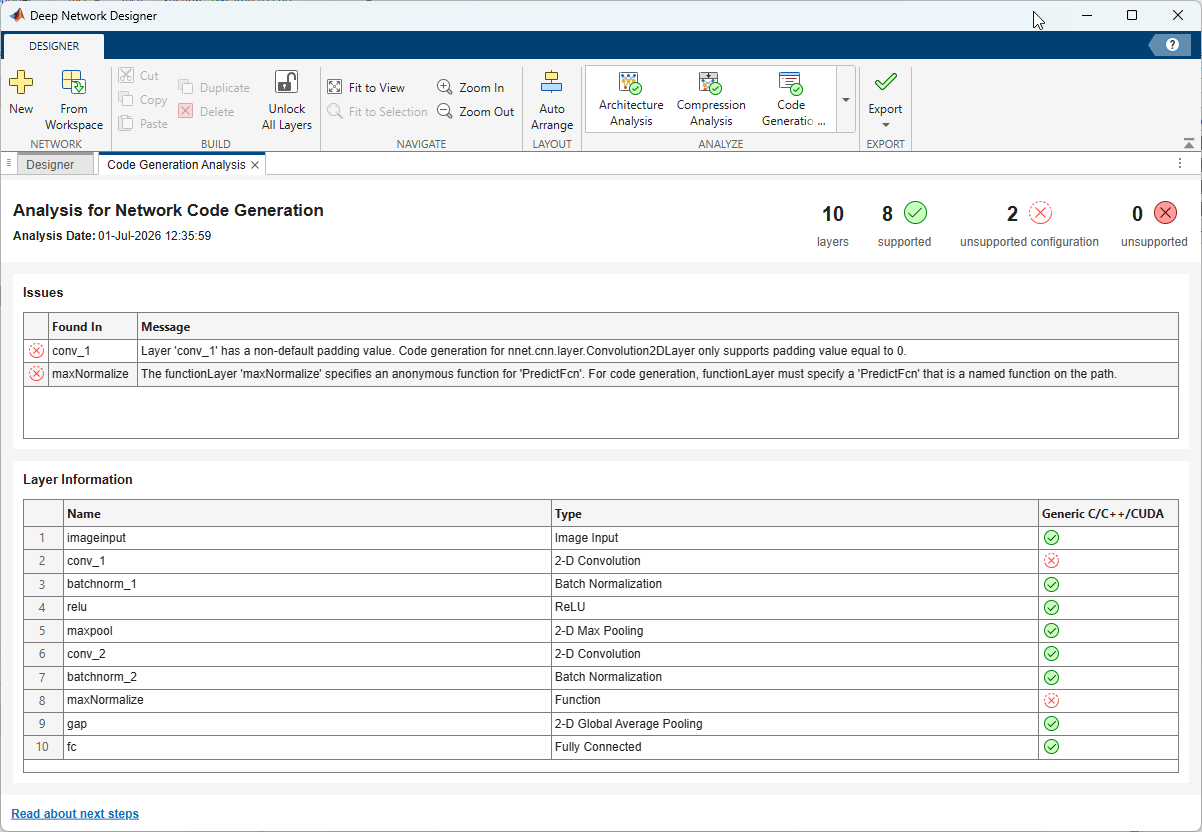
Review the results. The report displays a summary of the issues, as well as a table that lists each issue along with guidance on how to fix it. The code generation analysis reports two types of issues:
Unsupported configuration — The layer type is supported, but a specific property or configuration is not supported for library-free code generation. You might be able to fix these issues by changing a layer property value in the Properties pane for each layer.
Unsupported — The layer type is not supported for library-free code generation. You must replace the layer with a supported alternative or restructure your network.
Fix the layers with issues. Depending on the issue, you can fix the layer directly in Deep Network Designer by editing the properties of the layer, or you might need to export the network to the workspace and make changes programmatically.
Analyze the network again to check if you have resolved all of the issues.
Fix Code Generation Issues
This example shows how to use the code generation report to fix issues before deployment. Open the network in Deep Network Designer and run the code generation analysis. In this example, the analyzer reports two issues: a convolution layer with a nonzero padding value, and a function layer that uses an anonymous function.
Fix the Padding Value
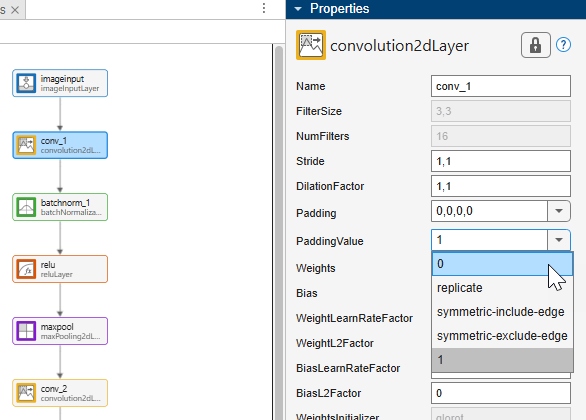
First, fix the issue in the convolution layer. The analyzer reports that the
PaddingValue property of the convolution layer must be
0 for library-free code generation. Select the convolution
layer in the Designer pane and set
PaddingValue to 0 in the
Properties pane.
Replace the Anonymous Function
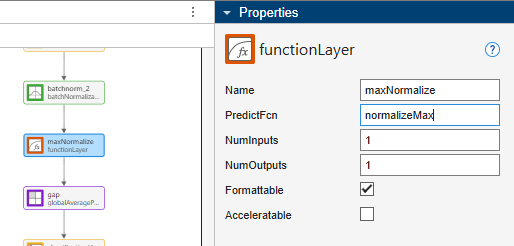
Next, fix the issue in the function layer. The analyzer reports that the functionLayernormalizeMax.m:
function Y = normalizeMax(X)
Y = X ./ max(X(:));
end
The PredictFcn property specifies the function that the
function layer executes during prediction. Code generation requires this to be a named
function rather than an anonymous function. In Deep Network Designer,
select the function layer and set the PredictFcn property to
normalizeMax.
Rerun Analysis
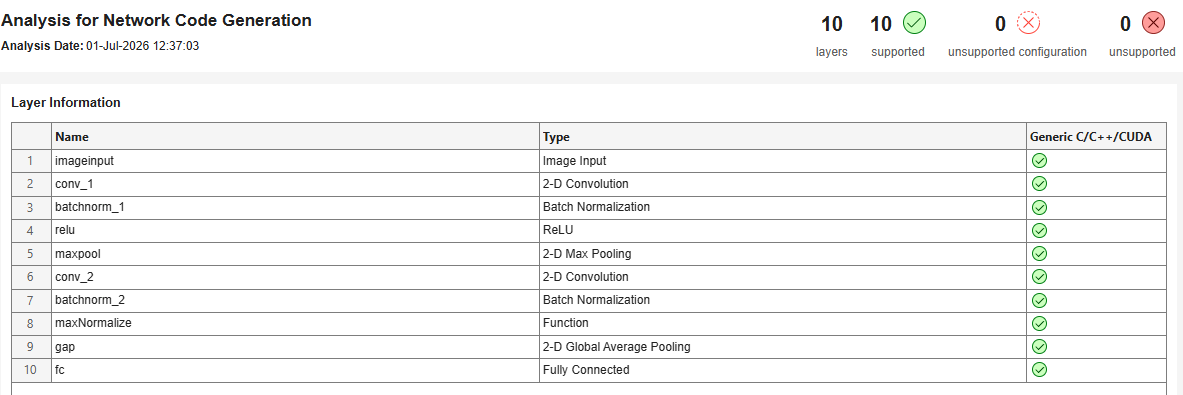
Run the analysis again to confirm that the analyzer reports no remaining issues and the network is ready for code generation.
Generate Generic C/C++ Code for Deep Learning Networks
After you resolve any issues with your network, you can export it to Simulink or MATLAB.
Export to Simulink — Click Export > Export to Simulink and select to export your network as a single network block.
Export to MATLAB — Click Export.
For an example of the MATLAB Coder code generation workflow for deep learning networks, see Generate Generic C/C++ Code for Deep Learning Networks (MATLAB Coder).
See Also
Deep Network
Designer | analyzeNetworkForCodegen (MATLAB Coder)
Topics
- Prerequisites for Deep Learning with MATLAB Coder (MATLAB Coder)
- Workflow for Deep Learning Code Generation with MATLAB Coder (MATLAB Coder)
- Build Networks with Deep Network Designer
- Generate MATLAB Code from Deep Network Designer
- Code Generation for a Deep Learning Simulink Model That Performs Lane and Vehicle Detection (GPU Coder)

