Analysis Setup
Continuous Integration: Run static analysis on Polyspace Platform projects from the command line
Starting in R2025a, you can run static analysis on a Polyspace® Platform project (.psprjx) from the command line. Use the
polyspace-project
            -generate-launching-script-for
system command to generate the necessary
files, including a script that launches the static analysis.
Compiler Support: Analyze code compiled with GCC version 13.x
In R2025a, Polyspace supports GCC compiler version 13.x natively. If you compile your source code by
using this GCC compiler version, specify the compiler name as
gnu13.x.
You can now set up a Polyspace project without knowing the internal workings of this compiler version. The analysis can interpret macros that are implicitly defined by the compiler and compiler-specific language extensions, such as keywords and pragmas.
At the Polyspace Platform user interface, specify the GCC version using the option
Compilation toolchain (Static
         Analysis)
.
At the command line, specify a compiler by using the option -compiler.
For
instance:
polyspace-bug-finder-server -sources file.c -compiler gnu13.x ...
Compiler Support: Analyze code compiled by using Clang versions 14.x, 15.x, and 16.x
In R2025a, Polyspace supports Clang compiler versions 14.x, 15.x, and 16.x natively. If you build
your source code by using any of these Clang compiler versions, specify the compiler name as
clang14.x, clang15.x, or
clang16.x.
You can now set up a Polyspace project without knowing the internal workings of these Clang compiler versions. The analysis can interpret macros that are implicitly defined by the compiler and compiler-specific language extensions, such as keywords and pragmas.
At the Polyspace Platform user interface, specify the Clang version using the option
Compilation toolchain (Static
Analysis).
At the command line, specify a compiler by using the option -compiler.
For instance:
polyspace-bug-finder-server -sources file.c -compiler clang14.x ...
Compiler Support: Analyze code compiled by using Diab version 7.x
In R2025a, Polyspace supports Diab compiler version 7.x. This version of the Diab compiler is
identical to the Clang compiler version 15.x. If you use this version of Diab compiler,
specify your compiler as clang15.x. The Diab7.x compiler supports
ARM® targets such as arm and arm64.
At the command line, specify your compilers and targets using the options Compiler (-compiler)
and Target processor type
(-target):
polyspace-bug-finder-server -sources file.c -compiler clang15.x -target arm...
At the Polyspace Platform user interface, specify the compiler using the option
Compilation toolchain (Static
         Analysis)
.
Target Processor Support: Analyze code running on ARM processors
In R2025a, Polyspace static analysis tools support processors that use the Advanced RISC Machines
(ARM) architecture. When analyzing code that is intended to run on an ARM processor, you do not have to manually specify the sizes of data types.
Specify the value arm or arm64 for the option
-target.
At the command line, specify the processor by using the option -target. For instance:
polyspace-bug-finder-server -sources file.c -target arm ...
Target
processor type (-target).The polyspace-configure command now supports ARM targets natively. If
your compile command contains GNU ARM toolchain commands, such as arm-none-eabi-gcc, the
polyspace-configure command now uses the analysis option
-target arm. Previously, polyspace-configure
approximated the configuration of ARM targets by using options such as -target
i386 or -target x86_64.
Target Processor Support: Analyze code running on RISC-V processors
In R2025a, Polyspace static analysis tools support processors that use the RISC-V architecture.
When analyzing code that is intended to run on a RISC-V processor, you do not have to
manually specify the sizes of data types. Specify the value riscv or
riscv64 for the option -target.
At the command line, specify the processor by using the option -target. For instance:
polyspace-bug-finder-server -sources file.c -target riscv ...
Target
processor type (-target).The polyspace-configure command now supports RISC-V targets natively.
If your compile command contains RISC-V toolchain commands, such as
riscv-none-elf-gcc, the polyspace-configure
command now uses the analysis option -target riscv. Previously,
polyspace-configure approximated the configuration of RISC-V targets
by using other supported targets.
Adaptive AUTOSAR support: Faster and library aware analysis of adaptive AUTOSAR code
Starting in R2025a, Polyspace
Bug Finder™ runs a faster analysis of C++ code that uses the adaptive AUTOSAR library and
shows more precise results. If you use the option Libraries used (-library) with the new value
adaptive_autosar, Polyspace does not attempt to verify the implementations of the functions in the adaptive
AUTOSAR namespace (ara). This results in a faster analysis. No results are
reported in the body of the functions belonging to the ara namespace,
making the results review easier. Consider this
code:
namespace ara {
	class Widget {
	public:
		int foo(int x) {
			//...
		}
	};

    int func1();
    int func2(){
        return 42/func1();
    }
}

namespace acme {
	class Gadget {
	public:
		int foo(int x) {
			return 42 / x;
		}
	};

}

int main() {
	volatile int rd = 0;
	if(rd) {
		ara::Widget w;
		w.foo(0);
	}
	if(rd) {
		acme::Gadget g;
		g.foo(0);
	}
} ara namespace. Violations in
this part of the code might not be relevant to your current development. Specify the option
-library adaptive_autosar. Violations in the body of the functions in
the ara namespace are no longer reported.For more information, see Libraries used (-library)
.
Concurrency: Auto-Detect thread creation and critical sections implemented using μC/OS-III library
Starting in R2025a, Polyspace supports the μC/OS-III multitasking library. If your code uses this library for implementing multitasking, Polyspace autodetects thread creation and critical sections. For more details, see Auto-Detection of Thread Creation and Critical Section in Polyspace.
Simulink Support: Analyze single instruction, multiple data (SIMD) code with greater precision
You can generate single instruction, multiple data (SIMD) code for several hardware architectures from Simulink® models or MATLAB® code. In R2025a, Polyspace obtains a more detailed description of the SIMD code generated for Intel® platforms, which can result in fewer false positive violations of the MISRA C:2023 or MISRA C++:2023 coding standards and fewer orange run-time errors. C++ code containing SIMD code now compiles without unexpected errors.
To configure Polyspace for analyzing SIMD code, integrate your Polyspace installation with MATLAB and Simulink. See Integrate Polyspace with MATLAB and Simulink.
All Polyspace workflows are compatible with generated SIMD code.
For more details about generating SIMD code Simulink models, see Generate SIMD Code from Simulink Blocks for Intel Platforms (Embedded Coder).
Because the analysis of SIMD code is now more precise, the number of coding rule violations or runtime errors in your code can change.
Changes in analysis options and binaries
Share project file classifications between Polyspace Bug Finder, Polyspace Code Prover, and Polyspace as You Code
Behavior change
When defining a classification for the files in a project using an XML file, you specify
a product with which the classification is associated. Starting in R2025a, you can
associate a project file classification with more than one Polyspace product. For example, this XML uses a comma separated list of Polyspace product names as the value of the node
product:
<specification version="1.1">
    <classification product="bug-finder, code-prover">
        <fileset name="foo">
            <files-in-set>
                <file-pattern>*_foo</file-pattern>
            </files-in-set>
            <behaviors>
                <analyze-functions>*</analyze-functions>
                <show-results value="true"/>
            </behaviors>
        </fileset>
    </classification>
</specification>product node:
Polyspace Bug Finder —
bug-finderPolyspace Code Prover™ —
code-proverPolyspace as You Code™ —
bug-finder-access
Previously, you could specify only one product name in the product node and a classification XML file could be associated with only one product.
For more information about this option, see -classification.
Functionality being removed
Checking violations of MISRA C:2004 will be removed
Still runs
In a future release, the ability to check for violations of the MISRA C:2004 standard will be removed from Polyspace
Bug Finder and Polyspace
Bug Finder
Server™. If you use the option Check MISRA C:2004 (-misra2) in your analysis, Polyspace issues a warning.
Instead of using the MISRA C:2004 standard, use the MISRA C:2023 standard. See
Check MISRA C:2023
            (-misra-c-2023)
.
Checking violations of MISRA AC AGC will be removed
Still runs
In a future release, the ability to check for violations of the MISRA AC AGC standard will be removed from Polyspace
Bug Finder and Polyspace
Bug Finder
Server. If you use the option Check MISRA AC AGC (-misra-ac-agc) in your analysis, Polyspace issues a warning.
Instead of using the MISRA AC AGC standard, use the MISRA C:2023 standard with the
option Use generated code
requirements (-misra-c-2023-agc-mode) when analyzing generated
code.
Support for MISRA C:2004 and MISRA AC AGC standards in checkers selection file will be removed
Still runs
Support for the MISRA C:2004 and MISRA AC AGC standards in checkers selection files will be removed in a future
release. Use the MISRA C:2023 standard instead. When analyzing generated code, use the
MISRA C:2023 standard with the option Use generated code
requirements (-misra-c-2023-agc-mode). See Set checkers by file
(-checkers-selection-file).
Support for MISRA C:2004 and MISRA AC AGC standards in checkers activation file will be removed
Still runs
Support for the MISRA C:2004 and MISRA AC AGC standards in checkers activation file will be removed in a future
release. Use the MISRA C:2023 standard instead. When analyzing generated code, use the
MISRA C:2023 standard with the option Use generated code requirements (-misra-c-2023-agc-mode). See
Checkers activation file (-checkers-activation-file).
Running Polyspace analysis on C/C++ code from the MATLAB Coder app no longer supported
Errors
In R2025a, run Polyspace analyses using MATLAB scripts. See Run Polyspace on C/C++ Code Generated from MATLAB Code.
Polyspace Platform User Interface: Activate Polyspace products from within the user interface
Starting in R2025a, you can activate the Polyspace products, such as Polyspace
Bug Finder and Polyspace
Code Prover, from within the Polyspace Platform user interface. This can be useful for
installation workflows such as using MATLAB Package Manager (mpm) for installation, where the Polyspace
product is not activated as part of the installation process.
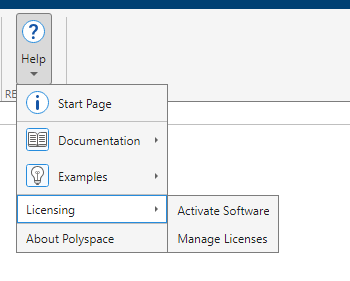
To activate your Polyspace product from within the Polyspace Platform user interface, select Help > Licensing > Activate Software and follow the prompts from within the MathWorks® Product Activation application.
To access the MathWorks License Center in your browser, select Help > Licensing > Manage Licenses.
Polyspace Platform User Interface: Activate Polyspace products from within the user interface
Polyspace Platform User Interface: Convert Polyspace projects to Polyspace Platform projects from the command line
In R2025a, you can convert a Polyspace project file (.psprj) to a Polyspace
Platform workspace file (.pswks) and Polyspace Platform project files
(.psprjx) by using the polyspace-project
-convert-psprj-to-workspace
system command. For more information on the benefits and limitations of converting to
Polyspace Platform projects, see Benefits and Limitations of Switching to Polyspace Platform User Interface.
Analysis Results
Bug Finder Defects: Check for variable that can be moved and variable that are read after move operation
In R2025a, you can use Bug Finder to check for these defects.
| Defect | Description | Defect Group |
|---|---|---|
Expensive
                     last use of variable
| An expensive-to-copy local variable is copied in its final use instead of being moved. | Performance |
Variable
                     read after move
| A variable in a moved-from state is used in an operation that has preconditions. | Programming |
For the full list of checkers, see Defects. For more information on defect groups, see Bug Finder Defect Groups.
MISRA C:2012 Support: Check for violations of concurrency-related rules introduced in MISRA C:2012 Amendment 4
In R2025a, Polyspace supports these concurrency rules introduced in MISRA C™:2012 Amendment 4 (AMD4).
| Rule | Description |
|---|---|
MISRA
C:2012 Rule 2.8 | A project should not contain unused object definitions |
MISRA
C:2012 Rule 7.6 | The small integer variants of the minimum-width integer constant macros shall not be used |
MISRA
C:2012 Rule 9.6 | An initializer using chained designators shall not contain initializers without designators |
MISRA
C:2012 Rule 11.10 | The _Atomic qualifier shall not be applied to the
incomplete type void |
MISRA
C:2012 Rule 12.6 | Structure and union members of atomic objects shall not be directly accessed |
MISRA
C:2012 Rule 18.10 | Pointers to variably-modified array types shall not be used |
MISRA
C:2012 Rule 22.13 | Thread objects, thread synchronization objects and thread-specific storage pointers shall have appropriate storage duration |
MISRA
C:2012 Rule 22.18 | Non-recursive mutexes shall not be recursively locked |
MISRA
C:2012 Rule 21.25 | All memory synchronization operations shall be executed in sequentially consistent order |
For more information, see Polyspace Support for MISRA C : 2012 Technical Corrigenda and Amendments.
MISRA C:2023 Support: Check for violations of concurrency-related rules
In R2025a, Polyspace supports these new rules that check for issues related to concurrency.
| Rule or Directive | Description |
|---|---|
MISRA
C:2023 Rule 2.8 | A project should not contain unused object definitions |
MISRA
C:2023 Rule 7.6 | The small integer variants of the minimum-width integer constant macros shall not be used |
MISRA
C:2023 Rule 9.6 | An initializer using chained designators shall not contain initializers without designators |
MISRA
C:2023 Rule 11.10 | The _Atomic qualifier shall not be applied to the
incomplete type void |
MISRA
C:2023 Rule 12.6 | Structure and union members of atomic objects shall not be directly accessed |
MISRA
C:2023 Rule 18.10 | Pointers to variably-modified array types shall not be used |
MISRA
C:2023 Rule 21.25 | All memory synchronization operations shall be executed in sequentially consistent order |
MISRA
C:2023 Rule 22.18 | Non-recursive mutexes shall not be recursively locked |
MISRA
C:2023 Rule 22.13 | Thread objects, thread synchronization objects and thread-specific storage pointers shall have appropriate storage duration |
For the full list of supported MISRA C:2023 rules and directives, see MISRA C :2023 Directives and Rules.
CERT C Support: Check for additional recommendations
In R2025a, you can check for violations of these CERT C recommendations in addition to previously supported rules and recommendations.
| CERT C Recommendations | Description | Polyspace Checker |
|---|---|---|
| EXP03-C | Do not assume the size of a structure is the sum of the sizes of its members | CERT C:
Rec. EXP03-C |
| PRE04-C | Do not reuse a standard header file name | CERT C:
Rec. PRE04-C |
| STR06-C | Do not assume that strtok() leaves the parse string unchanged | CERT C:
Rec. STR06-C |
For the complete list of supported CERT C rules and recommendations, see CERT C Rules and Recommendations.
CWE Support: Check for violation of additional CWE rules
In R2025a, Polyspace supports these additional Common Weakness Enumeration (CWE) coding rules.
| CWE Rule | Description | Polyspace Checkers |
|---|---|---|
| CWE 89 | Improper Neutralization of Special Elements used in an SQL Command ('SQL Injection') | CWE Rule
89 |
| CWE 90 | Improper Neutralization of Special Elements used in an LDAP Query ('LDAP Injection') | CWE Rule
90 |
| CWE 99 | Improper Control of Resource Identifiers ('Resource Injection') | CWE Rule
99 |
| CWE 256 | Plaintext storage of a password | CWE Rule
256 |
For all CWE rules supported with Polyspace Bug Finder, see Common Weakness Enumeration (CWE).
Code Metrics: Measure function stress complexity
In R2025a, you can calculate the stress complexity of your function using the code metric
Function Stress
         Complexity
. This metric measures the
complexity of the internal structure and external connections of a function. A high value of
this metric can indicate a bottleneck in your code.
Polyspace calculates this metric using this formula:
Function stress complexity = Cyclomatic complexity ⋅ (Number of calling functions ⋅ Number of called functions)2
For more details, see Function Stress
Complexity.
For a list of supported code metrics, see Code Metrics.
Guidelines coding rule: Check if function stress complexity exceeds threshold
In R2025a, you can check if any function in your code exceeds the specified function stress
complexity threshold by using the Guideline coding rule Function stress
complexity exceeds threshold.
Function stress complexity measures the complexity of internal structure and external
connections of a function. If a function in your code has high function stress complexity, it
can indicate a bottle neck in your code. The default threshold of this Guideline coding rule
is 10000.
For details about this Guideline coding rule, see Function stress
complexity exceeds threshold
Assembly Support: Obtain precise analysis results for asm blocks with
input and output variables
In R2025a, Polyspace supports the extended assembly capability of GCC and Clang compilers. These
compilers support asm blocks that allow you to specify input and output
operands of the asm block. The input operands are read from and the output
operands are written to in the assembly code. For example, the function
mySQRT uses an asm block to calculate the square root
of a floating-point variable. The asm block specifies that the assembly
code reads from the input variable input and writes to the output variable
res.
float mySQRT(float input)
{
	register float res = 0.0f;
	__asm volatile("FSQRT %s[result], %s[value]"
	               : [result] "=w"(res)
	               : [value] "w"(input)
	              );
	return res;
}


void func(void) {
	float myConst = 1 / mySQRT(3.1416);
}asm block if
your compiler is GCC or Clang. This information improves the precision of Polyspace analysis. For example, analyze the preceding code with the option Compiler (-compiler) set to gnu12.x or
clang13.x. Polyspace recognizes that the variable res is written to in the
asm block and does not report the defect Float
division by zero on the operation 1/mySQRT(3.1416).
Previously, Polyspace did not recognize the write operation in the asm block and
reported a Float division by zero defect.Concurrency: Analyze code containing recursive mutexes with higher precision
Starting in R2025a, Polyspace recognizes recursive mutexes. For example, in this code, Polyspace recognizes the mutex rec_mutex as a recursive
mutex:
mtx_t rec_mutex;

void foo(){
    mtx_init( &rec_mutex, mtx_recursive); // Recursive mutex

}Double lock when a recursive function locks a recursive mutex
recursively.Because the analysis of code containing recursive mutexes is now more precise, the number of coding rule violations and defects reported on your code related to concurrency can change.
Reviewing Results
Polyspace Platform User Interface: Store Polyspace actions in the Navigation History pane
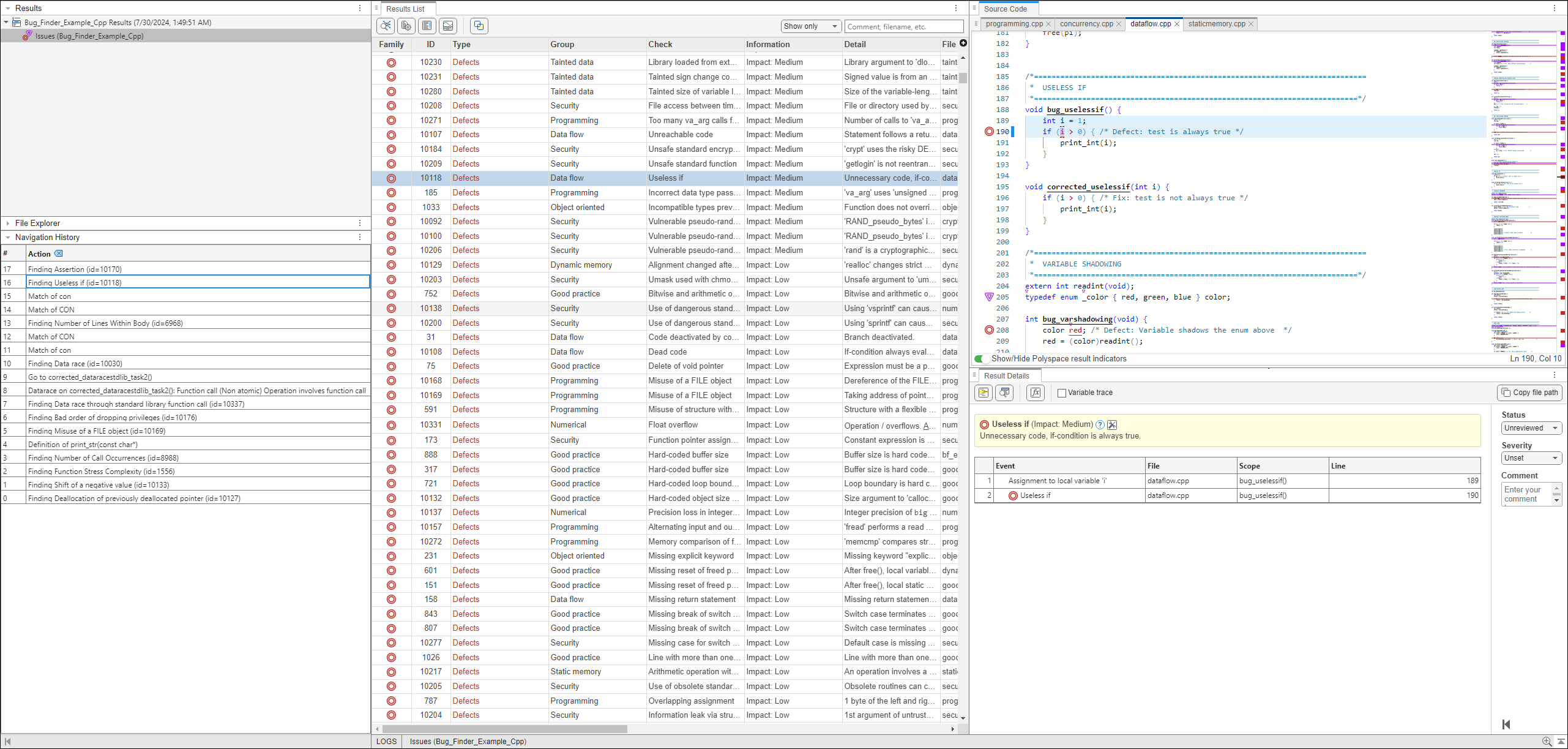
In R2025a, Polyspace displays certain review workflow actions in the Navigation History pane.
Click on an action in the Navigation History pane to open the relevant result in the Result Details pane and navigate within the Source Code pane to the location of the code associated with the action. As you continue your results review process, use the Navigation History to refer back to previous results and locate the associated code in the Source Code pane.
The actions Polyspace records include:
Selecting a result in the Results List pane
Selecting Keep position in Navigation History from the Source Code pane right-click menu.
Selecting a node in a graph, such as the Error Call Graph or the Variable Access Graph.
Selecting a row in the Code Search, Call Hierarchy, Global Variable Usage or Global Variable Accesses panes.
Polyspace Platform User Interface: Store Polyspace actions in the Navigation History pane
Polyspace Platform User Interface: Differentiate between results in different files
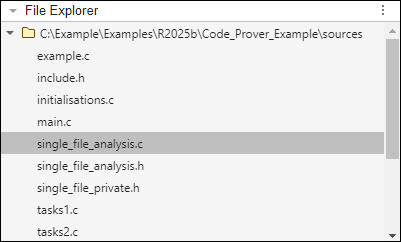
In R2025a, Polyspace displays the File Explorer pane to help recognize different results and the source files the result was found in. Click a source file name in the File Explorer pane to filter the Results List to show only results found in the selected source file. This can be useful when reviewing results where multiple source files share the same name.
Right-click a file in the File Explorer pane to select the option to view the source file in the Source Code pane or copy the path of the source file to your clipboard.
Polyspace Platform User Interface: Differentiate between results in different files