R2024b

New Features, Bug Fixes, Compatibility Considerations

Analysis Setup

 Polyspace Platform: Integrated environment supporting static analysis and dynamic testing of C/C++ code

Starting in R2024b, you can choose to use Polyspace Platform, an integrated environment for Polyspace® Bug Finder™, Polyspace Code Prover™, and Polyspace Test™. Polyspace Platform supports static analysis and dynamic testing of C/C++ code in one common interface. This means that:

  • You can perform a single one-time setup for static analysis and dynamic testing.

  • You can view results of static analysis and dynamic testing on a common dashboard.

  • The static analysis products provide information that makes the dynamic testing workflow easier.
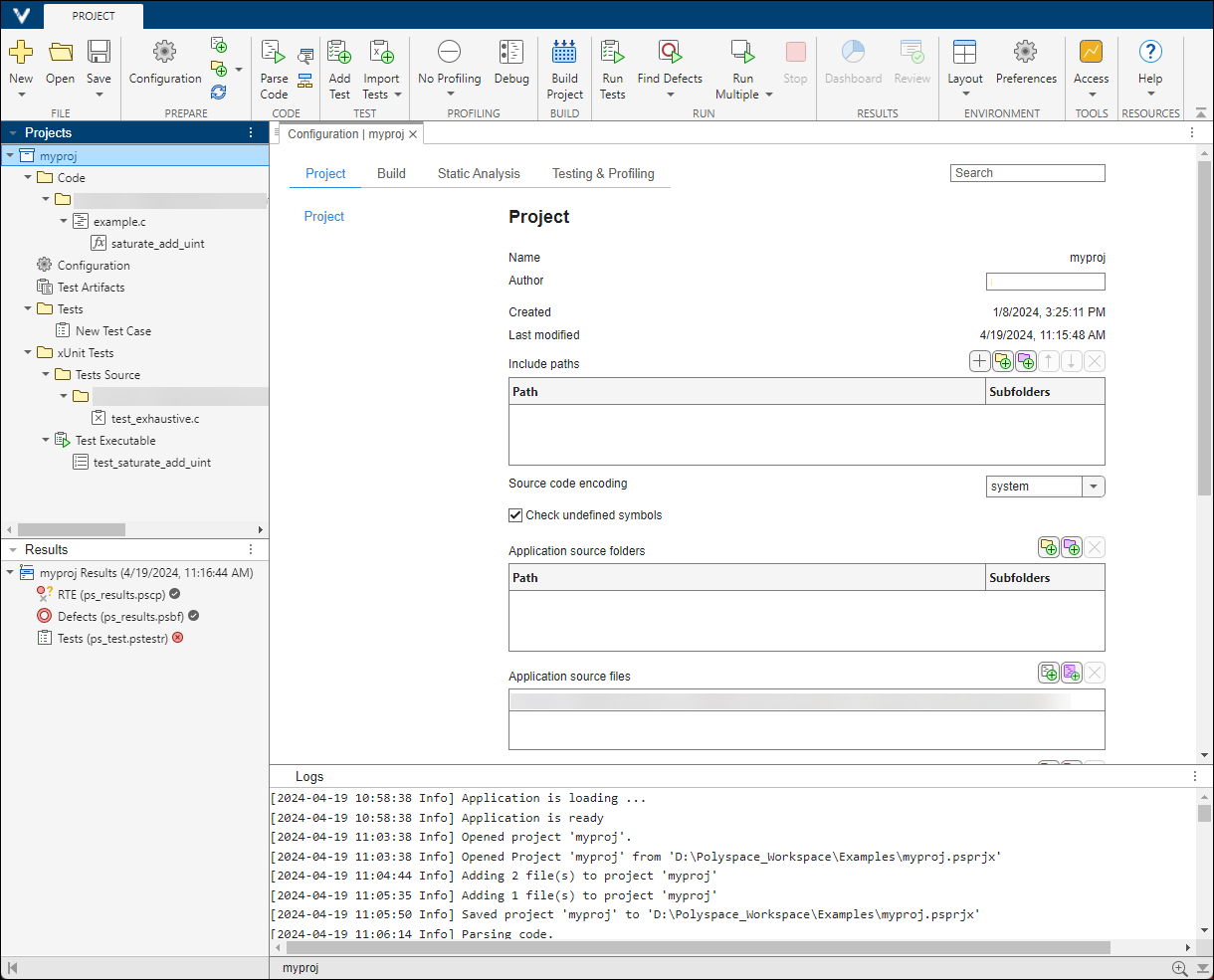
Polyspace Platform project open with Configuration tab, Results list, and Project pane.

Benefits of Polyspace Platform

The following table explains some benefits the integrated environment of Polyspace Platform provides.

BenefitDetails
Shared project setup

You can add C/C++ source files to the project, configure build options, optionally change defaults for static analysis or testing options, and start running static analysis or tests. Adding sources and configuring build options is required only once, irrespective of whether you want to find bugs or write and run tests.

Shared build configuration

You can use your build configuration for both static analysis and running tests.

Polyspace Bug Finder and Polyspace Code Prover use the build information to emulate your compiler and check your sources for compliance with the C/C++ language standard, before running static analysis.

Polyspace Test uses the build information to build and run your sources and tests using your compiler.

Same layout for static analysis, dashboards, and test results

Polyspace Platform displays all results in a similar layout, whether or not the results are from static analysis or dynamic tests.

You can see an overview of all results on a single dashboard. The dashboards for various families of results (defects, coding standard violations, tests, coverage) follow a similar layout.

Opening a set of results from a project or result dashboard displays a Results List. Click a result to bring up explanation and review information in the Result Details pane and highlight the error in your code within the Source Code pane.

You can start reviewing results by clicking on items on the Results List pane and drilling down to the details on the Result Details and Source Code pane. Once you review a result, you can add review information, such as the Status, Severity, and optional notes. This workflow is similar for all families of results (defects, coding standard violations, tests, coverage).

Static analysis products that complement dynamic testing

The static analysis products can provide information that makes the dynamic testing workflow easier. In particular:

New Features in the Polyspace Platform user interface

In addition, the Polyspace Platform user interface supports several new features that are not available in the desktop user interface.

FeatureLearn more
Utilize basic source control abilities such as diff and merge for projects and configurations

Compare and Merge Polyspace Platform Projects and Configurations Before Submission to Source Control (Polyspace Test)

Create workspaces capable of opening multiple projects at once

Manage Related Projects in Polyspace Platform User Interface Using Workspaces

View project overview and review dashboards previously only available in Polyspace Access

Dashboard in Polyspace Platform User Interface

Review and address identical findings

Apply Existing Review Information to Identical Findings

View file specific options in your project configuration

Add Sources from Build Command

Add resources such as source files, external test files, include paths, and xUnit test files using relative pathsShare Polyspace Platform Projects, Workspaces, and Configurations

For more information about Polyspace Platform, see Polyspace Platform: A Unified Platform for Static Analysis and Dynamic Testing.

 Compatibility Considerations

To migrate your current Polyspace projects (.psprj files) to Polyspace Platform projects (.psprjx files), see Benefits and Limitations of Switching to Polyspace Platform User Interface.

Some capabilities are not yet supported in the Polyspace Platform user interface. For more information on unsupported workflows and changes in workflows, see Capabilities Not Yet Supported in Polyspace Platform User Interface.

 Create user-defined coding standard

Starting in R2024b, you can create a user-defined coding standard by using existing Polyspace defects and coding rules. A user-defined coding standard allows you to collect and sort coding rules and defects that are relevant to your project or your organization into a single coding standard.

To create a user-defined coding standard:

  1. Choose a set of guidelines that comprise your custom standard. These guidelines can be part of existing coding standards.

  2. Map these guidelines to existing Polyspace checkers.

  3. Create a user coding standard (.pschk) file by bundling the mapped checkers into a single standard. To bundle the checkers, use the command polyspace-catalog-bundler.

For details about creating the user-defined coding standard, see Create User-Defined Coding Standard by Using Polyspace Bug Finder Checkers. To learn more about finding appropriate mappings between your chosen guidelines and Polyspace checkers, see Find Polyspace Bug Finder Checkers That Map to Coding Rules in User-Defined Coding Standard.

You can share the user-defined coding standard file among multiple projects and users to enforce a common set of rules in your group or organization.

To run a Polyspace Bug Finder analysis using the user-defined coding standard, use the user-defined coding standard (.pschk) file as an input to the command Checkers activation file (-checkers-activation-file). Alternatively, specify the .pschk file as an input to Checkers activation file in the Polyspace Platform user interface. See Check for Violations of User-Defined Coding Standard Using Polyspace Bug Finder.

C++20 Support: Run Polyspace analysis on code that follows version C++20 of C++ standard

In R2024b, Polyspace supports version C++20 of the C++ Standard (ISO®/IEC 14882:2020).
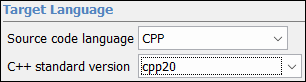
Polyspace Target Language menu selection

You can now setup a Polyspace analysis for code that uses C++20-specific features. Previously, Polyspace did not recognize some C++20 features, resulting in compilation errors.

See also C++ standard version (-cpp-version).

Project Creation from Build Command: Create separate Polyspace analysis modules using existing modularization in your codebase

Starting in R2024b, when you create a Polyspace project or options file from your build command, you can specify an explicit modularization strategy.

Previously, when creating a Polyspace project or options file from your build command using the polyspace-configure command, you could specify the option -module, which created a separate analysis module for each binary created from your build command. This modularization strategy worked only if you created a project or options file by running your build command. You could not have used this strategy if you created the project or options file from a JSON compilation database.

Starting in R2024b, you have two additional options that allow you to specify an explicit modularization strategy:

  • -modules-list fileWithModuleList: Specify a text file fileWithModuleList with an explicit list of root folders in your codebase (one root folder per line). For each root folder listed in the text file, the polyspace-configure command creates a separate analysis module that consists of only the source files in that root folder.

  • -module-output-pattern regex: Specify a regular expression for the root folders in your codebase. For each root folder captured by your regular expression, the polyspace-configure command creates a separate analysis module that consists of only the source files in that root folder.

Both options are supported whether you create a project or options file from your build command or a JSON compilation database. If you use a CMake compilation database, you do not even have to specify the option -module-output-pattern with a regular expression. If you use the option -module, the polyspace-configure command can read the modularization from your JSON compilation database and create separate analysis modules.

What constitutes an analysis module depends on the output of the polyspace-configure command:

  • If you generate a Polyspace Platform workspace (.pswks file), using a modularization strategy creates a workspace with several projects (.psprjx files).

  • If you generate a Polyspace options file, using a modularization strategy creates several options files.

For more information, see polyspace-configure.

Polyspace Bug Finder run settings: Calculate code metrics when running a fast analysis

In R2024b, you can calculate code metrics when running a Polyspace Bug Finder analysis with the option -fast-analysis. For details about how to enable this option, see Use fast analysis mode for Bug Finder (-fast-analysis).

For details about calculating code metrics, see Calculate code metrics (-code-metrics).

 Changes in MATLAB function, options object and properties

getSummary input values for individual coding standards not recommended

Behavior change in future release

These input values for the function getSummary are not recommended:

Input ValuesMeaning
'misraC'MISRA C™:2004 rules
'misraCAGC'MISRA C:2004 rules for generated code
'misraCPP'MISRA™ C++ rules
'misraC2012'MISRA C:2012 rules
'jsf'JSF® C++ rules
'certC'CERT® C rules
'certCpp'CERT C++ rules
'iso17961'ISO/IEC TS 17961 rules
'autosarCPP14'AUTOSAR C++ 14 rules
'metrics'Code complexity metrics
'customRules'Custom rules enforcing naming conventions for identifiers
'guidelines'Polyspace Guidelines checkers

To summarise the coding rule violations, use the value 'codingStandards' instead. If you use the input values in the table, Polyspace shows a warning.

For more information, see getSummary.

Analysis Results

  MISRA C++:2023 Support: Check for violations of coding rules from MISRA C++: 2023 standard

In R2024b, Polyspace supports all the rules and directives from the new MISRA C++:2023 standard. The MISRA C++:2023 guidelines target ISO/IEC 14882:2017, commonly referred to as C++17. This new standard is an update of MISRA C++:2008 and incorporates the AUTOSAR C++14 rules. To check for violations of coding rules from this new standard, use one of these workflows:

For a list of MISRA C++:2023 rules, see MISRA C++:2023 Rules and Directives.

MISRA C:2023 Support: Check for violations of concurrency related rules and directives

In R2024b, Polyspace supports seven new rules that check for issues related to concurrency.

Rule or DirectiveDescription
MISRA C:2023 Dir 5.1There shall be no data races between threads.
MISRA C:2023 Dir 5.2There shall be no deadlocks between threads.
MISRA C:2023 Rule 22.11A thread that was previously either joined or detached shall not be subsequently joined nor detached.
MISRA C:2023 Rule 22.15Thread synchronization objects and thread-specific storage pointers shall not be destroyed until after all threads accessing them have terminated.
MISRA C:2023 Rule 22.16All mutex objects locked by a thread shall be explicitly unlocked by the same thread.
MISRA C:2023 Rule 22.17No thread shall unlock a mutex or call cnd_wait() or cnd_timedwait() for a mutex it has not locked before.

MISRA C:2012 Support: Check for violations of concurrency-related rules and directives introduced in MISRA C:2012 Amendment 4

In R2024b, Polyspace supports new concurrency rules and directives from MISRA C:2012 Amendment (AMD) 4.

Rules and Directives Introduced in Amendment 4

Rule or DirectiveDescription
MISRA C:2012 Dir 5.1There shall be no data races between threads.
MISRA C:2012 Dir 5.2There shall be no deadlocks between threads.
MISRA C:2012 Rule 22.11A thread that was previously either joined or detached shall not be subsequently joined nor detached.
MISRA C:2012 Rule 22.15Thread synchronization objects and thread-specific storage pointers shall not be destroyed until after all threads accessing them have terminated.
MISRA C:2012 Rule 22.16All mutex objects locked by a thread shall be explicitly unlocked by the same thread.
MISRA C:2012 Rule 22.17No thread shall unlock a mutex or call cnd_wait() or cnd_timedwait() for a mutex it has not locked before.

Rules Modified in Amendment 4

Rule or DirectiveDescription of Change
MISRA C:2012 Rule 1.4

This rule now allows the use of these features:

  • The _Atomic type specifier and the facilities provided by <stdatomic.h>

  • The _Thread_local storage class specifier and the facilities provided by <threads.h>

MISRA C:2012 Rule 2.2The rule definition is changed to "A project shall not contain dead code".
MISRA C:2012 Rule 2.7The rule definition is changed to "A function should not contain unused parameters".
MISRA C:2012 Rule 8.9

The rule definition is changed to "An object should be declared at block scope if its identifier only appears in a single function".

MISRA C:2012 Rule 11.3The rule definition is changed to "A conversion shall not be performed between a pointer to object type and a pointer to a different object type".
MISRA C:2012 Rule 11.8The rule is extended to cover the _Atomic qualification. The rule definition is changed to "A conversion shall not remove any const, volatile or _Atomic qualification from the type pointed to by a pointer".
MISRA C:2012 Rule 13.2The rule is extended to cover concurrency related issues. The rule definition is changed to "The value of an expression and its persistent side effects shall be the same under all permitted evaluation orders and shall be independent from thread interleaving".
MISRA C:2012 Rule 18.3 The rule now applies to expressions of pointer type instead of objects of pointer type. The rule definition is changed to "The relational operators >, >=, < and <= shall not be applied to expressions of pointer type except where they point into the same object".
MISRA C:2012 Rule 18.6The rule is extended to thread-local objects. The rule definition is changed to "The address of an object with automatic or thread-local storage shall not be copied to another object that persists after the first object has ceased to exist".
MISRA C:2012 Rule 18.8

The rule is limited to variable-length arrays only. The rule definition is changed to "Variable-length arrays shall not be used".

See Polyspace Support for MISRA C : 2012 Technical Corrigenda and Amendments.

Bug Finder Checkers: Check for defects such as useless captures and expensive use of map container

In R2024a, using new Bug Finder checkers, you can check for these additional defects.

DefectDescriptionDefect Group
Useless captureLambda captures objects but does not use the objects.Good Practice
Expensive use of map instead of setThe key for an std::map is a member or field of the object being inserted, resulting in redundant map key.Performance

For the full list of checkers, see Defects. For more information on defect groups, see Bug Finder Defect Groups.

CERT C Support: Check for additional recommendations

In R2024b, you can look for violations of these CERT C recommendations in addition to previously supported rules and recommendations.

CERT C RecommendationsDescription Polyspace Checker
EXP11-CDo not make assumptions regarding the layout of structures with bit-fields.CERT C: Rec. EXP11-C
FIO03-CDo not make assumptions about fopen() and file creation.CERT C: Rec. FIO03-C
FIO06-CCreate files with appropriate access permissions.CERT C: Rec. FIO06-C
FIO08-CTake care when calling remove() on an open file.CERT C: Rec. FIO08-C
FIO10-CTake care when using the rename() function.CERT C: Rec. FIO10-C
PRE05-CUnderstand macro replacement when concatenating tokens or performing stringificationCERT C: Rec. PRE05-C

For the complete list of supported rules, see CERT C Rules and Recommendations.

 Accuracy Improvement: See more accurate results for code containing signal handling

Starting in R2024b, Polyspace Bug Finder detects signal() and std::signal() functions and models the signals as preemptable interrupts. Polyspace now assumes:

  • Signal-handling functions can be executed any time during the program execution.

  • Execution of the signal-handling functions cannot be interrupted by other tasks. Signal handling functions can be interrupted by other interrupts.

Because of the change in how Polyspace treats signal handling, accuracy of Bug Finder results is improved. Consider this code:

#include <stdbool.h>
#include <csignal>

static bool cond = true;

static void sig_handler_func(int sig) {

	if(sig == SIGTERM) {
		cond = false;
	}
}

void foo(void) {

	std::signal(SIGTERM, sig_handler_func);  

	while(cond) {     //Potential infinite loop
		//...
	}

	return;
}

The function foo() contains a while loop that terminates if the program receives a SIGTERM or termination signal. Polyspace now assumes that the function sig_handler_func() can be executed at any time and can set the variable cond to false, thereby terminating the loop. As a result, Polyspace now does not report the defect Infinite loop. Previously, because Polyspace did not model signals as interrupts, the loop in foo() was reported as an Infinite loop defect.

 Compatibility Considerations

Because of changes in Polyspace assumptions about the data flow of signal handling, the number of Bug Finder defects and coding rule violations in your code might change.

 Accuracy Improvement: Bug Finder no longer reports issues that cannot occur with known input values

Starting in R2024b, Polyspace Bug Finder no longer reports defects and coding rule violations that cannot occur with known input values. For example, in this code, an Integer division by zero defect can occur in the function inv_average() if n=0:

int inv_average(int n, int* data) {
     int sum = 0;
     for (int i = 0; i < n; i++) {
         sum += data[i];
     }
     return n / sum;
 }


void call() {
    int tab[] = {54, 54, 54, 54, 54, 54, 54, 54, 54, 54, 54};
    inv_average(sizeof(tab)/sizeof(tab[0]), tab);
}
Because the function is not called with n = 0 on any execution paths, Polyspace does not report a violation.

In previous releases, Polyspace Bug Finder reported such issues with these messages in Results Details:

  • This defect is unreachable given the function's known input values.
  • The function's known input values will not cause a defect.

 Precision Improvement: Constraint set to the bound of data type when it is outside the type range

Starting in R2024b, if the constraint you specify for a variable is outside the range of the variable data type, Polyspace sets the constraint to the bounds of the data type. For example, consider this function:

short getFlooredNumber(short var1, short var2) {
    return var1/var2;
}
If you run a stricter Polyspace Bug Finder analysis using the option Run stricter checks considering all values of system inputs (-checks-using-system-input-values) and specify no constraints on the function parameters, Bug Finder reports an Integer division by zero defect. Now specify these constraints for the input variables of the function:

  • For var1, set the constraint to 1..32768

  • For var2, set the constraint to -33333..-1

The variables have the data type short, which has the range -32768..32767. At least one constraint for each variable is beyond the range of short.

Polyspace now sets the out-of-range constraint to the bounds of the variable data type. In this case:

  • The maximum value of var1 is set to 32767, resulting in the constraint 1..32767.

  • The minimum value of var2 is set to -32768, resulting in the constraint -32768..-1.

Running a Polyspace Bug Finder analysis with these constraints resolves the defect.

Previously, if a constraint was beyond the range of the variable data type, Polyspace reported a warning in the analysis log and then ignored the specification in the analysis. The constraints on var1 and var2 would not resolve the defect in previous releases of Polyspace.

 Compatibility Considerations

This change may change the number of Polyspace results in your code.

Reviewing Results

 Check for violations of coding rules from a user-defined coding standard

In R2024b, Polyspace supports checking for violations of coding rules from a user-defined coding standard. A custom coding standards is a .pschk file. Use it either with the Polyspace Platform user interface or at the command-line.

  • Polyspace Platform user interface:

    1. In the Configuration pane of a project, in the Static Analysis tab, select Defects and Coding Standards and then specify the .pschk file as an input to Checkers activation file.

    2. Optionally, you can open the .pschk file by clicking the button next to the option and then activate additional Bug Finder defects or other existing coding rules.

    3. After configuring checkers, run Polyspace analysis by clicking Find Defects in the Project tab.

  • Command line — Specify the user-defined coding standard (.pschk file) as an input to the option Checkers activation file (-checkers-activation-file) when running analysis in the command line. For example, use this command:

    polyspace-bug-finder -sources foo.cpp -checkers-activation-file myStandard.pschk
    This command runs a Bug Finder analysis in which the checkers in the user-defined coding standard myStandard.pschk are activated. Optionally, you can activate other checkers by opening the file myStandard.pschk in the Checkers Selection window. To open this window, at the command line, enter:
    polyspace-checkers-selection
    After the Checkers Selection window opens, browse to the file myStandard.pschk and select additional checkers. After saving your selection, you can use the file at the command line to activate checkers from the user-defined coding standard as well as other Bug Finder checkers that you selected.

For more details, see Check for Violations of User-Defined Coding Standard Using Polyspace Bug Finder. For details about how to crate a user-defined coding standard, see Create User-Defined Coding Standard by Using Polyspace Bug Finder Checkers.

The older Polyspace desktop user interface and Polyspace Access™ currently do not support this feature. If you upload analysis results that contain violations of a user-defined coding standard to Polyspace Access, the violations are ignored. To check for violations of user-defined coding standards, use the new Polyspace Platform user interface, the command line, or the Polyspace as You Code IDE extensions. For details about configuring your Polyspace as You Code extensions to check for violations of user-defined coding standards, see Setting Checkers in Polyspace as You Code (Polyspace Access).

MISRA Comments and Code Annotations: Import your existing MISRA C++:2008 and AUTOSAR C++14 justifications to MISRA C++:2023 results

In R2024b, you can check for violations of coding rules from the new MISRA C++:2023 standard. The MISRA C++:2023 standard is an update and consolidation of the MISRA C++:2008 and AUTOSAR C++14 standards. If you have existing annotations and justification for MISRA C++:2008 and AUTOSAR C++14 results in your project, Polyspace automatically imports them for the corresponding MISRA C++:2023 results.

Consider this code that contains several MISRA C++:2008 and AUTOSAR C++14 violations:

int f1(int input) {
  int x;
  int a = 2, i = 0, b[10] = {0, 10, 20, 30, 40, 50, 60, 70, 80, 90};

  /* polyspace +1 AUTOSAR-CPP14:M2-13-2 [To investigate:High] "Justification for M2-13-2" */
  const int b2 = a + 00 ; 

  if (input)
    x = 2;

  /* polyspace +1 AUTOSAR-CPP14:A5-0-1 [To investigate:High] "Justification for A5-0-1" */
  x = b[i] + i++; 
}

void f2(void) {
  int r, x=1, *p = &x;
  float *q;

  /* polyspace +1 AUTOSAR-CPP14:A5-2-2 [To investigate:High] "Justification for A5-2-2" */
  q = (float*)p; 
}

int f3(int input) {
  int x;
  int a = 2, i = 0, b[10] = {0, 10, 20, 30, 40, 50, 60, 70, 80, 90};

  /* polyspace +1 MISRA-CPP:2-13-2 [To investigate:High] "Justification for 2-13-2" */
  const int b2 = a + 00 ;

  if (input)
    x = 2;

  /* polyspace +1 MISRA-CPP:5-0-1 [To investigate:High] "Justification 5-0-1" */
  x = b[i] + i++;
}
The MISRA C++:2008 and AUTOSAR C++14 violations are annotated in this code. After running a Polyspace analysis, you see these annotations in the Results Details pane. When you check for violations of MISRA C++:2023 in this code, Polyspace automatically imports the annotations from MISRA C++2008 rules and AUTOAR C++14 rules to the equivalent MISRA C++:2023 rules. For example, you see the review information for MISRA C++:2008 Rule 2-13-2 in the Results Details pane for MISRA C++:2023 Rule 5.13.3:
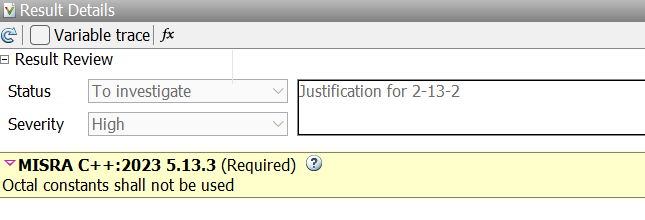
Results details showing the automatic import of review information from MISRA C++:2008: 2-13-2 to MISRA C++:2023 5.13.3

Polyspace also imports annotations and justifications from MISRA C++:2008 and AUTOSAR C++14 results to MISRA C++:2023 results if you upload your MISRA C++:2023 results to a Polyspace Access database that contains MISRA C++:2008 and AUTOSAR C++14 results.

For details about importing justifications, see Import Justifications from Older Standard to Newer Standard.

Simulink Support: Justify violations arising from operators

Polyspace now recognizes the code annotation MW:operator that Embedded Coder® inserts in code generated from Simulink® models. This annotation justifies violations arising from individual operators.

When generating code from a model, If you set the configuration parameter OperatorAnnotations to On, Embedded Coder inserts the code annotation MW:operator to justify violations arising from an operation. For example, this code justifies a violation of MISRA C:2012 Dir 4.1 arising from the - operation:

uint32_T qY;

/* Sum: '<Root>/SubUnsigned' incorporates:
 *  Inport: '<Root>/In1'
 *  Inport: '<Root>/In2'
 */
qY = U1 -
     /*MW:operator MISRA2012:D4.1 CERT-C:INT30-C 'Justifying MISRA C rule violation'*/
     /*MW:OvSatOk*/ U2;
if(qY > U1) {
	qY = 0U;
} 
Polyspace looks for violations arising from the operator preceding the MW:operator annotation, and annotates the violations as Justified in the results list.

For more details, see Annotate Code for Justifying Polyspace Checks (Embedded Coder).