Analysis Setup
polyspaceArtifact Function: Generate artifacts necessary for Polyspace analysis without regenerating code
In R2024a, you can generate Polyspace® artifacts for a Simulink® model without regenerating the code by calling the function
polyspaceArtifact. You do not need to integrate Polyspace with Simulink to use this function. The function polyspaceArtifact is
available with Simulink R2024a. This function generates two artifacts:
Data range specifications — The data ranges of the generated code summarized in an XML file.
Link-to-model data — The data to link the generated code to the Simulink model summarized in an XML file.
This function generates individual XML files. Access to individual Polyspace artifacts outside of an archive can be useful in a continuous integration workflow.
Some changes in your model might require updating these artifacts without requiring
updates to the generated code. For examples, If you change the Minimum or
Maximum attribute of a signal in your model, only the data range
specification needs to be updated to run a more precise Polyspace analysis. Use polyspaceArtifact function to generate the
new data range specification XML file quickly without requiring a complete regeneration of
your code.
For more details about the function, see polyspaceArtifact.
Simulink Support: More precise analysis of GetSet storage class
signal
Starting in R2024a, Polyspace uses the minimum and maximum values of a signal that has the
GetSet storage class as the data range specification of the signal.
Previously, if a signal had the GetSet storage class, Polyspace ignored the specified minimum and maximum value of the signal and ran the
analysis assuming a full range signal.
Running a Polyspace analysis with a specified minimum or maximum for signals with
GetSet storage class can reduce the number of false positive
Polyspace
Bug Finder™ results or orange Polyspace
Code Prover™ checks. Starting in R2024a, the number of false positive Bug Finder results in your analysis may decrease.
Updated Microsoft Visual C++ Support: Set up Polyspace analysis for code compiled with Visual Studio 2022
In R2024a, Polyspace supports the compiler Visual Studio 2022 natively. If you build your source code by using Visual Studio 2022 (versions 17.x), you can specify the compiler name for your Polyspace analysis.
You specify a compiler at the command line by using the option
-compiler. For
example:
polyspace-bug-finder-server -compiler visual17.x -sources file.c ...
Compiler
(-compiler).Because of the native support, you can now set up a Polyspace project without knowing the internal workings of this compiler. The analysis can interpret macros that are implicitly defined by the compiler and compiler-specific language extensions such as keywords and pragmas.
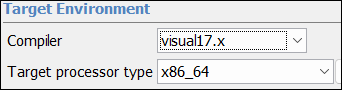
Updated Microsoft Visual C++ Support: Set up Polyspace analysis for code compiled with Visual Studio 2022
C++ Project Setup: Polyspace analysis uses the C++11 Standard (ISO/IEC 14882:2011) by default
In R2024a, the default configuration for C++ Polyspace projects uses the C++11 Standard
(ISO/IEC 14882:2011) and the analysis supports features specific to C++11 during
compilation. If you specify a value other than generic
for the Compiler
(-compiler) option, the default C++ version is defined by your
compiler.
Previously, the default configuration for C++ projects used C++03.
If your code uses C++11, you no longer need to set the option C++ standard version (-cpp-version) to
cpp11 when you run the analysis.
If you have an existing project that uses C++03, specify the option -compiler
cpp03.
Polyspace Analysis from MATLAB: Polyspace returns job ID when running analysis on remote cluster
Polyspace now returns the job ID associated with a remote analysis when you run Polyspace from MATLAB and offload the analysis to a remote cluster. You can use the job ID to, for example, download analysis results as part of an automation script.
If you create a polyspace.Options object and configure Polyspace to
send the analysis to a job scheduler, you can obtain the job ID of the remote analysis by
using these MATLAB
commands:
opts=polyspace.Options;
% Add sources and set other analysis options
% ...
% Run analysis
[status, jobID]=polyspaceBugFinder(opts,'-batch','-scheduler','myJobSchedulerProfile');
polyspaceBugFinder.Changes in analysis options and binaries
The code metrics estimating sizes of local variables have been removed
These code metrics have been removed from Bug Finder:
Lower Estimate of Size of Local VariablesHigher Estimate of Size of Local Variables
When you calculate the code metrics by using the option
-code-metrics, these two code metrics are not reported. To
calculate these metrics, use the option -stack-usage in
Polyspace
Code Prover. See Calculate stack
usage (-stack-usage) (Polyspace Code Prover).
The value CWE for the option Find defects (-checkers
-disable-checkers) has been removed
Errors
The value CWE for the option Find defects (-checkers
-disable-checkers) has been removed. If you use the value
CWE for this option, the Polyspace analysis fails with an error. To check your code for Common Weakness
Enumeration (CWE) violations, use the option Check CWE
(-cwe) instead.
The option Ignore link errors (-no-extern-C) will be
removed in a future release
Warns
The option Ignore link errors (-no-extern-C)
allows you to ignore linking errors that can arise due to functions having C linkage in
one source file and C++ linkage in another source file. Polyspace now supports mixing C code and C++ code in a project. Mixed linkages no
longer cause errors in a Polyspace analysis. This option is no longer useful and will be removed in a future
release.
If you use this option in your analysis, Polyspace issues a warning. Remove this option from your Polyspace commands and projects.
Change in calculation of cyclomatic complexity
Behavior change
In R2024a, you can use the option -consider-switch-as-single-decision to change how Polyspace calculates the code metric Cyclomatic Complexity and
applies the Guideline Cyclomatic
complexity exceeds threshold. By default, Polyspace counts each individual case of a switch-case statement
as a separate decision point if the case is terminated with a break
statement. When you specify this option, Polyspace counts the entire switch-case statement as a single
decision point.
Analysis Results
MISRA C:2023 Support: Check for violations of coding rules from MISRA C: 2023 standard
In R2024a, Polyspace supports the new MISRA C™:2023 standard. This new standard consolidates:
MISRA C:2012 rules and directives
Clarifications added in Technical Corrigendum 1 (TC1) and Technical Corrigendum 2 (TC2)
New rules and modifications added in Amendment 1 (AMD1), Amendment 2 (AMD2), Amendment 3 (AMD3), and Amendment 4 (AMD4)
To check for violations of coding rules from this new standard, use either of these methods:
Polyspace desktop user interface — In the Configuration pane, select Check MISRA C:2023 in the node Coding Standards & Code Metrics. Select a value from the drop-down list to enable groups of MISRA C:2023 coding rules.
Command line — Use the option
Check MISRA C:2023 (-misra-c-2023)orCheckers activation file (-checkers-activation-file).
To check for violations of MISRA C:2023 rules and directives that apply to generated code, specify the option
Use generated code requirements (-misra-c-2023-agc-mode).
The table shows Polyspace coverage of MISRA C:2023 rules and directives.
| Rules | Coverage |
|---|---|
| Rules from the MISRA C:2012 standard | 100% |
| Clarifications added by TC1 and TC2 | 100% |
| Rules and modifications from MISRA C:2012 AMD1. These rules address security vulnerabilities. | 100% |
Rules and modifications from MISRA C:2012 AMD2. These rules address
C11 core functionalities such as the aligned_alloc
function and the _Exit flag. | 100% |
Rules and modifications from MISRA C:2012 AMD3. These rules address
new functionalities from the C11 and C18 standards such as complex
essential types and _Generic selection. | 100% |
| Rules and modifications from MISRA C:2012 AMD4. These rules address new functionalities from the C11 and C18 standard related to multithreading and atomics. | Will be covered in a future release |
For a list of supported MISRA C:2023 rules, see MISRA C :2023 Directives and Rules.
CWE Support: Additional CWE version 4.12 support
In R2024a, Polyspace supports Common Weakness Enumeration (CWE) version 4.12. In this release, you can check for violations of these CWE rules in addition to previously supported rules.
| CWE Rule | Description | Polyspace Checkers |
|---|---|---|
| CWE 543 | Use of Singleton Pattern Without Synchronization in a Multithreaded Context | CWE
Rule 543 |
| CWE 674 | Uncontrolled Recursion | CWE
Rule 674 |
For all CWE rules supported with Polyspace Bug Finder, see Common Weakness Enumeration (CWE).
CWE Support: Extend Polyspace coverage of CWE rules more easily
Polyspace now checks for an additional 77 Common Weakness Enumeration (CWE) rules when you enable all CWE checkers. Previously, Polyspace checked for a smaller subset of rules when you enabled all CWE checkers, and you had to use a mapping between CWE rules and Polyspace defect checkers to extend the coverage of CWE rules.
With the broader CWE coverage, some Polyspace CWE checkers only partially match a given
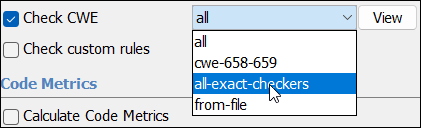
CWE rule. To enable only CWE checkers that match a CWE rule exactly, set the Check CWE
(-cwe) analysis option to the new value
all-exact-checkers.
Bug Finder Checkers: Check for defects such as unused objects or expensive
std::function type
In R2024a, using new Bug Finder checkers, you can check for these additional defects.
| Defect | Description | Defect Group |
|---|---|---|
Unnecessary reference to parameter | Parameter is passed to function as const reference when passing by value
is more efficient | Performance |
Expensive unused object | Expensive local object is constructed but not used | Performance |
Expensive std::function type definition | When defining an std::function type, pass-by-value
semantics are used for expensive to copy arguments | Performance |
Unused variable | Variable defined or declared but not read or written | Good Practice |
Resource injection | Data input is not properly restricted before being used as a resource identifier | Security |
For the full list of checkers, see Defects. For more information on defect groups, see Bug Finder Defect Groups.
MISRA C:2012 Support: Check for violations of rules and directives introduced and modified in MISRA C:2012 Amendment 3
In R2024a, Polyspace supports new and modified rules and directives from MISRA C:2012 Amendment (AMD) 3.
Rules and Directives Introduced in Amendment 3
| Rule or Directive | Description |
|---|---|
MISRA C:2012 Dir 4.15 | Evaluation of floating-point expressions shall not lead to the undetected generation of infinities and NaNs |
MISRA C:2012 Rule 1.5 | Obsolescent language features shall not be used |
MISRA C:2012 Rule 6.3 | A bit field shall not be declared as a member of a union |
MISRA C:2012 Rule 7.5 | The argument of an integer constant macro shall have an appropriate form |
MISRA C:2012 Rule 8.15 | All declarations of an object with an explicit alignment specification shall specify the same alignment |
MISRA C:2012 Rule 8.16 | The alignment specification of zero should not appear in an object declaration |
MISRA C:2012 Rule 8.17 | At most one explicit alignment specifier should appear in an object declaration |
MISRA C:2012 Rule 17.9 | A function declared with a _Noreturn function
specifier shall not return to its caller |
MISRA C:2012 Rule 17.10 | A function declared with a _Noreturn function
specifier shall have void return type |
MISRA C:2012 Rule 17.11 | A function that never returns should be declared with a
_Noreturn function specifier |
MISRA C:2012 Rule 17.12 | A function identifier should only be used with either a preceding
&, or with a parenthesized parameter
list |
MISRA C:2012 Rule 17.13 | A function type shall not be type qualified |
MISRA C:2012 Rule 18.9 | An object with temporary lifetime shall not undergo array-to-pointer conversion |
MISRA C:2012 Rule 21.22 | All operand arguments to any type-generic macros declared in
<tgmath.h> shall have an appropriate
essential type |
MISRA C:2012 Rule 21.23 | All operand arguments to any multi-argument type-generic macros
declared in <tgmath.h> shall have the same
standard type |
MISRA C:2012 Rule 21.24 | The random number generator functions of
<stdlib.h> shall not be used |
MISRA C:2012 Rule 23.1 | A generic selection should only be expanded from a macro |
MISRA C:2012 Rule 23.2 | A generic selection that is not expanded from a macro shall not contain potential side effects in the controlling expression |
MISRA C:2012 Rule 23.3 | A generic selection should contain at least one non-default association |
MISRA C:2012 Rule 23.4 | A generic association shall list an appropriate type |
MISRA C:2012 Rule 23.5 | A generic selection should not depend on implicit pointer type conversion |
MISRA C:2012 Rule 23.6 | The controlling expression of a generic selection shall have an essential type that matches its standard type |
MISRA C:2012 Rule 23.7 | A generic selection that is expanded from a macro should evaluate its argument only once |
MISRA C:2012 Rule 23.8 | A default association shall appear as either the first or the last association of a generic selection |
Rules and Directives Modified in Amendment 3
| Rule or Directive | Description of Change |
|---|---|
MISRA C:2012 Rule 1.4
| The rule now allows the use of these features:
|
MISRA C:2012 Rule 10.1
| Polyspace reports a violation on comparison of real and complex floating-point types. |
MISRA C:2012 Rule 10.3
| Polyspace reports no violations for appropriate assignments of essentially real floating types to essentially complex floating types. |
MISRA C:2012 Rule 10.4
| The rule now supports complex essential types. |
MISRA C:2012 Rule 10.5
| Polyspace reports a violation on inappropriate conversion to and from essentially complex floating types. |
MISRA C:2012 Rule 10.7
| The rule now supports complex essential types. |
MISRA C:2012 Rule 10.8
| Polyspace reports a violation when complex numbers are cast to wider essential types or cast from narrower essential types. |
MISRA C:2012 Rule 11.7
| The rule now supports complex essential types. |
MISRA C:2012 Rule 21.11
| The rule is now categorized as Advisory. |
MISRA C:2012 Rule 21.12
| The rule is now categorized as Required. |
MISRA C:2012 Dir 4.9
| The directive now allows function-like macros when they are used for generic selection. |
See Polyspace Support for MISRA C : 2012 Technical Corrigenda and Amendments.
Code Metrics: Measure new code comment metrics
In R2024a, you can calculate these additional code metrics.
| Code Metrics | Description |
|---|---|
Comment Ratio
| Ratio of number of lines that contain comments to the total number of lines in a file, expressed as percentage. This metric is equivalent to the Comment Frequency metric defined by European Cooperation for Space Standardization (ECSS). |
Function Comment Density
| Ratio of number of comments to number of statements per function.
This metric is similar to the file level metric Comment Density
,
measured at the function level. |
See also Code Metrics.
Guidelines: Check if use of recursion in your project exceeds threshold
In R2024a, you can use these Guideline coding rules to check if the level of recursion in your project is beyond a specified threshold:
| Guideline Checker | Description | Default Threshold |
|---|---|---|
Number of recursions exceeds threshold | Number of call graph cycles over one or more functions is greater than the defined threshold | 0 |
Number of direct recursions exceeds
threshold | Number of instances of a function calling itself directly is greater than the defined threshold. | 0 |
The Guidelines coding rules now cover all code metrics specified by the Hersteller Initiative Software (HIS) standard. See Reduce Software Complexity by Using Polyspace Checkers.
Reviewing Results
Concurrency Modeling: See protections for shared variables in concurrency modeling table
Starting in R2024a, you can view all resources related to concurrency modeling of your application in one place. On the Concurrency Modeling pane, in addition to tasks, you can now see resources such as protections for shared variables (mutex variables or functions that begin and end critical sections).
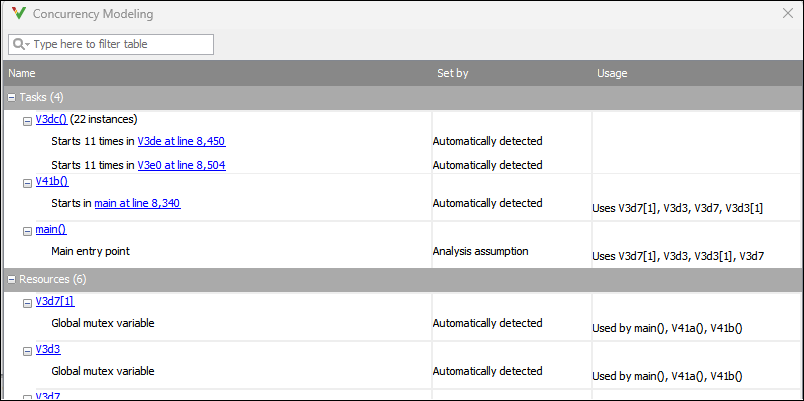
You can use the Concurrency Modeling pane to understand the Polyspace modeling of your C/C++ application with respect to concurrent/multithreaded execution. In particular, you can find the following information in one place:
Which tasks can run concurrently.
Which resources are used to protect a section of code in a task from interruption by another task.
For more information, see Concurrency Modeling in Polyspace Desktop User Interface.
MISRA Comments and Code Annotations: Import your existing MISRA C:2012 justifications to MISRA C:2023 results
In R2024a, you can check for violations of coding rules from the new MISRA C:2023 standard. If you have existing annotations and justification for MISRA C:2012 and MISRA C:2004 results in your project, Polyspace automatically imports them for MISRA C:2023 results.
For details about importing justification, see Import Justifications from an Older MISRA C Standard to a Newer MISRA C Standard.
The automatic comment import from MISRA C:2012 results to MISRA C:2023 results also takes place if you upload your MISRA C:2023 results to a Polyspace Access database that contains MISRA C:2012 results.