Analysis Setup
Simulink Support: Polyspace does not report MISRA C: 2012 rule violations for unused declarations in generated utility files
When generating code from a Simulink® model, Embedded Coder® generates utility files containing declarations for various utility functions. You can use these utility functions and macros in various other places in your project. Some of these utility functions can remain unused in your project. Starting in R2023b, Polyspace® no longer reports violations of these MISRA C™: 2012 rules for the utility files:
MISRA C:2012 Rule
                            2.3
— A project should not contain unused type declarations.MISRA C:2012 Rule 2.5— A project should not contain unused macro declarations.
You might see fewer violations of these rules for the shared utility folders:
MISRA C:2012 Rule 2.3— A project should not contain unused type declarations.MISRA C:2012 Rule 2.5— A project should not contain unused macro declarations.
Simulink Support: Reduce Polyspace analysis time of generated code by ignoring specific referenced models
Starting in R2023b, you can decrease the Polyspace analysis time of generated code by ignoring one or more referenced models. If you use a referenced model that is already verified or part of a library, you can ignore the referenced model. By ignoring already verified referenced models, you can verify your model hierarchy incrementally. This feature is available only if you use Embedded Coder to generate code from your Simulink models. Polyspace assumes that:
The functions originating from the ignored model are stubbed.
The variables originating from the ignored model are full-range.
These assumptions allow Polyspace to analyze less code and can reduce the time required to complete an analysis.
You can specify the referenced models you want to ignore interactively or programmatically:
If you run Polyspace interactively from the Simulink toolstrip, then select Ignore model references in the Configuration Parameters window.
If you run Polyspace analysis programmatically, then specify the list of model that you want to ignore in the field
ModelRefIgnoreListof apslinkoptionsobject. The list is a cell containing strings where each string is a referenced model that you want to ignore.
For details about the workflow, see:
Configuration from Build System: Improved determination of configuration import strategy based on compiler version
Polyspace can now detect your compiler version and use a configuration import strategy that is compatible with that compiler version.
To extract predefined macros, includes, and other compiler information, Polyspace tries different import strategies such as querying the compiler directly or tracing your build. Polyspace tries only import strategies that are compatible with the compiler.
Previously, Polyspace did not detect the compiler version and might have tried an import strategy that was not compatible with that compiler version.
See also polyspace-configure.
Functionality Removed: Polyspace desktop integration with Eclipse IDE
The Polyspace desktop product integration with Eclipse™-based IDEs is removed.
To continue monitoring the quality of your code from your Eclipse-based IDE, use the Polyspace as You Code™ Eclipse plugin. See Run Polyspace as You Code in Eclipse and Review Results.
Changes in analysis options and binaries
New option -create-checkers to define new checkers
Behavior change in future release
In R2023b, you can use the option -create-checkers to define specifications for a new checker. Currently, the option can be used only to define the tainted data checker, Tainted source used with sensitive function.
For more information, see -create-checkers.
New option -start-level-from-one to change how Polyspace counts call level
Behavior change in future release
In R2023b, you can use the option -start-level-from-one to
change how Polyspace calculates the code metric Number of Call
Levels. By default, Polyspace starts counting the call levels from 0. By using this option,
you can start counting the call levels from 1.
For more information, see:
Analysis Results
MISRA C:2012 Support: Checkers updated to account for MISRA C:2012 Technical Corrigendum 2
MISRA C:2012 Technical Corrigendum (TC) 2 adds clarifications to existing rules. The clarifications have led to changes in these checkers:
| Rule | Description | Updates |
|---|---|---|
MISRA C:2012 Rule
                            2.5
| A project should not contain unused macro definitions | The title of the rule is changed. The word 'declarations' is replaced by 'definitions'. |
MISRA C:2012 Rule 10.2
| Expressions of essentially character type shall not be used inappropriately in addition and subtraction operations | Polyspace now reports violations of this rule if you use
long or long long type variables in an
arithmetic operation with char type variables. |
MISRA C:2012 Rule 13.2
| The value of an expression and its persistent side effects shall be the same under all permitted evaluation orders | When evaluating whether the value or side effect of an expression depends on the order of evaluation, Polyspace no longer considers the known value of an object. Polyspace now determines if an expression is noncompliant using only the expression. This change simplifies result review. Consider this code: int foo(int x) {
int a = 0;
int y = (x = a) && (x = 2); //Noncompliant
return (x++) && (x = 1); //Noncompliant
}a. |
MISRA C:2012 Rule 13.6
| The operand of the sizeof operator shall not contain any expression which has potential side effects | This rule now has the category of "Required" instead of "Mandatory". |
MISRA C:2012 Rule 17.4
| All exit paths from a function with non-void return type shall have an explicit return statement with an expression | Polyspace does not report a violation if the main()
function of C code from C99 or later lacks an explicit
return statement. |
MISRA C:2012 Rule 17.5
| The function argument corresponding to a parameter declared to have an array type shall have an appropriate number of elements | This rule has the category of "Required" instead of "Advisory". |
See Polyspace Support for MISRA C : 2012 Technical Corrigenda and Amendments.
CERT C++ Support: Check for concurrency, exception handling, and other issues
In R2023b, you can look for violations of these CERT C++ rules in addition to previously supported rules.
| CERT C++ Rule | Description | Polyspace Checker |
|---|---|---|
| CON51-CPP | Ensure actively held locks are released on exceptional conditions | CERT C++: CON51-CPP
|
| CON55-CPP | Preserve thread safety and liveness when using condition variables | CERT C++: CON55-CPP
|
| CON56-CPP | Do not speculatively lock a non-recursive mutex that is already owned by the calling thread | CERT C++: CON56-CPP
|
| ERR60-CPP | Exception objects must be nothrow copy constructible | CERT C++: ERR60-CPP
|
| ERR62-CPP | Detect errors when converting a string to a number | CERT C++: ERR62-CPP
|
| EXP56-CPP | Do not call a function with a mismatched language linkage | CERT C++: EXP56-CPP
|
| EXP60-CPP | Do not pass a nonstandard-layout type object across execution boundaries | CERT C++: EXP60-CPP
|
| INT50-CPP | Do not cast to an out-of-range enumeration value | CERT C++: INT50-CPP
|
| OOP56-CPP | Honor replacement handler requirements | CERT C++: OOP56-CPP
|
| MSC54-CPP | A signal handler must be a plain old function | CERT C++: MSC54-CPP
|
For the complete list of supported rules, see CERT C++ Rules.
CWE Support: Updated CWE version and support for additional rules
In R2023b, Polyspace supports version 4.10 of the CWE standard. In this release, you can check for violations of these CWE rules in addition to previously supported rules.
| CWE Rule | Description | Polyspace Checkers |
|---|---|---|
| CWE-311 | Missing Encryption of Sensitive Data | CWE Rule
311 |
| CWE-319 | Cleartext Transmission of Sensitive Information | CWE Rule
319 |
| CWE-321 | Use of Hard-coded Cryptographic Key | CWE Rule
321 |
| CWE-374 | Passing Mutable Objects to an Untrusted Method | CWE Rule
374 |
| CWE-493 | Critical Public Variable Without Final Modifier |
CWE Rule
493
|
| CWE-496 | Public Data Assigned to Private Array-Typed Field | CWE Rule
496 |
| CWE-498 | Cloneable Class Containing Sensitive Information | CWE Rule
498 |
| CWE-606 | Unchecked Input for Loop Condition | CWE Rule
606 |
| CWE-683 | Function Call With Incorrect Order of Arguments | CWE Rule
683 |
| CWE-686 | Function Call With Incorrect Argument Type | CWE Rule
686 |
| CWE-687 | Function Call With Incorrectly Specified Argument Value | CWE Rule
687 |
| CWE-688 | Function Call With Incorrect Variable or Reference as Argument | CWE Rule
688 |
| CWE-822 | Untrusted Pointer Dereference | CWE Rule
822 |
For all CWE rules supported with Polyspace Bug Finder™, see Common Weakness Enumeration (CWE).
Bug Finder Checkers: Check for expensive std::any_cast, expensive member initialization, and use of new in throw expressions
In R2023b, using new Bug Finder checkers, you can check for these additional issues.
| Defect | Description | Defect Group |
|---|---|---|
Expensive member initialization | You assign values to class members in the constructor body instead of constructing members using a member initializer list | Performance |
Expensive use of std::any_cast
| An object is cast by-value using std::any_cast when casting by-reference is more efficient | Performance |
Plain text password stored in file system | Password stored in files in plain text format | Security |
Pointer or
reference to destroyed temporary object | Destruction of temporary object results in dangling pointer or reference | Programming |
Tainted source used with sensitive function | Data obtained from an unsecured source is passed to user-defined sensitive function | Tainted Data |
Throw argument expression calls new | The argument expression in a throw statement allocates memory by calling new, which can result in abrupt termination of the program and resource leaks | C++ Exception |
For the full list of checkers, see Defects. See also Bug Finder Defect Groups.
Code Covered by Analysis: Files with noncompiling functions no longer excluded entirely from post-compilation analysis
In R2023b, if a C/C++ file does not compile, Bug Finder does not exclude the file entirely from post-compilation analysis. Only functions that do not compile are excluded from this phase of the analysis.
Checkers that involve numerical, control flow, data flow and memory analysis run during the post-compilation phase of a Bug Finder analysis. Therefore, you might see more results of these types in noncompiling files.
For instance, in the following file, both functions getX() and getY() contain a dead if branch. However, getY() also contains a compilation error.
int getANumber(void);
int getX(void) {
int x = getANumber();
if(x == 0)
if(x < 0) //Dead code
return 1;
return x;
}
int getY(void) {
int y = getANumber();
if(y == 0)
if(y < 0) //Dead code
return 1;
return x; //Compilation error
}
Dead code result in this file. Starting in R2023b, you see the dead code result in the function getX(), which does not contain a compilation error.You might see more results in files that contain noncompiling files. The analysis now excludes only the noncompiling functions in those files and takes the remaining functions into account.
Changes to Code Metrics
In R2023b, these changes have been made to the calculation of supported code metrics:
| Code Metric | Description | Change |
|---|---|---|
Number of Call
Levels | Maximum depth of nesting of control flow structures | Polyspace now starts counting the call level from
You can start
counting call levels from Previously,
Polyspace counted the call levels as
|
Number of Executable
Lines | Number of executable lines in function body |
|
Number of Lines Within
Body | Number of lines in function body | |
Language
Scope | Cost of maintaining or changing a function |
|
You might see a different value for code metrics after these changes..
Reviewing Results
Bug Finder Checkers Support: Display custom comments in Results List and Result Details pane
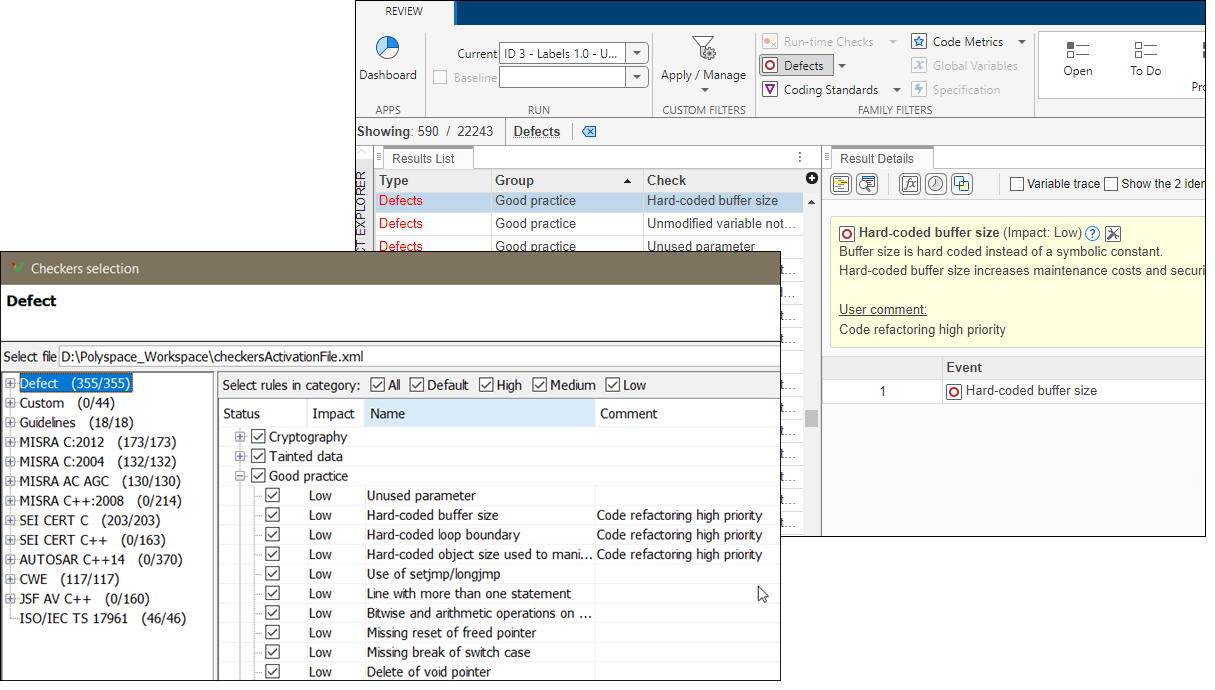
If you use the Checkers selection interface to enable Bug Finder checkers and you enter text in the Comment column for these checkers, Polyspace now displays that text in the Result Details pane and in the Detail column of the Results List. You can then filter your results based on the text that you entered.
Add custom comments if, for instance, you want to focus your review on a custom grouping of defect checkers while refactoring your code.
You cannot enable Bug Finder Checkers and create custom comments if you open the
Checkers selection interface from the Polyspace user interface. To create custom comments, open the Checkers
selection interface from one of the Polyspace
as You Code plugins or by using the command
polyspace-checkers-selection.
See also:
Changes in polyspace-access Command Options
Options -new-findings and -review-status are
removed
Errors
The polyspace-access command options in this table are removed. Use
the new options instead.
| Usage | Current Option | New Option |
|---|---|---|
Select only new findings when you:
|
-new-findings
|
This new option lets you filter by additional resolution types
such as If the project contains only one run, all findings are new and you can omit this option. |
Select findings with one of the specified review status when you:
|
|
-status
Unreviewed | "To investigate" | "To fix" | Justified | "No
                              action planned" | "Not a defect" | Other
|
See also:
Command -delete-project deletes projects from database
Behavior change
The polyspace-access -delete-project command deletes projects
from the database if the project is located in the
ProjectsWaitingForDeletion folder. This action cannot be undone.
Previously, the command moved projects to the
ProjectsWaitingForDeletion folder, but had no effect if the project
was already in that folder.